




Here's how it works



How to use or fill out Alaska DMV Form 413 with DocHub

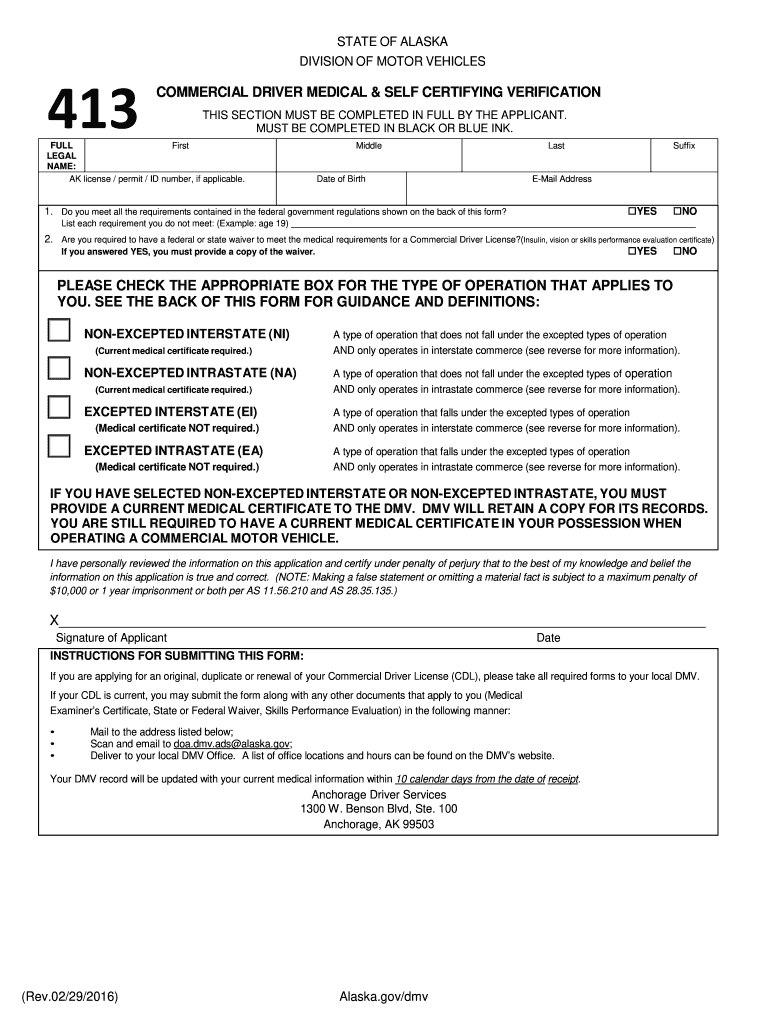
- Click ‘Get Form’ to open the Alaska DMV Form 413 in our platform's editor.
- Begin by entering your full legal name, including first, middle, last, and suffix. Ensure accuracy as this information is crucial for identification.
- Input your date of birth and email address. This information helps the DMV contact you regarding your application.
- Answer the medical requirements questions by selecting 'YES' or 'NO'. If you do not meet any requirements, list them clearly in the provided space.
- Select the appropriate box for your type of operation (Non-Excepted Interstate, Non-Excepted Intrastate, Excepted Interstate, Excepted Intrastate). Refer to the back of the form for definitions if needed.
- If applicable, ensure you have a current medical certificate ready to upload or submit along with your form.
- Finally, sign and date the form at the bottom. Review all entries for accuracy before submission.
Start using our platform today to fill out your Alaska DMV Form 413 easily and for free!
It's free
Got questions?
How can I sign my alaska dmv form 413 without printing?
eSignatures are a great replacement for traditional signing, as they save time, effort, and money people spend on printing, scanning, and paper delivery. You can eSign your alaska dmv form 413 utilizing a reliable and powerful online document management tool like DocHub. It complies with major eSignature standards (ESIGN and UETA), so all forms approved there are legally binding and have the same validity as physically signed ones.
How do you complete alaska dmv form 413 online?
You can complete and eSign your alaska dmv form 413 online, even on a tight deadline. All you need to access high quality editing instruments on any device is a DocHub profile, which you can register within a couple of moments. Once you register, upload your file or find what you are looking for in our catalog, complete it using the editing instruments you want, and put your electronic signature on it at the end.
Is a handwritten bill of sale OK?
Can you get a title with a bill of sale in Alaska?
How long does medical DOT last?
Security and compliance
At DocHub, your data security is our priority. We follow HIPAA, SOC2, GDPR, and other standards, so you can work on your documents with confidence.
Learn more


