




Here's how it works



How to use or fill out Endorsement Certificate for Officers Serving on a Maltese

- Click ‘Get Form’ to open the Endorsement Certificate in our editor.
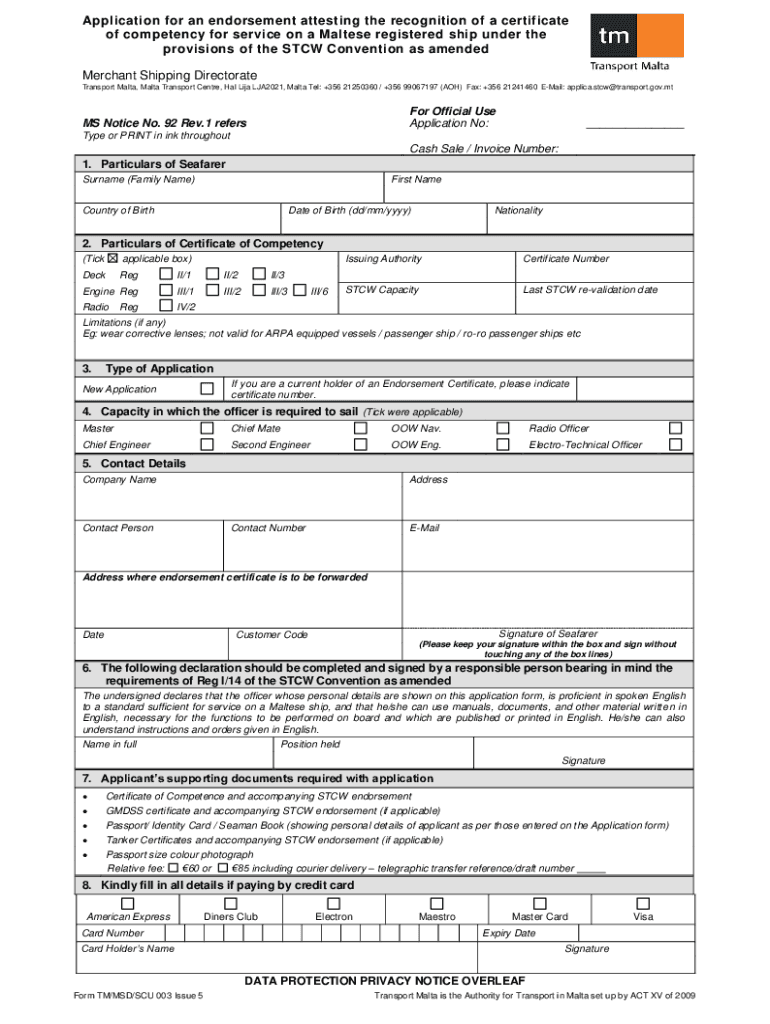
- Begin by filling in the 'Particulars of Seafarer' section. Enter your surname, first name, country of birth, date of birth, and nationality accurately.
- In the 'Particulars of Certificate of Competency' section, tick the applicable boxes for your certificate type and provide the issuing authority and certificate number.
- Indicate if this is a new application or if you hold an existing endorsement certificate by providing its number.
- Select your capacity for sailing from the options provided, such as Master or Chief Engineer.
- Complete your contact details including address, company name, contact person, and email. Ensure to specify where you want the endorsement certificate sent.
- Sign within the designated box and ensure all supporting documents are attached as listed in section 7.
Start using our platform today to streamline your document editing and signing process for free!
It's free
See more Endorsement Certificate for Officers Serving on a Maltese versions
Got questions?
How do I sign my Endorsement Certificate for Officers Serving on a Maltese free of charge?
Most eSignature solutions require users to have a paid subscription. With DocHub, there are two options for you to add an electronic signature to your Endorsement Certificate for Officers Serving on a Maltese without being charged:
- You can do it during a 7-day trial period;
- You can sign up for a free plan.
The second option, though, has restrictions on the number of signatures, sign requests, emails, and forms for adjusting available per month. You can check for full information here.
How do you edit Endorsement Certificate for Officers Serving on a Maltese in Chrome?
If you use Chrome, there are two simple methods to edit your Endorsement Certificate for Officers Serving on a Maltese online. First, visit the DocHub website, add your document, and edit it using our toolbar. You can also set up our Chrome extension and edit any document by dragging and dropping it in your web browser window.
Security and compliance
At DocHub, your data security is our priority. We follow HIPAA, SOC2, GDPR, and other standards, so you can work on your documents with confidence.
Learn more


