




Here's how it works



How to use or fill out South Florida Regional Transportation Authority with our platform

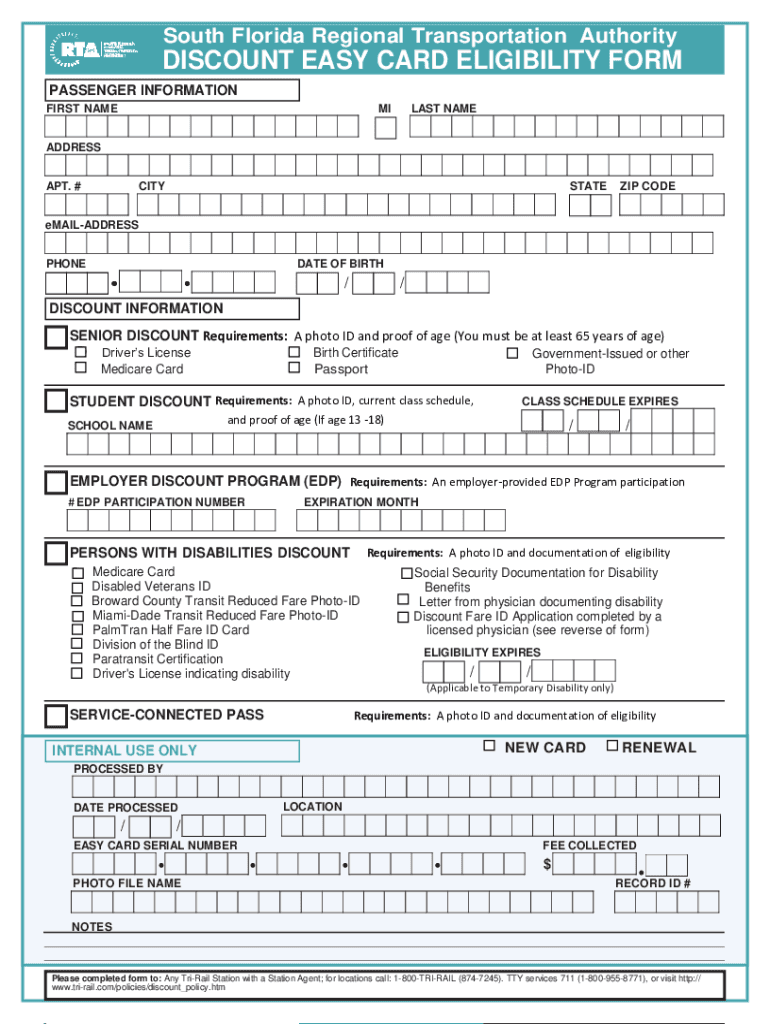
- Click ‘Get Form’ to open the South Florida Regional Transportation Authority Discount Easy Card Eligibility Form in the editor.
- Begin by filling out the Passenger Information section. Enter your first name, middle initial, last name, address, apartment number (if applicable), city, state, and zip code. Don’t forget to include your email address and phone number for contact purposes.
- Next, provide your date of birth in the designated format. This information is crucial for determining eligibility for discounts.
- Move on to the Discount Information section. Select the type of discount you are applying for: Senior, Student, Employer Discount Program (EDP), or Persons with Disabilities. Ensure you have the required documentation ready as specified for each category.
- For each discount type selected, fill in any additional fields such as class schedule expiration date for students or EDP participation number if applicable.
- Finally, review all entered information for accuracy before submitting. You can save your progress at any time using our platform’s features.
Start filling out your form today using our platform for free and streamline your application process!
It's free
See more South Florida Regional Transportation Authority versions
Got questions?
Can I use DocHub to generate legal eSignatures on my South Florida Regional Transportation Authority?
Yes, you can utilize DocHub for signing any business and private documentation, including your South Florida Regional Transportation Authority. All electronic signatures you create with our tool are legally binding and court-admissible, as DocHub complies with criteria required by ESIGN and UETA. Save your completed form with a detailed Audit Trail if needed.
How do you edit South Florida Regional Transportation Authority in Chrome?
If you are using Chrome, there are two simple ways to modify your South Florida Regional Transportation Authority online. First, visit the DocHub site, add your document, and modify it utilizing our toolbar. You may also install our Chrome extension and modify any document by dragging and dropping it in your web browser window.
Security and compliance
At DocHub, your data security is our priority. We follow HIPAA, SOC2, GDPR, and other standards, so you can work on your documents with confidence.
Learn more


