Notary Application - Office of the Maryland Secretary of State 2026

Get Form
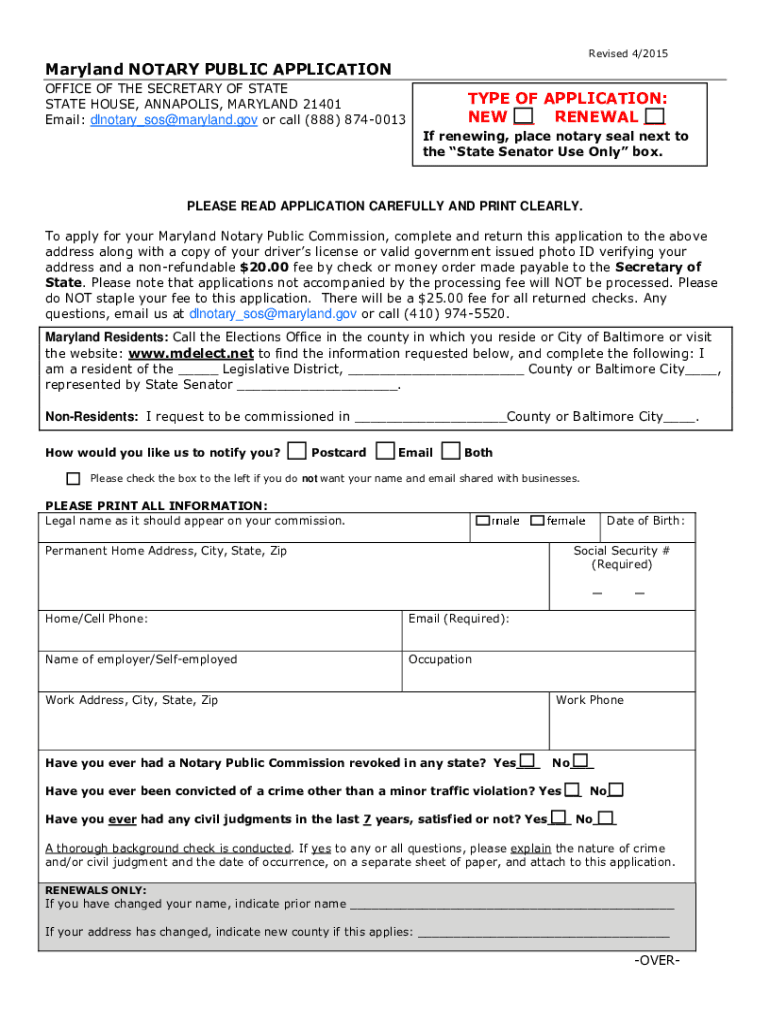
maryland notary application form Preview on Page 1

Here's how it works

01. Edit your maryland notary application form online
Type text, add images, blackout confidential details, add comments, highlights and more.
02. Sign it in a few clicks
Draw your signature, type it, upload its image, or use your mobile device as a signature pad.
03. Share your form with others
Send state of maryland notary application via email, link, or fax. You can also download it, export it or print it out.

How to use or fill out Notary Application - Office of the Maryland Secretary of State with our platform

Form edit decoration
9.5
Ease of Setup
DocHub User Ratings on G2
9.0
Ease of Use
DocHub User Ratings on G2
  1. Click ‘Get Form’ to open the Notary Application in the editor.
  2. Select the type of application you are submitting: NEW or RENEWAL. If renewing, ensure to place your notary seal next to the designated box.
  3. Carefully read through the application instructions and print clearly in all fields. Begin by entering your legal name as it should appear on your commission.
  4. Fill in your date of birth, permanent home address, social security number, and contact information including phone and email.
  5. Indicate your employer's name and occupation, along with your work address. Answer questions regarding any previous notary commissions or criminal convictions truthfully.
  6. For renewals, provide any changes in name or address. List three references who can attest to your character, ensuring their email addresses are included.
  7. Read and initial each statement confirming your understanding of notary responsibilities. Finally, sign and date the application before submission.

Start using our platform today for free to complete your Notary Application efficiently!

See more Notary Application - Office of the Maryland Secretary of State versions

We've got more versions of the Notary Application - Office of the Maryland Secretary of State form. Select the right Notary Application - Office of the Maryland Secretary of State version from the list and start editing it straight away!
Versions Form popularity Fillable & printable
2015 4.8 Satisfied (65 Votes)
be ready to get more

Complete this form in 5 minutes or less

Get form

Got questions?

We have answers to the most popular questions from our customers. If you can't find an answer to your question, please contact us.
Contact us

According to eSignature regulations, documents signed digitally have the same validity as those approved with pen and paper. You can electronically sign almost any business and personal documentation. Four types of paperwork still require wet signatures only - wills and testamentary trusts, court orders and other court forms, state statutes regulating divorce, adoption, or other family law, and notice of cancellation of utility services. If you follow the regulations and utilize a secure and compliant software solution, like DocHub, you can eSign your Notary Application - Office of the Maryland Secretary of State without printing it.

If you are using Chrome, there are two easy methods to modify your Notary Application - Office of the Maryland Secretary of State online. First, go to the DocHub website, add your file, and modify it using our toolbar. You may also set up our Chrome extension and modify any document by dragging and dropping it in your web browser window.

Yes. Effective October 1, 2021, all new notary applicants must complete a course of study and pass an examination. However, notary renewal applicants are required to complete only a course of study. The course and examination must be taken through an entity approved by the secretary of state.
In Maryland, you have the freedom to choose between the convenience of online notary services or traditional walk-in or mobile notary services. Documents docHubd with in-person wet-ink signatures will be accepted as legally valid in all 50 states, as will electronic eSignatures.
As of Aug 11, 2023, the average hourly pay for a Remote Notary in Maryland is $60.87 an hour.

Security and compliance

At DocHub, your data security is our priority. We follow HIPAA, SOC2, GDPR, and other standards, so you can work on your documents with confidence.

Learn more
ccpa2
pci-dss
gdpr-compliance
hipaa
soc-compliance

People also ask

It takes six to eight weeks to become a remote Notary in Maryland with the first six weeks spent on getting your traditional Notary Public commission. Once you have your commission, youll spend one day selecting a RON technology provider and one day filling out and submitting your registration form.
How much does it cost? There is a non-refundable $9 fee plus a $2 service fee to apply for a Notary Public commission. An $11 fee is paid to the county clerk for taking your oath of office and receiving your commission. Additional costs for bonds, Notary tools and education courses vary depending on vendors.
In order to complete an online notarization in Maryland, youll need the following: An original, unsigned document (Dont sign it before uploading! A computer, iPhone, or Android phone with audio and video capabilities. A valid governmentissued photo ID. A U.S. social security number for secure identity verification.
How much does it cost? There is a non-refundable $9 fee plus a $2 service fee to apply for a Notary Public commission. An $11 fee is paid to the county clerk for taking your oath of office and receiving your commission. Additional costs for bonds, Notary tools and education courses vary depending on vendors.
This course and exam fulfill Marylands state requirement for all new Notary applicants. Course highlights include: Detailed instructions on the application process and the role of a Notary Public in Maryland. An overview of the five-step notarization process for traditional and remote notarizations.

Related links