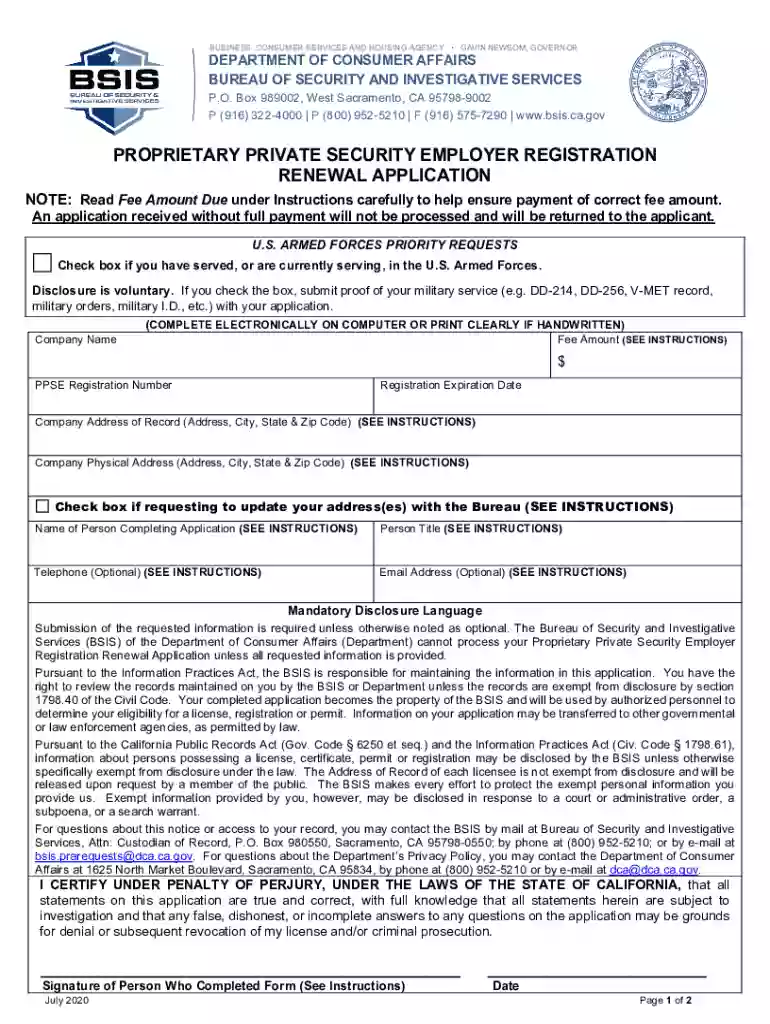
Proprietary Private Security Employer Registration- Renewal Application Proprietary Private Security 2026

Get Form
Proprietary Private Security Employer Registration- Renewal Application Proprietary Private Security Preview on Page 1

Here's how it works

01. Edit your form online
Type text, add images, blackout confidential details, add comments, highlights and more.

02. Sign it in a few clicks
Draw your signature, type it, upload its image, or use your mobile device as a signature pad.

03. Share your form with others
Send it via email, link, or fax. You can also download it, export it or print it out.

How to use or fill out Proprietary Private Security Employer Registration- Renewal Application Proprietary Private Security with our platform

Form edit decoration
9.5
Ease of Setup
DocHub User Ratings on G2
9.0
Ease of Use
DocHub User Ratings on G2
  1. Click ‘Get Form’ to open the Proprietary Private Security Employer Registration Renewal Application in the editor.
  2. Begin by entering your Company Name in the designated field. Ensure that it matches your registered business name.
  3. Next, input the Fee Amount due as specified in the instructions. Be mindful of deadlines to avoid additional fees.
  4. Fill in your PPSE Registration Number and Registration Expiration Date accurately to ensure proper processing.
  5. Complete both the Company Address of Record and Company Physical Address fields, ensuring they are current and correct.
  6. If applicable, check the box to update your address(es) with the Bureau. This is crucial for maintaining accurate records.
  7. Provide your name, title, and optional contact information (telephone and email) for efficient communication regarding your application.
  8. Finally, review all entries for accuracy before signing and dating the application at the bottom of the form.

Start using our platform today to streamline your application process for free!

See more Proprietary Private Security Employer Registration- Renewal Application Proprietary Private Security versions

We've got more versions of the Proprietary Private Security Employer Registration- Renewal Application Proprietary Private Security form. Select the right Proprietary Private Security Employer Registration- Renewal Application Proprietary Private Security version from the list and start editing it straight away!
Versions Form popularity Fillable & printable
2024 4.3 Satisfied (54 Votes)
2020 4.9 Satisfied (55 Votes)
2019 4.8 Satisfied (117 Votes)
2015 4.2 Satisfied (73 Votes)
be ready to get more

Complete this form in 5 minutes or less

Get form

Got questions?

We have answers to the most popular questions from our customers. If you can't find an answer to your question, please contact us.
Contact us
Proprietary private security officer vs security guard includes differences in carrying a weapon, the authority to arrest, and licensure.
Understanding Proprietary Information This information includes trade secrets, formulas, processes, and designs that are not publicly known. To protect this information, companies use confidentiality agreements and information security measures.
Example of Proprietary Security Service: The security personnel are full-time employees of the bank and follow protocols established by the banks security department, ensuring the organization retains complete control over the security operations.
In proprietary security, also called in-house security, you have complete control over the security guards including the hiring process, training, management, security protocols, and others.
California Guard Card Renewal Keep your address up-to-date with BSIS. Use the most current BSIS renewal application form for your license type. Make sure you sign the form. Pay the correct guard card renewal fee. Mail your application to BSIS between 60 and 90 days before your current guard card expires.

Security and compliance

At DocHub, your data security is our priority. We follow HIPAA, SOC2, GDPR, and other standards, so you can work on your documents with confidence.

Learn more
ccpa2
pci-dss
gdpr-compliance
hipaa
soc-compliance
be ready to get more

Complete this form in 5 minutes or less

Get form

People also ask

Myth: Proprietary Software is Always More Secure While proprietary software benefits from controlled access and vendor support, it is not immune to vulnerabilities. Proprietary vendors implement various security measures, including regular updates, patches, and comprehensive testing, to safeguard their products.
A retail store hires several individuals to be part of their security department. This is an example of proprietary private police security.

Related links