




Here's how it works



How to use or fill out Inner Freedom Yoga Retreat Registration Form with our platform

- Click ‘Get Form’ to open the Inner Freedom Yoga Retreat Registration Form in the editor.
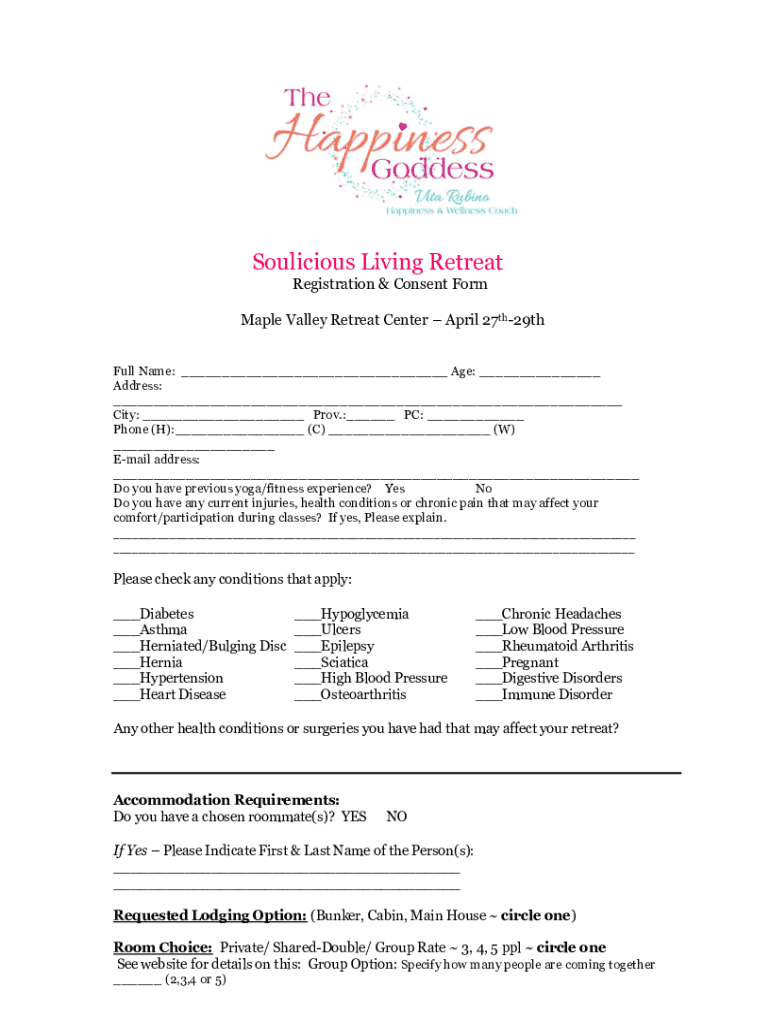
- Begin by entering your full name and age in the designated fields. This information is essential for your registration.
- Fill in your address, including city, province, and postal code. Ensure accuracy for communication purposes.
- Provide your phone numbers (home, cell, work) and email address. This will help us reach you regarding any updates or inquiries.
- Indicate your previous yoga/fitness experience and disclose any current injuries or health conditions that may affect your participation.
- Check any applicable health conditions from the list provided to ensure we can accommodate your needs during the retreat.
- Specify accommodation requirements, including roommate preferences and lodging options. Circle your choices clearly.
- Detail any special meal requirements due to allergies or dietary restrictions to ensure a comfortable experience.
- List emergency contacts with their relationship to you for safety purposes during the retreat.
- Complete the payment section as per your chosen method and review the cancellation policy before submitting.
Start filling out your registration form today on our platform for free!
It's free
See more Inner Freedom Yoga Retreat Registration Form versions
Got questions?
How can I eSign my Inner Freedom Yoga Retreat Registration Form in Word?
Microsoft Word doesn’t have signing tools to generate legitimate electronic signatures and enforceable paperwork. Luckily, DocHub is an online eSignature-compliant editor that supports different document formats, including .doc files. Sign in to your account and add the Word version of your Inner Freedom Yoga Retreat Registration Form from your device and cloud, or URL - our editor will automatically convert it into an editable PDF. Make all required changes in your form and click Sign to generate your own legally-binding eSignature. You will find four signing methods from which to choose.
How do you edit Inner Freedom Yoga Retreat Registration Form in Chrome?
If you use Chrome, there are two simple methods to modify your Inner Freedom Yoga Retreat Registration Form online. First, visit the DocHub website, add your document, and modify it using our toolbar. You can also install our Chrome extension and modify any document by dragging and dropping it in your browser tab.
Security and compliance
At DocHub, your data security is our priority. We follow HIPAA, SOC2, GDPR, and other standards, so you can work on your documents with confidence.
Learn more


