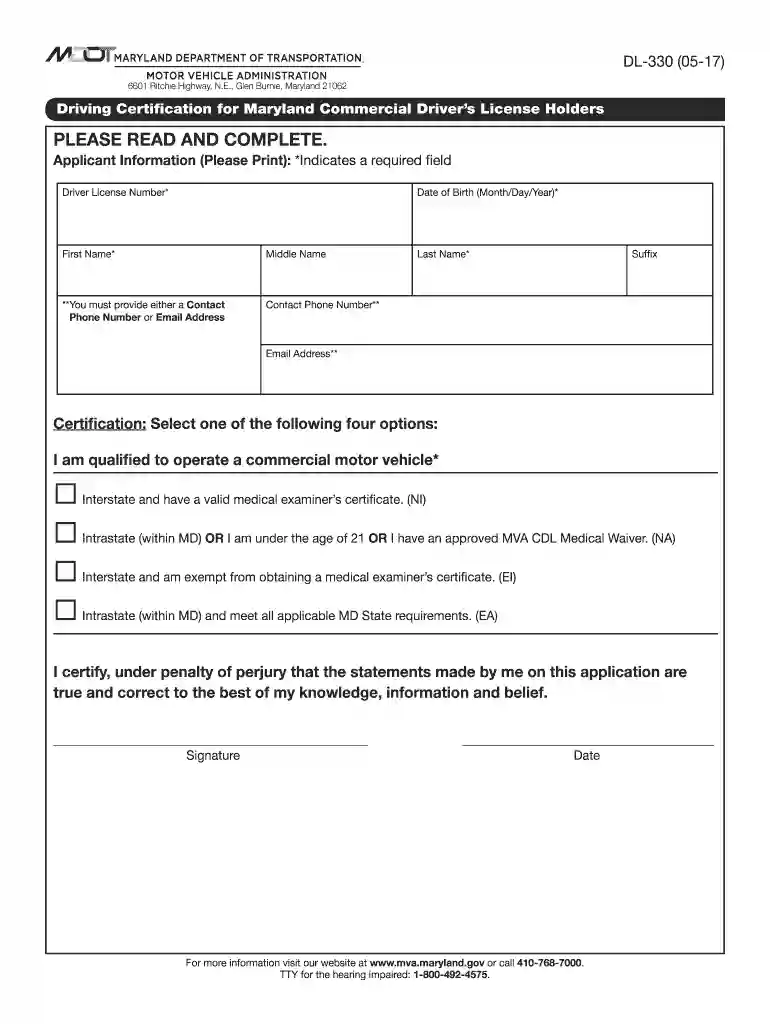
Driving Certification for Maryland Commercial Driver's License Holders Driving Certification for Mar 2026

Get Form
dl 330 pdf Preview on Page 1

Here's how it works

01. Edit your dl 330 pdf online
Type text, add images, blackout confidential details, add comments, highlights and more.

02. Sign it in a few clicks
Draw your signature, type it, upload its image, or use your mobile device as a signature pad.

03. Share your form with others
Send it via email, link, or fax. You can also download it, export it or print it out.

How to use or fill out Driving Certification for Maryland Commercial Driver's License Holders Driving Certification for Mar with our platform

Form edit decoration
9.5
Ease of Setup
DocHub User Ratings on G2
9.0
Ease of Use
DocHub User Ratings on G2
  1. Click ‘Get Form’ to open the Driving Certification form in the editor.
  2. Begin by filling out the Applicant Information section. Ensure you provide your Driver License Number, Date of Birth, First Name, Last Name, and either a Contact Phone Number or Email Address. Fields marked with an asterisk (*) are required.
  3. In the Certification section, select one of the four options that best describes your qualifications to operate a commercial motor vehicle. Make sure to check only one box.
  4. Finally, review your information for accuracy. Sign and date the form at the bottom to certify that all statements are true and correct.

Start using our platform today to complete your Driving Certification form quickly and efficiently!

See more Driving Certification for Maryland Commercial Driver's License Holders Driving Certification for Mar versions

We've got more versions of the Driving Certification for Maryland Commercial Driver's License Holders Driving Certification for Mar form. Select the right Driving Certification for Maryland Commercial Driver's License Holders Driving Certification for Mar version from the list and start editing it straight away!
Versions Form popularity Fillable & printable
2017 4.8 Satisfied (142 Votes)
2013 4 Satisfied (38 Votes)
be ready to get more

Complete this form in 5 minutes or less

Get form

Got questions?

We have answers to the most popular questions from our customers. If you can't find an answer to your question, please contact us.
Contact us

Yes, you can utilize DocHub for signing any business and private documentation, including your Driving Certification for Maryland Commercial Driver's License Holders Driving Certification for Mar. All eSignatures you create with our service are legally binding and court-admissible, as DocHub complies with standards required by ESIGN and UETA. Save your accomplished document with a detailed Audit Trail if necessary.

You may easily complete, modify, and even eSign your Driving Certification for Maryland Commercial Driver's License Holders Driving Certification for Mar using DocHub. Create a new account and start your free trial. After that, you may upload the file with the form and simply make all the necessary edits. No need to print on paper or use a third-party application to sign it, as you can put your electronic signature on your document quicker through DocHub.

You are allowed a maximum of 20 minutes to complete the drivers knowledge test and a score of 88% or better is required to pass.
Note: Even if you are not required to have a CDL, you may still need a Medical Examiners Certificate. Maryland law requires you to carry a DOT card if your vehicle: is used for commercial purposes; and. weighs more than 10,000 pounds.
Proof of Identity, Age, and Residency You must also provide your Social Security Number and two documents that prove you live in Maryland, like a utility bill or bank statement.

Security and compliance

At DocHub, your data security is our priority. We follow HIPAA, SOC2, GDPR, and other standards, so you can work on your documents with confidence.

Learn more
ccpa2
pci-dss
gdpr-compliance
hipaa
soc-compliance
be ready to get more

Complete this form in 5 minutes or less

Get form

People also ask

What to expect on the actual MD MVA exam How many questions50How many correct answers to pass40Passing score80%
You get this by passing a DOT physical exam from an approved examiner. And Priority Care conveniently offers DOT-certified examiners at each of our Maryland clinics. You can check our certified examiners on the FMCSA website. DOT physicals are regulated by law to ensure you can safely spend hours on the road.
How will I be able to submit my updated MED Cert when MVA contacts me? Option #1Use our myMVA eServices portal: ​​Medical Examiners Certificate​ Portal​​Option #2Send mail to: Maryland MVA 6601 Ritchie Highway, N.E. Room 145, Attn: CDL Med Cert Glen Burnie, MD 21062
Licensing requirements include a vision screening, a knowledge test, and a driving skills test. The Maryland MVA written test is designed to check the applicants knowledge of motor vehicle laws, road rules, road signs and safe driving practices.
All CDL applicants (Class A, B and C) must study the following sections: Driving Safely, Transporting Cargo Safely, Air Brakes (if you plan to operate vehicles equipped with air brakes), Vehicle Inspection Test, Basic Control Skills Test, Road Test.

Related links