Remitter authorization form nc 2026

Get Form
north carolina remitter authorization Preview on Page 1

Here's how it works

01. Edit your north carolina remitter authorization online
Type text, add images, blackout confidential details, add comments, highlights and more.
02. Sign it in a few clicks
Draw your signature, type it, upload its image, or use your mobile device as a signature pad.
03. Share your form with others
Send nc remitter authorization form via email, link, or fax. You can also download it, export it or print it out.

How to use or fill out remitter authorization form nc with our platform

Form edit decoration
9.5
Ease of Setup
DocHub User Ratings on G2
9.0
Ease of Use
DocHub User Ratings on G2
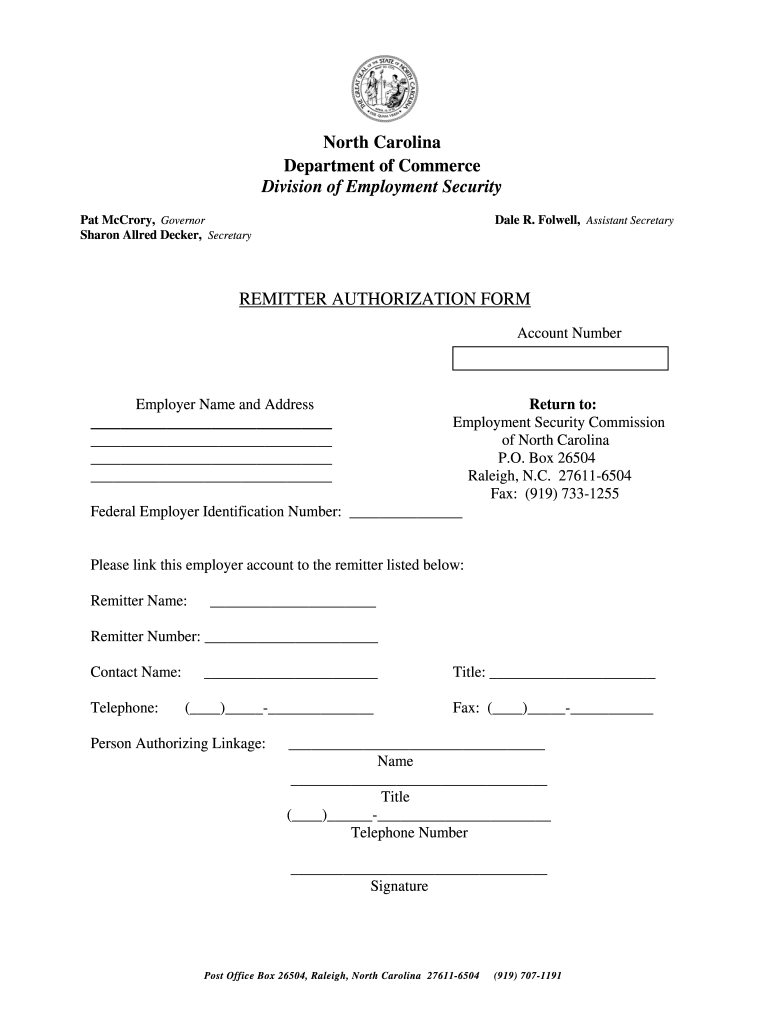
  1. Click ‘Get Form’ to open the remitter authorization form in the editor.
  2. Begin by entering your Account Number at the top of the form. This is essential for linking your employer account.
  3. Fill in the Employer Name and Address fields accurately. Ensure that all details are complete to avoid processing delays.
  4. Provide your Federal Employer Identification Number (FEIN) in the designated field, as this is required for identification purposes.
  5. Next, enter the Remitter Name and Remitter Number. This identifies who will be handling your account.
  6. Complete the Contact Name, Telephone, and Fax fields to ensure proper communication regarding your authorization.
  7. In the Person Authorizing Linkage section, fill out your name, title, telephone number, and provide a signature to finalize the authorization.

Start using our platform today to fill out your remitter authorization form nc quickly and efficiently!

See more remitter authorization form nc versions

We've got more versions of the remitter authorization form nc form. Select the right remitter authorization form nc version from the list and start editing it straight away!
Versions Form popularity Fillable & printable
2013 4.8 Satisfied (32 Votes)
be ready to get more

Complete this form in 5 minutes or less

Get form

Got questions?

We have answers to the most popular questions from our customers. If you can't find an answer to your question, please contact us.
Contact us

Sure, a typed name is recognized as a valid electronic signature when you add it to your document using a compliant solution like DocHub. Simply import your remitter authorization form nc to our editor, click Sign in the top tool pane → Create your signature → Type your name in the proper tab, and select how it will appear on your document.

When you edit your remitter authorization form nc with DocHub, you only need a stable web connection and virtually any web browser installed on your device. No need to set up any third-party applications or study tutorials. Just open a tab with DocHub, drag and drop your file, and edit it immediately.

Employers pay unemployment insurance taxes based on employer payrolls. Unemployment taxes are not deducted from employees wages. The N.C. Division of Employment Security (DES) collects these taxes from employers. When needed, the funds are used to pay unemployment benefits to qualified workers.
NCUI 604 - Employer Status Report Complete and submit to register and determine an employers liability under N.C. Employment Security Law, General Statute 96 and division regulations. This process may be completed online.
You can check your claim status by logging into your MyNCUIBenefits account. While you wait on a decision, remember to: Keep filing your weekly certifications. Look for a job, including on NCWorks.gov, and keep a record of your work search.

Security and compliance

At DocHub, your data security is our priority. We follow HIPAA, SOC2, GDPR, and other standards, so you can work on your documents with confidence.

Learn more
ccpa2
pci-dss
gdpr-compliance
hipaa
soc-compliance

People also ask

The Ncui 668 form is a specific document used primarily for reporting and claiming unemployment insurance benefits in the United States. This form is essential for individuals who have lost their jobs and are seeking financial assistance through state unemployment programs.

Related links