




Here's how it works

01. Edit your dochub com fillable form online
Type text, add images, blackout confidential details, add comments, highlights and more.

02. Sign it in a few clicks
Draw your signature, type it, upload its image, or use your mobile device as a signature pad.

03. Share your form with others
Send va form 21 0788 via email, link, or fax. You can also download it, export it or print it out.
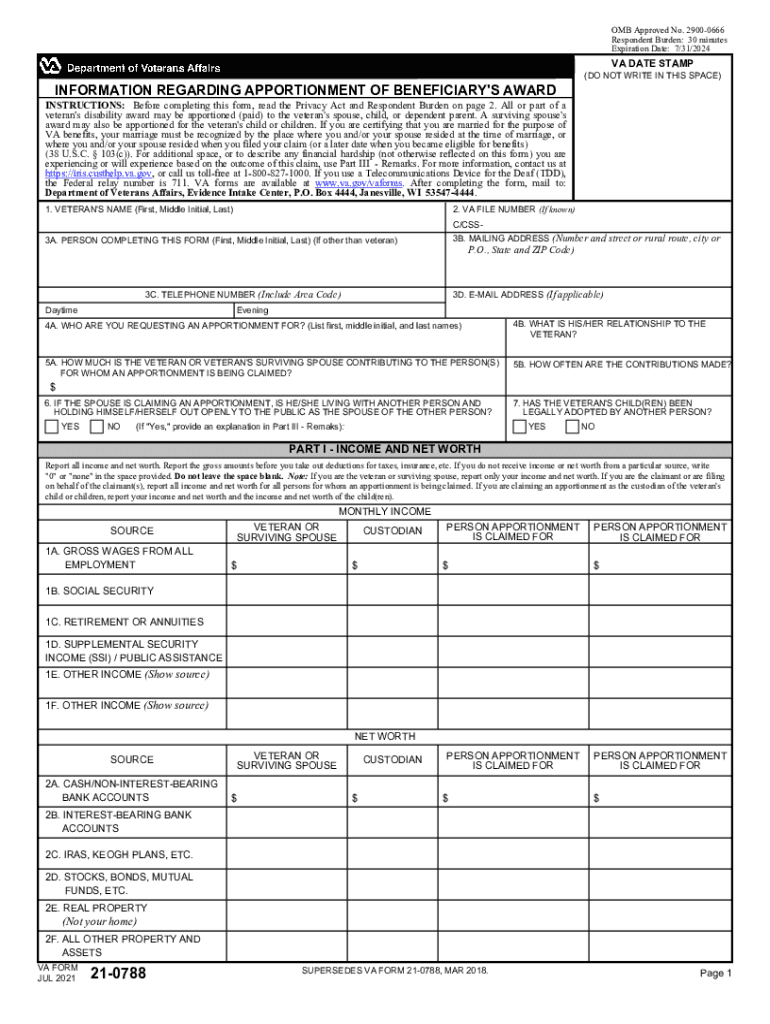
How to use or fill out VA Form 21-0788 - Veterans Benefits Administration with our platform

- Click ‘Get Form’ to open it in the editor.
- Begin by entering the veteran's name in section 1, followed by their VA file number if known. This establishes the primary subject of the form.
- In section 3, provide details about the person completing the form, including their name, mailing address, and contact information. This is crucial for communication regarding the apportionment request.
- Section 4 requires you to specify who you are requesting an apportionment for and their relationship to the veteran. Be thorough in listing names and relationships.
- In sections 5A and 5B, detail any financial contributions made by the veteran or surviving spouse towards those listed in section 4. Specify both the amount and frequency of these contributions.
- Complete Part I by reporting all income and net worth accurately. Ensure that you include gross amounts before deductions.
- Fill out Part II with monthly living expenses, ensuring no spaces are left blank. This provides a clear picture of financial obligations.
- Use Part III for any additional remarks or explanations regarding financial hardships not covered elsewhere on the form.
- Finally, certify your statements in Part IV by signing and dating the form before submission.
Start using our platform today to complete your VA Form 21-0788 easily and for free!
Fill out VA Form 21-0788 - Veterans Benefits Administration online
It's free
It's free
See more VA Form 21-0788 - Veterans Benefits Administration versions
We've got more versions of the VA Form 21-0788 - Veterans Benefits Administration form. Select the right VA Form 21-0788 - Veterans Benefits Administration version from the list and start editing it straight away!
Security and compliance
At DocHub, your data security is our priority. We follow HIPAA, SOC2, GDPR, and other standards, so you can work on your documents with confidence.
Learn more


