




Here's how it works



How to use or fill out ARTICLE 19-A BUS DRIVER'S BLOOD PRESSURE FOLLOW-UP BY DRIVER'S HEALTH CARE PROVIDER with our platform

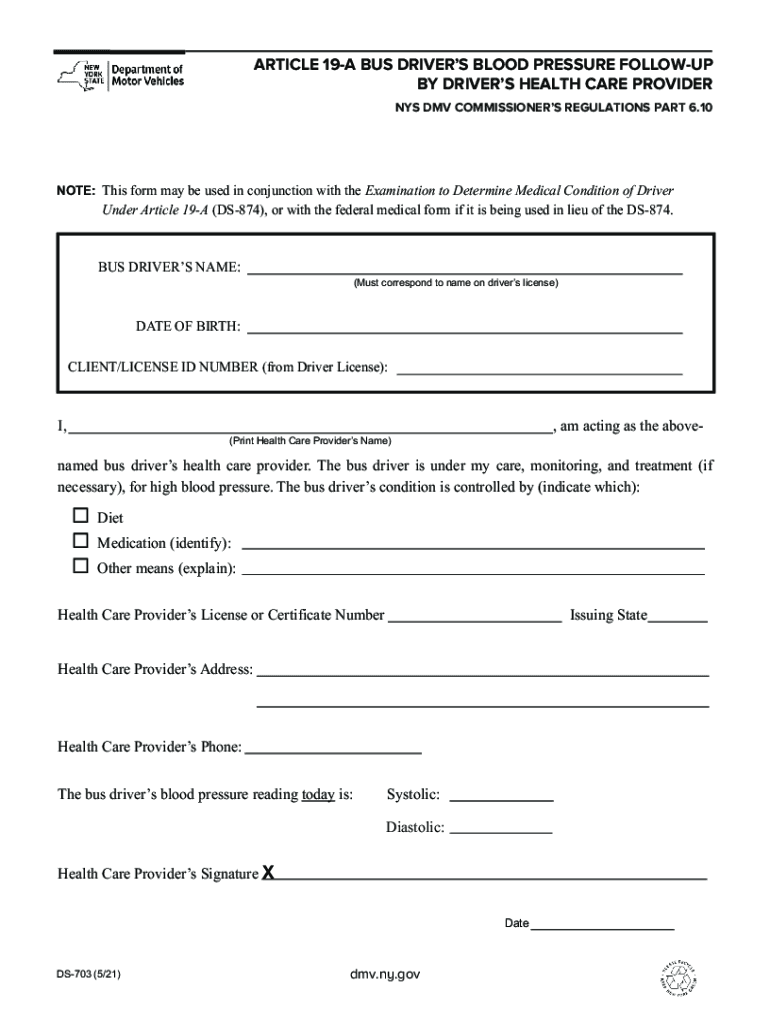
- Click ‘Get Form’ to open the ARTICLE 19-A BUS DRIVER'S BLOOD PRESSURE FOLLOW-UP in the editor.
- Begin by entering the bus driver’s name, ensuring it matches the name on their driver’s license.
- Fill in the date of birth and client/license ID number as indicated on the form.
- In the section for health care provider details, print your name as the bus driver’s health care provider.
- Indicate how the bus driver’s high blood pressure is being managed by checking appropriate options: Diet, Medication (specify), or Other means (explain).
- Provide your health care provider's license or certificate number along with the issuing state.
- Complete your address and phone number for contact purposes.
- Record today’s blood pressure reading by filling in both systolic and diastolic values.
- Finally, sign and date the form to validate it before submission.
Start using our platform today to easily complete and manage your forms for free!
It's free
See more ARTICLE 19-A BUS DRIVER'S BLOOD PRESSURE FOLLOW-UP BY DRIVER'S HEALTH CARE PROVIDER versions
Got questions?
Can I sign my dmv ds 703 in electronic format?
Based on eSignature laws, documents approved electronically have the same validity as those approved with pen and paper. You can electronically sign almost any business and private paperwork. Four types of paperwork still require handwritten signatures only - wills and testamentary trusts, court orders and other court papers, state statutes governing divorce, adoption, or other family law, and notice of cancellation of utility services. If you follow the regulations and utilize a safe and compliant software solution, like DocHub, you can eSign your dmv ds 703 without printing it.
Can I sign my ds703 form while I edit it?
If you edit your ds703 form with DocHub, you simply will not need to look for other software or solutions to eSign it. An electronic signature is a component of DocHub’s extensive editing toolset, which allows you to implement changes in your form without switching between platforms. Just complete your form, double-check the correctness of the data and put your electronic signature at the end to make it submission-ready in minutes.
What disqualifies you from driving a school bus in NY?
What is Article 19a in NYS?
Can you drive a school bus with a felony in NY?
Security and compliance
At DocHub, your data security is our priority. We follow HIPAA, SOC2, GDPR, and other standards, so you can work on your documents with confidence.
Learn more


