01. Edit your florida cna reciprocity application online
Type text, add images, blackout confidential details, add comments, highlights and more.
02. Sign it in a few clicks
Draw your signature, type it, upload its image, or use your mobile device as a signature pad.
03. Share your form with others
Send florida cna reciprocity via email, link, or fax. You can also download it, export it or print it out.
How to use or fill out CNA - Florida Board of Nursing with DocHub
Ease of Setup
DocHub User Ratings on G2
Ease of Use
DocHub User Ratings on G2
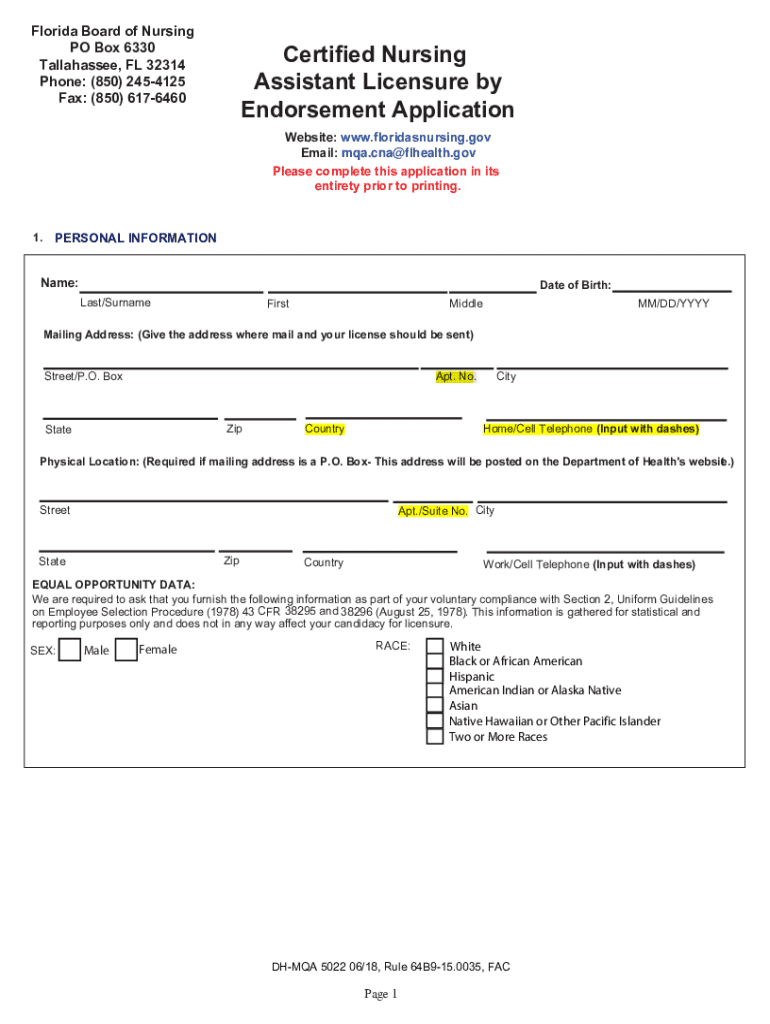
Click ‘Get Form’ to open the CNA - Florida Board of Nursing application in our editor.
Begin by filling out your personal information, including your name, date of birth, and mailing address. Ensure all fields are completed accurately.
Proceed to the applicant background section. Answer questions regarding any previous names, education history, and prior applications for licensure. Be honest as this information is crucial for your application.
In the criminal history section, disclose any convictions or legal issues. If applicable, prepare to submit additional documentation as required.
Complete the electronic fingerprinting section by following the instructions provided. Make sure to choose an approved Livescan provider for your fingerprints.
Review all sections thoroughly before signing the application at the end. Ensure that you have answered all questions truthfully and completely.
Start using our platform today to streamline your CNA application process for free!
Fill out CNA - Florida Board of Nursing online It's free
We've got more versions of the CNA - Florida Board of Nursing form. Select the right CNA - Florida Board of Nursing version from the list and start editing it straight away!
Cna florida board of nursing phone numberCna florida board of nursing verificationFL CNA License lookupFL CNA license renewal onlineFlorida board of nursing school verificationFlorida board of nursing application statusFlorida board of nursing application for nclexFlorida board of nursing license renewal
Security and compliance
At DocHub, your data security is our priority. We follow HIPAA, SOC2, GDPR, and other standards, so you can work on your documents with confidence.
Florida Board of Nursing CNA Exam Requirements: U.S. citizen or legal immigrant; At least 18 years of age; High School Diploma or GED; Undergo a Background Read more
Cookie consent notice
This site uses cookies to enhance site navigation and personalize your experience.
By using this site you agree to our use of cookies as described in our Privacy Notice.
You can modify your selections by visiting our Cookie and Advertising Notice.