01. Edit your lifelabs requisition email address online
Type text, add images, blackout confidential details, add comments, highlights and more.
02. Sign it in a few clicks
Draw your signature, type it, upload its image, or use your mobile device as a signature pad.
03. Share your form with others
Send lifelabs requisition email via email, link, or fax. You can also download it, export it or print it out.
How to use or fill out lifelabs pathology requisition with our platform
Ease of Setup
DocHub User Ratings on G2
Ease of Use
DocHub User Ratings on G2
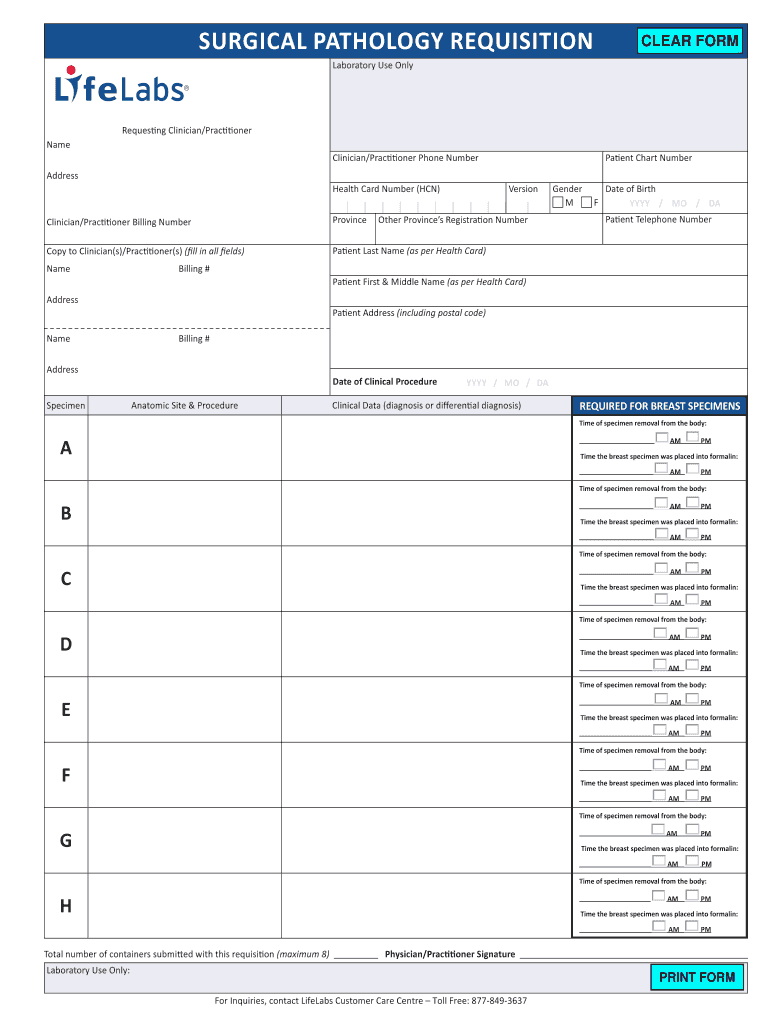
Click ‘Get Form’ to open the lifelabs pathology requisition in the editor.
Begin by entering the 'Requesting Clinician/Practitioner' details, including their name and phone number. Ensure accuracy for effective communication.
Fill in the patient's information: last name, first & middle name (as per Health Card), date of birth, health card number, and address. This is crucial for proper identification.
Specify the 'Anatomic Site & Procedure' along with the clinical data or diagnosis. This section helps in understanding the context of the specimen.
Record all relevant times related to specimen removal and placement into formalin. Use AM/PM indicators for clarity.
Indicate the total number of containers submitted with this requisition, ensuring it does not exceed eight.
Finally, have the requesting clinician/practitioner sign where indicated to validate the requisition before submission.
Start using our platform today to streamline your document editing and form completion process for free!
Fill out lifelabs pathology requisition online It's free
We've got more versions of the lifelabs pathology requisition form. Select the right lifelabs pathology requisition version from the list and start editing it straight away!
Pathology requisition forms are used by physicians to test organ, tissue and bodily fluid samples for disease diagnosis. Other samples collected include blood, oral fluid, , cervical fluid, pleural fluid, pericardial fluid and ascetic fluid.
What is the purpose of a requisition form?
The requisition will display the patients demographics and all information that was documented on the order. Once processed, this requisition will be sent electronically to the lab. Remember, the patient must be admitted, and a Lab Order is required before a requisition can be created.
How do I send a requisition to LifeLabs?
Emailing faxing requisitions BC: PatientREQSBC@lifelabs.com. ON: PatientREQSON@lifelabs.com. ON Fax Number: 905-795-9891. BC Fax Number: 1-888-674-0370. *Disclaimer: LifeLabs is accepting requisitions via email to support our patients who present to a Patient Service Centre with an electronic requisition.
What is a requisition form for blood work?
A lab requisition form is used by healthcare professionals to request laboratory tests such as or blood testing. They are also called test requisition forms. When blood, , or tissue is sent to a lab from a doctors office a lab requisition form is required.
How long is a requisition good for LifeLabs?
LifeLabs requisitions are valid for 1 year from the date it is issued by the physicians. Requisitions sent directly to the lab electronically are valid for 6 months. If you have several requisitions from 1 or more practitioners, you can bring them all in at the same time and the lab will complete the tests requested.
Doctors, including primary care physicians, specialists, and surgeons, are qualified to give phlebotomy orders.
Who gives the phlebotomist a requisition form?
If further investigation is needed, the doctor might order blood or other lab tests, or medical imaging. To arrange these tests, your doctor will need to fill out paperwork requesting the specific exam and explaining why they are needed. This order is called a requisition.
lifelabs requisition forms
A Journey into the Hidden Lives of Electronic Medical
Drawing upon a three and a half year long research project, this dissertation examines the adaptation process of an electronic medical record (EMR) in a
Cookie consent notice
This site uses cookies to enhance site navigation and personalize your experience.
By using this site you agree to our use of cookies as described in our Privacy Notice.
You can modify your selections by visiting our Cookie and Advertising Notice.