



Vt copy 2026

Get Form
vermont birth form Preview on Page 1

Here's how it works

01. Edit your vermont birth form online
Type text, add images, blackout confidential details, add comments, highlights and more.

02. Sign it in a few clicks
Draw your signature, type it, upload its image, or use your mobile device as a signature pad.

03. Share your form with others
Send vt copy via email, link, or fax. You can also download it, export it or print it out.

How to use or fill out vt copy with our platform

Form edit decoration
9.5
Ease of Setup
DocHub User Ratings on G2
9.0
Ease of Use
DocHub User Ratings on G2
  1. Click ‘Get Form’ to open the vt copy in the editor.
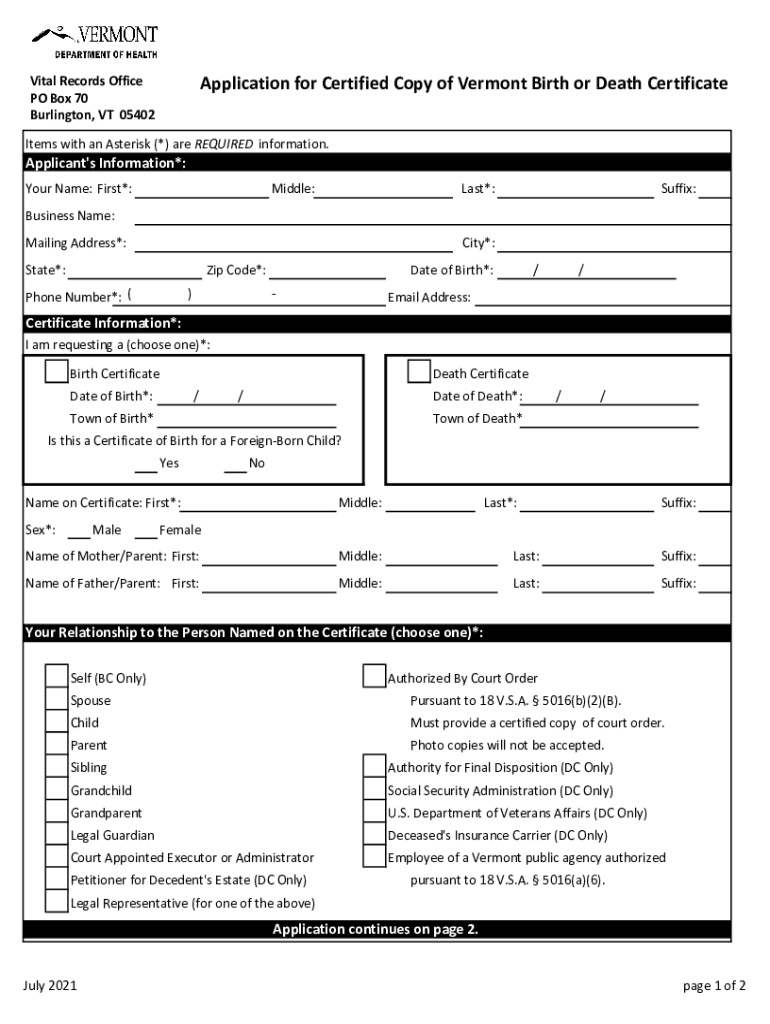
  2. Begin by filling out the Applicant's Information section. Enter your first name, last name, and mailing address. Ensure all required fields marked with an asterisk (*) are completed.
  3. In the Certificate Information section, select whether you are requesting a Birth or Death Certificate. Fill in the relevant dates and towns of birth or death as applicable.
  4. Provide details about your relationship to the person named on the certificate by selecting from the options provided. Make sure to include any necessary documentation if required.
  5. Complete the Order Details section by indicating how many copies you wish to order and calculating the total cost.
  6. Upload a copy of your identification document as specified in the form. Ensure that you fill in the ID number and expiration date for verification purposes.
  7. Finally, review all information for accuracy, sign and date where indicated, then submit your application along with payment and identification.

Start using our platform today for free to streamline your vt copy application process!

See more vt copy versions

We've got more versions of the vt copy form. Select the right vt copy version from the list and start editing it straight away!
Versions Form popularity Fillable & printable
2021 4.8 Satisfied (67 Votes)
2019 4.2 Satisfied (46 Votes)
be ready to get more

Complete this form in 5 minutes or less

Get form

Got questions?

We have answers to the most popular questions from our customers. If you can't find an answer to your question, please contact us.
Contact us
You can print from your laptop using MyPrintCenter. Log in to MyPrintCenter using your Hokie Passport number. Upload your documents and select your desired print options (color or black and white, single or double sided, etc.). Go to one of the librarys photocopiers.
Print from a standard printer On your computer, open Chrome. Open the page, image, or file you want to print. Click File. Print. Or, use a keyboard shortcut: Windows Linux: Ctrl + p. Mac: ⌘ + p. In the window that appears, select the destination and change your preferred print settings. Click Print.
If the Marriage License was not obtained in Burlington, you must contact the town in which the license was issued to receive a copy of the certificate. If youre unsure of what town the Marriage License was issued in, you may contact the State of Vermont Archives to obtain any records for all towns in Vermont.
1. After successfully logging in to the Client Portal, please click Funds in your left menu and go to the withdraw funds page. 2. Please select your trading account number and fill in the withdrawal amount and press continues.
Set up Touchless Mobile Printing the Pharos Print app from the Apple Store or Google Play Store. Open the app and enter pharos.lib.vt.edu in the server address field. Enter your Hokie Passport number in the username field. Touchless Mobile Print is ready to go!

Security and compliance

At DocHub, your data security is our priority. We follow HIPAA, SOC2, GDPR, and other standards, so you can work on your documents with confidence.

Learn more
ccpa2
pci-dss
gdpr-compliance
hipaa
soc-compliance
be ready to get more

Complete this form in 5 minutes or less

Get form

People also ask

Birth and death certificates require a form be filled out that will require identification. To order a birth or death certificate online, go to the Vermont Health Department website at .
Community Borrowers Card account can add funds for use in printing, photocopying, faxing, or paying fines at the Cash to Card machine located next to the Print Center, across from the Library Services Desk, on the second floor of Newman Library or several other locations on campus.

Related links