01. Edit your canada immigration citizenship certificate online
Type text, add images, blackout confidential details, add comments, highlights and more.
02. Sign it in a few clicks
Draw your signature, type it, upload its image, or use your mobile device as a signature pad.
03. Share your form with others
Send cit 0480 via email, link, or fax. You can also download it, export it or print it out.
How to use or fill out CIT 0480 E with our platform
Ease of Setup
DocHub User Ratings on G2
Ease of Use
DocHub User Ratings on G2
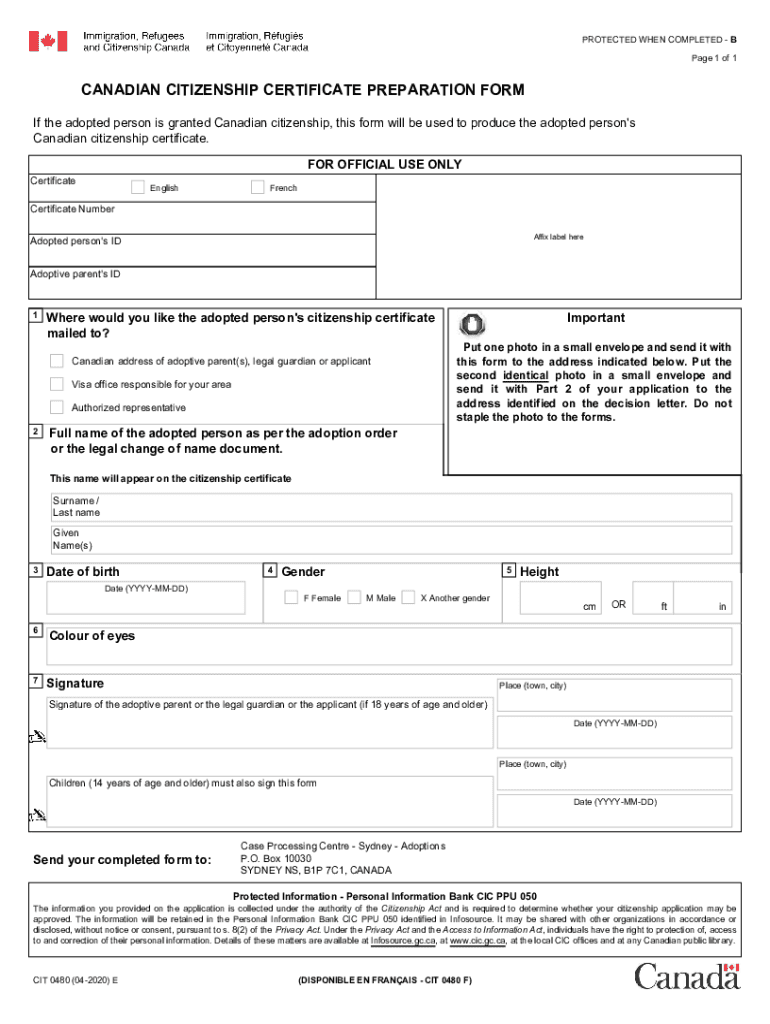
Click ‘Get Form’ to open the CIT 0480 E in the editor.
Begin by entering the adopted person's full name as per the adoption order in the designated fields for surname and given names.
Input the date of birth in the format YYYY-MM-DD, ensuring accuracy for official records.
Select the gender of the adopted person by checking the appropriate box: Female, Male, or Another gender.
Fill in the height of the adopted person either in centimeters or feet and inches as required.
Provide details on where you would like the citizenship certificate mailed, including a Canadian address if applicable.
Affix one photo in a small envelope and ensure it is sent with this form. Remember not to staple it to any documents.
Complete the signature section by having the adoptive parent or legal guardian sign and date it. If applicable, children aged 14 years and older must also sign.
Start filling out your CIT 0480 E form online for free today!
CIT 0014CIT 0001CIT 0014 instruction guideCIT 0001 photo requirementsAdoption part 2IRCC Part 2How to get Certificate of Citizenship for adopted childCitizenship for adopted adults
Security and compliance
At DocHub, your data security is our priority. We follow HIPAA, SOC2, GDPR, and other standards, so you can work on your documents with confidence.
by I Oltra-Massuet 2005 Cited by 293 (23) Stress in the future and conditional. Fut. [ [ v Th ]] [ F Th ] T/Agr . . . . . . a/e/i r / /s/mos . . . *corr-it-e/*corr-it-o/*corr-e-cit-o fromRead more
Cookie consent notice
This site uses cookies to enhance site navigation and personalize your experience.
By using this site you agree to our use of cookies as described in our Privacy Notice.
You can modify your selections by visiting our Cookie and Advertising Notice.