Uniting - PSFO Request for Service Form 2026

Get Form
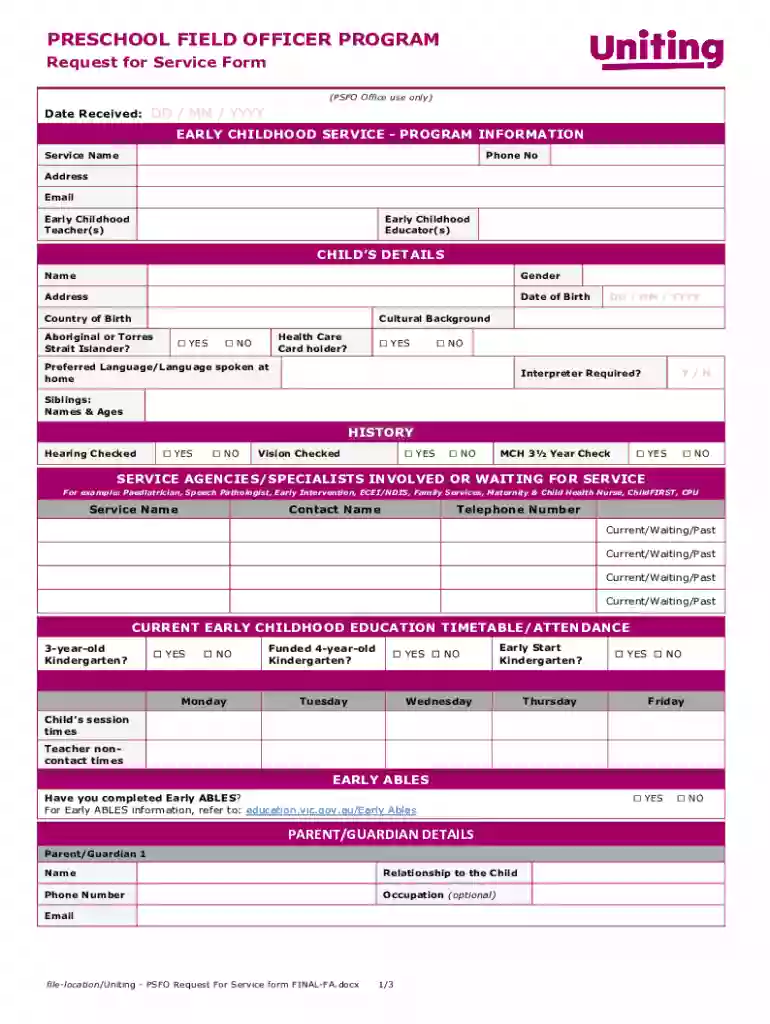
Uniting - PSFO Request for Service Form Preview on Page 1

Here's how it works

01. Edit your form online
Type text, add images, blackout confidential details, add comments, highlights and more.

02. Sign it in a few clicks
Draw your signature, type it, upload its image, or use your mobile device as a signature pad.

03. Share your form with others
Send it via email, link, or fax. You can also download it, export it or print it out.

Definition and Meaning

The "Uniting - PSFO Request for Service Form" is a structured document used to facilitate access to early childhood services through the Preschool Field Officer Program. This form collects critical information about children and their families to ensure they receive the appropriate support and resources. It aims to enhance collaboration between educators and service providers, focusing on the developmental needs of children in alignment with educational frameworks.

How to Use the Uniting - PSFO Request for Service Form

To effectively utilize the Uniting - PSFO Request for Service Form, individuals should follow these steps:

  1. Gather Necessary Information: Collect all relevant information, including child details, parent or guardian information, and health history.
  2. Complete Each Section: Fill out each section of the form accurately, ensuring that all required fields are completed.
  3. Review and Verify: Double-check all entered information for accuracy and completeness before submission.
  4. Submit the Form Appropriately: Follow the indicated submission method, whether online, by mail, or in person.

Key Elements of the Uniting - PSFO Request for Service Form

  • Child Details: Includes the child's name, age, and other identifying information.
  • Parent/Guardian Information: Captures contact details and relationship to the child.
  • Health History: Contains any relevant medical background necessary for providing services.
  • Consent for Information Sharing: Secures permission for educators and service agencies to collaborate on the child's development.

Steps to Complete the Uniting - PSFO Request for Service Form

  1. Start with Child Details: Begin by entering the child's personal information, including their full name and date of birth.
  2. Provide Health History: Detail the child's health conditions and any medical treatments they have undergone.
  3. Fill Out Educational Background: Include information on current educational involvement, such as school or daycare attendance.
  4. Submit Parent/Guardian Information: Ensure that all contact information is up to date.
  5. Sign Consent for Information Sharing: Grant permission for educators and service agencies to communicate regarding the child’s needs.

Who Typically Uses the Uniting - PSFO Request for Service Form

This form is primarily used by:

  • Parents and Guardians: Those seeking early childhood services for their children.
  • Educators: Teachers or administrators who facilitate services for children.
  • Service Providers: Agencies involved in the Preschool Field Officer Program.
decoration image ratings of Dochub

Important Terms Related to the Uniting - PSFO Request for Service Form

  • Preschool Field Officer (PSFO): A professional who supports early childhood educators in meeting the needs of children.
  • Consent for Information Sharing: Authorization that allows the exchange of information between relevant parties.
  • Victorian Early Years Learning and Development Framework: An educational framework guiding the services provided.

Form Submission Methods

The Uniting - PSFO Request for Service Form offers several submission methods:

  • Online Submission: Fast and convenient via a designated web portal.
  • Mail Submission: Sending completed forms through postal services.
  • In-Person Submission: Delivering forms directly to an office or service center.

Eligibility Criteria

Eligibility for using the Uniting - PSFO Request for Service Form typically includes:

  • Age Range: Designed for families with preschool-aged children seeking support.
  • Residency Requirements: Families residing within specific service regions.
  • Developmental Need: Children who would benefit from additional educational support.
decoration image

Application Process and Approval Time

The application process is designed to be straightforward:

  1. Complete the Form: Fill out all required sections accurately.
  2. Submit the Form: Ensure timely submission using one of the prescribed methods.
  3. Receive Confirmation: Await confirmation of receipt and evaluation timelines.
  4. Approval Notification: Notification about the approval of services is typically received within several weeks.

Examples of Using the Uniting - PSFO Request for Service Form

Consider a scenario where a parent notices their child struggling with social interactions in preschool:

  • Parent Completes Form: The parent completes the PSFO form to seek support.
  • Educator Collaborates: An educator reviews the form and discusses strategies with PSFO.
  • Service Coordination: The PSFO coordinates with the preschool for tailored interventions.

Software Compatibility

While the specific form may not directly require software compatibility, forms related to service requests, such as DocHub, support various file formats:

  • PDF, DOC, and XLS Compatibility: These formats allow seamless access and editing.
  • Integration with Cloud Services: Import and export capabilities with Google Drive and OneDrive ensure accessibility.

See more Uniting - PSFO Request for Service Form versions

We've got more versions of the Uniting - PSFO Request for Service Form form. Select the right Uniting - PSFO Request for Service Form version from the list and start editing it straight away!
Versions Form popularity Fillable & printable
2020 4.6 Satisfied (31 Votes)
be ready to get more

Complete this form in 5 minutes or less

Get form

Got questions?

We have answers to the most popular questions from our customers. If you can't find an answer to your question, please contact us.
Contact us

With DocHub, you can quickly approve your Uniting - PSFO Request for Service Form or any other document on iOS, even without installing extra programs. You can access your DocHub account from any web-connected browser and fill out and sign your form in any preferred method with just a few clicks.

As a comprehensive document modifying platform, DocHub is accessible on mobile phones. Open DocHub in your choice of mobile browser and use our intelligent mobile-friendly toolset to fill out your Uniting - PSFO Request for Service Form.

Here are the most important elements to include in a request for service form: Requestors name. Contact info (cell phone number, email, etc.) Type of service theyre requesting. Detailed information about the problem they need to be solved. Date and time they need service completed.
The Check Request Form consists of various fields necessary for collecting payment information and documenting requests. Date of Request: Enter the date the request is being submitted. Dept Name: Specify the department requesting the payment. Check Due By: Indicate the date by which the payment is needed.
The form will need information such as company details, client or customer details, project description, company background, objective, the scope of work, start date, completion date, consulting rates, payment terms, and signatures.

Security and compliance

At DocHub, your data security is our priority. We follow HIPAA, SOC2, GDPR, and other standards, so you can work on your documents with confidence.

Learn more
ccpa2
pci-dss
gdpr-compliance
hipaa
soc-compliance

People also ask

What is the Preschool Field Officer program? The Preschool Field Officer program (the program) provides support to Victorian government-funded kindergartens. This support helps early childhood educators to create inclusive environments in kindergartens for children with additional needs.
How do you create a time off request form? Employees name and signature. Employee ID number or job title. Department or team. Date of request. Type of leave (e.g., vacation, sick leave, military leave, personal day) Dates of leave. Return to work date. Date of approval or denial.

Related links