







Definition & Meaning
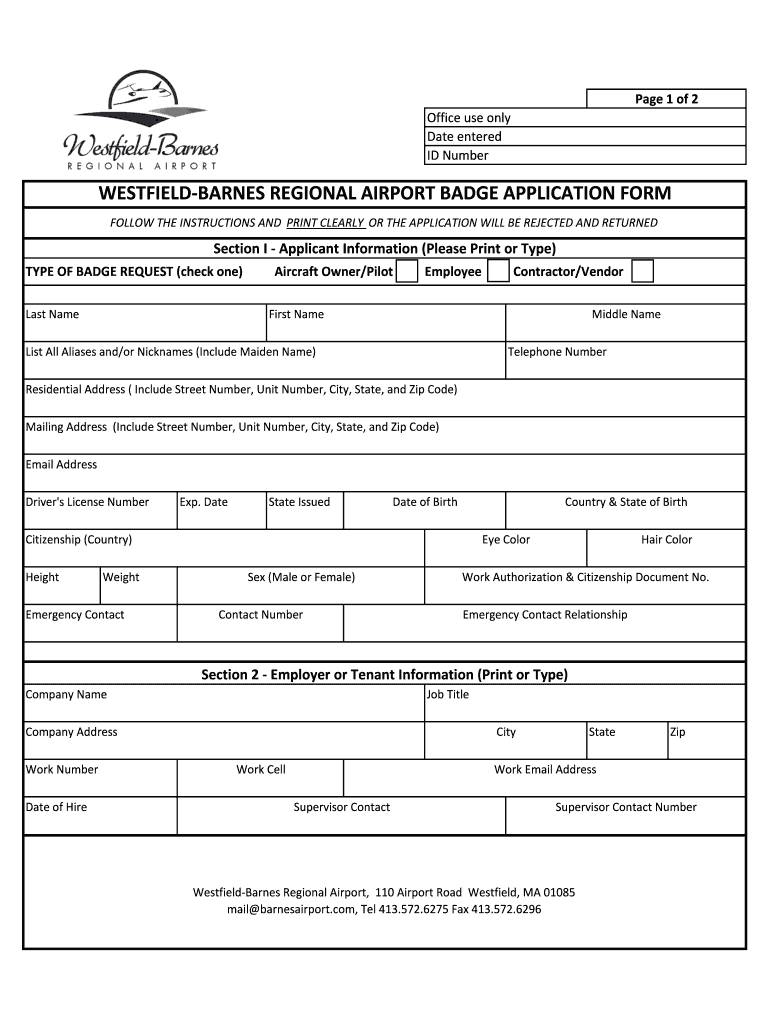
The Security Badge Application for Westfield-Barnes Airport is a crucial document intended for individuals who need access to secure areas within the airport premises. This application is an instrumental part of maintaining safety and security standards at the airport, which ensures only authorized personnel can enter specified zones. A security badge not only symbolizes authorization but is a functional tool that helps in identifying personnel at a glance. Typically, this application form requires applicants to provide detailed personal and employment information, which is used to determine eligibility for granting access.
Key Elements of the Security Badge Application
The application form is structured to capture essential data crucial for the vetting process. Key components include:
- Personal Information: Full name, address, contact information, and social security number.
- Employment Details: Current employer, job title, and duration of employment.
- Badge Type Selection: Categories like temporary, permanent, specialized, or restricted area access.
- Certification and Agreements: Sections where applicants acknowledge the airport's security policies and procedures.
Furthermore, the form outlines the responsibilities associated with holding a badge, such as adhering to display rules and reporting lost or stolen badges immediately.
Steps to Complete the Security Badge Application
Completing the Security Badge Application involves several steps to ensure all required information is accurately provided:
- Gather Required Documents: This typically includes government-issued ID, proof of employment, and possibly a photograph for the badge.
- Fill Out Personal and Employment Information: Ensure accuracy in providing your personal data and current employment details.
- Select the Appropriate Badge Type: Depending on your role and required access level, choose the appropriate badge category.
- Review Rules and Regulations: Carefully read through the rules concerning badge use and security protocols.
- Sign the Certification Section: Acknowledge your understanding of badge usage terms and airport security procedures.
- Submit the Application: Submit the completed form either online, via mail, or in person at the designated office.
Application Process & Approval Time
The application process for obtaining a security badge at Westfield-Barnes Airport is designed to be thorough and diligent:
- Application Review: After submission, applications are reviewed for completeness and accuracy.
- Background Checks: Security protocols necessitate background checks to ensure applicants do not pose a risk.
- Approval and Issuance: Once vetted, applicants are notified, and badges are issued. The timeline from submission to approval can vary, commonly taking several weeks depending on the complexity of the background check.
Who Typically Uses the Security Badge Application?
The primary users of the Security Badge Application are individuals who require frequent access to secure areas of Westfield-Barnes Airport. These typically include:
- Airport Employees: Staff working in various departments who need to go beyond public areas.
- Contractors: Personnel engaged in contract work within secure zones.
- Vendors and Suppliers: Regular visitors who provide goods and services to airport facilities.
- Airline Staff: Crew and administration members who require seamless transit through secure parts of the airport.


Legal Use of the Security Badge Application
Using the Security Badge Application responsibly is essential to uphold legal and security standards:
- Misuse or Fraud: Misrepresentation or fraudulent information on the application is strictly against the law and could lead to criminal charges.
- Badge Misuse: Unauthorized use or letting others use your badge can lead to restrictions, fines, or even revocation of access rights.
- Confidentiality: Information shared in the application is protected and used solely for security and identification purposes.
Required Documents for Submission
Applicants must ensure that all necessary documents accompany their application:
- Identification Documents: A government-issued ID such as a driver’s license or passport.
- Employment Verification: A letter from an employer or a recent pay stub that confirms current employment status.
- Relevant Certifications: If applicable, certifications or licenses related to the nature of work that require specific access.
Completing this form and submitting it with the correct documentation is crucial for timely processing and avoiding delays.
Important Terms Related to Security Badge Application
Understanding key terms is vital when dealing with the Security Badge Application:
- Authentication: The process of verifying the identity and credentials of an applicant.
- Background Check: A review of an applicant’s history to ensure they meet security requirements.
- Access Levels: Different security clearance levels required for various zones within the airport.
These terms form the backbone of the security application process and help maintain the integrity and safety of airport operations.




