
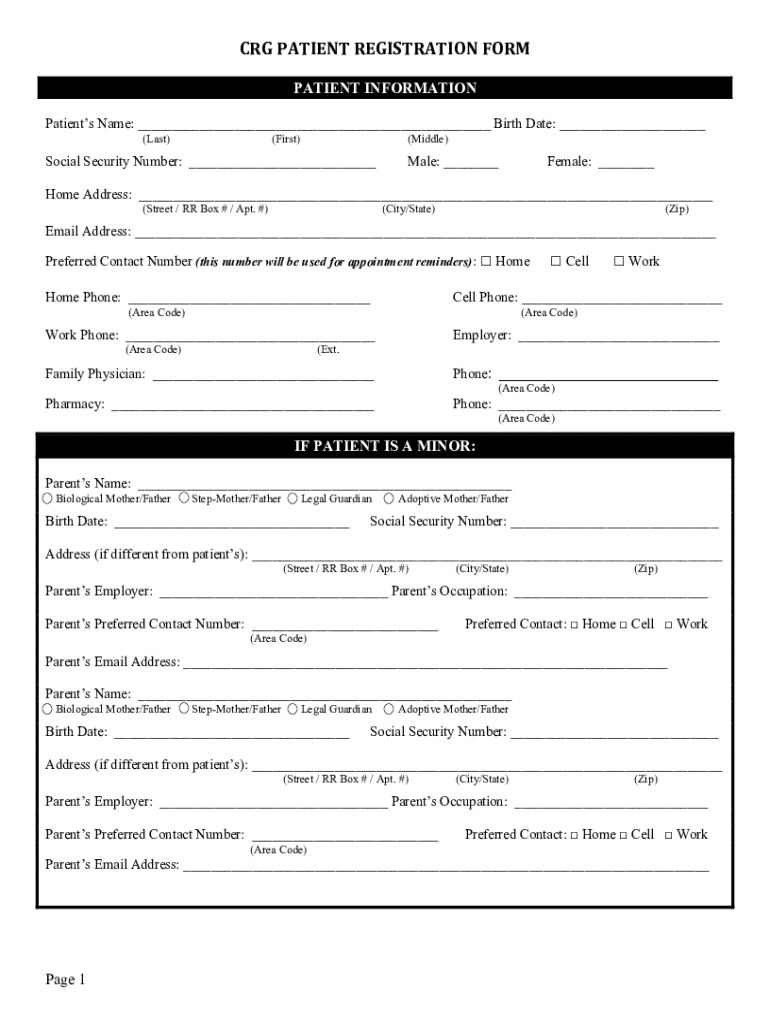







Overview of the CRG Patient Registration Form
The "CRG Patient Registration Form - Childrens Resource" is a comprehensive document that collects essential information required for registering a child at a healthcare facility specializing in resource management for children. This fillable form encompasses a wide range of sections aimed at capturing key patient data, ensuring effective treatment, and managing administrative processes.
Key Elements of the Form
Patient Personal Information
- Name and Identification: Collects the child's full name, date of birth, and contact information.
- Address: Requires a complete residential address for communication and record purposes.
- Emergency Contacts: Lists individuals to be contacted in case of an emergency, including their relationship to the patient and their phone numbers.
Insurance Information
- Primary Insurance Details: Requests specifics about the patient's primary insurance provider, policy number, and group number.
- Secondary Insurance Information: If applicable, gathers details regarding any additional insurance policies that cover the patient.
Consent and Authorization
- Consent for Treatment: Includes a section where guardians can provide consent for medical treatment and interventions.
- Medical Photography Consent: Provides options for consenting or declining the use of medical photography for documentation and educational purposes.
Steps to Complete the Form
- Download the Form: Access the fillable form online through platforms like DocHub, which support PDF and other document formats.
- Fill in Personal Information: Input the child's personal details and contact information in the designated fields.
- Enter Insurance Information: Accurately document the primary and secondary insurance details to facilitate billing and coverage verification.
- Provide Emergency Contacts: List emergency contact information, ensuring clarity and accuracy for quick communication if necessary.
- Review Consent Sections: Thoroughly read and complete sections regarding consent for medical procedures and photography.
- Sign the Form: Use an electronic signature to finalize the form, ensuring all required information is complete and accurate.
Legal Use and Compliance
Compliance with Federal Laws
- ESIGN Act Compliance: The CRG Patient Registration Form adheres to the ESIGN Act standards, allowing electronic signatures to be legally binding.
- Data Protection: Ensures that all personal and sensitive information is handled with confidentiality and compliance with data protection laws.
State-Specific Regulations
- Different states may have varying requirements for healthcare documentation. It's essential to verify any state-specific mandates that could affect form usage.
Who Typically Uses the Form


Primary Users
- Parents and Guardians: Typically, parents or legal guardians complete this form during the registration process for minors.
- Healthcare Administrators: Facility staff use the information provided to manage medical records and billing.
Secondary Users
- Insurance Providers: Utilize the data for claims processing and verification of coverage.
- Emergency Personnel: Access contact and medical information in urgent situations.
Important Terms Related to the Form
- Behavioral Health Coverage: Refers to insurance benefits that include mental health treatment, requiring verification.
- Financial Agreements: Outlines the responsibilities regarding payments for services and missed appointments.
- Email Communication Consent: Allows for electronic communication about medical information and appointment scheduling.
Form Submission Methods
Online Submission
- Forms can be completed and submitted electronically through platforms like DocHub, eliminating the need for paper copies.
In-Person or Mail
- Some facilities might require physical submission of the filled form, either by mail or direct handover during an appointment.
Differences in Digital and Paper Versions
- Digital Advantages: Online forms offer convenience, faster processing, and enhanced accessibility.
- Paper Format: Although less common, some may prefer physical forms for personal record-keeping or due to a lack of internet access.
By understanding and thoroughly engaging with each section of the CRG Patient Registration Form, users can ensure that they submit accurate, comprehensive information that facilitates the treatment and administrative processes at children's resource healthcare facilities.


