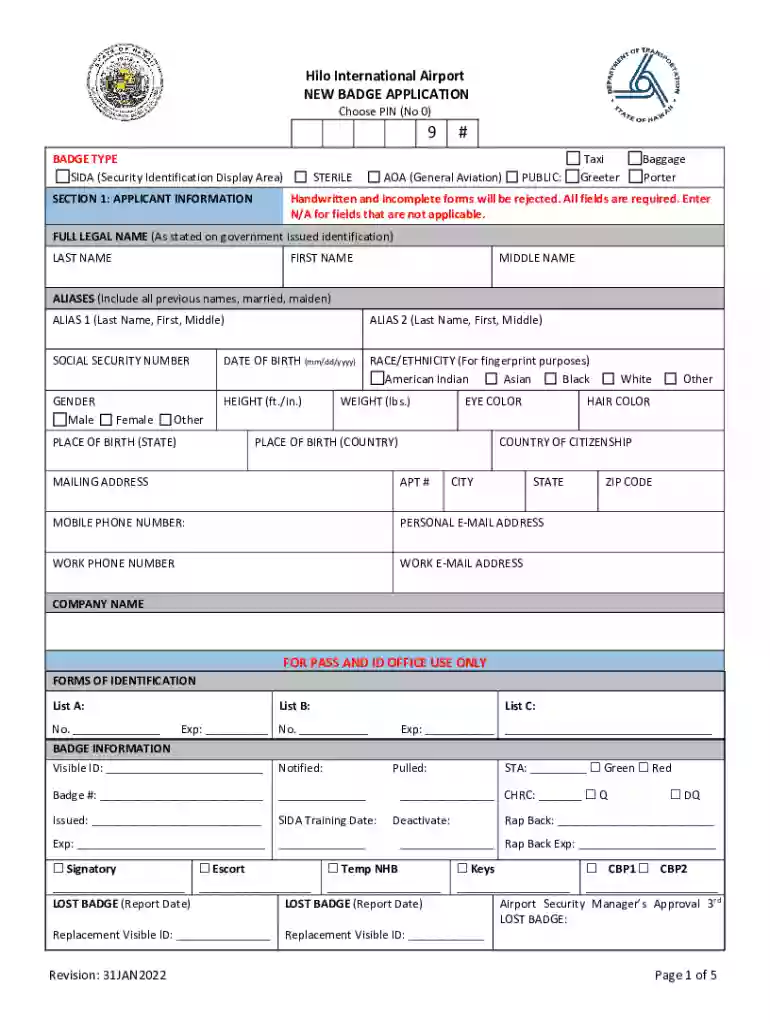
Fillable Online Hilo International Airport RENEW BADGE 2026

Get Form
Fillable Online Hilo International Airport RENEW BADGE Preview on Page 1

Here's how it works

01. Edit your form online
Type text, add images, blackout confidential details, add comments, highlights and more.

02. Sign it in a few clicks
Draw your signature, type it, upload its image, or use your mobile device as a signature pad.

03. Share your form with others
Send it via email, link, or fax. You can also download it, export it or print it out.

Definition and Meaning

The "Fillable Online Hilo International Airport RENEW BADGE" form is a crucial document used by employees and authorized personnel at the Hilo International Airport to renew their existing identification badges. These badges are often required for accessing secure areas of the airport to perform job duties. The renewal form ensures that all information is up-to-date and compliant with airport security protocols. Completing this form accurately helps maintain security at the facility, preventing unauthorized access.

How to Use the Fillable Online Hilo International Airport RENEW BADGE

Using the form involves several straightforward steps to ensure accurate submission:

  1. Access the Form: Obtain the "Fillable Online Hilo International Airport RENEW BADGE" form through the designated online platform provided by the airport.
  2. Complete Personal Information: Enter all personal details, such as full name, contact information, and employee ID, accurately.
  3. Certification and Attestation: Certify that the information provided is accurate to the best of your knowledge. This section may include signing or initialing specific declarations.
  4. Review and Submit: Double-check the completed form for any errors or omissions. Once confirmed, submit the form as directed, ensuring compliance with any attached instructions.

Steps to Complete the Fillable Online Hilo International Airport RENEW BADGE

Completing the renewal form involves a series of detailed steps:

  1. Start with Personal Identification: Fill in your name, title, and department. Ensure consistency with records.
  2. Include Badge Details: Specify the badge number and expiration date to be renewed.
  3. Respond to Security Questions: Answer any security-related questions to verify your continued eligibility for badge renewal.
  4. Provide Employment Verification: Your employer may need to verify your current employment status and role.
  5. Submit Required Documentation: Attach any requested documents, such as a recent photograph or identification proof.
  6. Sign the Form: Affix your electronic or handwritten signature to validate the form.
  7. Submit: Follow the submission instructions provided, which may involve online uploading or physical delivery to the security office.

Eligibility Criteria

To renew your badge, you need to meet specific eligibility criteria:

  • Current Employment: Must be actively employed or contracted by an entity operating within Hilo International Airport.
  • Valid Existing Badge: Only valid badges that are approaching expiration are eligible for renewal.
  • Security Clearance Compliance: Must complete any required security background checks as stipulated by airport security procedures.
  • Training Updates: Ensure completion of any required security or job-related training before renewal.
decoration image ratings of Dochub

Key Elements of the Fillable Online Hilo International Airport RENEW BADGE

The form contains essential elements that facilitate the renewal process:

  • Personal Information Section: Detailed fields for personal contact and identification details.
  • Badge Information: Current badge number and expiration details.
  • Security Verification: Questions aimed at verifying security clearance status.
  • Employment Confirmation: Section requiring employer verification to affirm continued employment and role relevance.

Required Documents

Submitting the "Fillable Online Hilo International Airport RENEW BADGE" form requires accompanying documents:

  • Current Badge Copy: A scanned copy of the current badge.
  • Identification Proof: Government-issued ID for identity verification.
  • Recent Photograph: Typically a passport-sized photo for badge reproduction.
  • Employment Verification Letter: A letter from the employer indicating current employment status and job title.

Legal Use of the Fillable Online Hilo International Airport RENEW BADGE

Legal compliance is critical when using this form:

  • Accurate Information: Ensure all data provided is truthful and up-to-date to avoid illegal submissions.
  • Authorized Use: The form is strictly for renewals within the context of ongoing employment at Hilo International Airport.
  • Privacy Compliance: Adhere to privacy regulations concerning the handling and submission of personal information.

Form Submission Methods

Renewing your badge involves specific submission methods for convenience:

  • Online Submission: Filling and submitting the form electronically via the airport’s designated platform is the preferred method.
  • Mailing Option: If online submission is unavailable, mailing physical copies of the form and documents is an alternative.
  • In-Person Submission: Providing documents directly to the airport's security office, if stated as an option in submission guidelines.

See more Fillable Online Hilo International Airport RENEW BADGE versions

We've got more versions of the Fillable Online Hilo International Airport RENEW BADGE form. Select the right Fillable Online Hilo International Airport RENEW BADGE version from the list and start editing it straight away!
Versions Form popularity Fillable & printable
2022 4.6 Satisfied (54 Votes)
2020 4.2 Satisfied (34 Votes)
be ready to get more

Complete this form in 5 minutes or less

Get form

Got questions?

We have answers to the most popular questions from our customers. If you can't find an answer to your question, please contact us.
Contact us

Signing documents on a mobile device is quick, straightforward, and doesn’t require software installation if you have an account with DocHub. Log in from any browser, complete your blank fields with your data, and click on Sign → Create your signature. You can draw your electronic signature just as you usually do on paper, add its image to your Fillable Online Hilo International Airport RENEW BADGE, or type in your name and stylize its look. No matter what option you select, your paperwork will be valid.

You can complete and sign your Fillable Online Hilo International Airport RENEW BADGE online, even on a tight deadline. All you need to access top-notch editing instruments on any device is a DocHub profile, that you can register in a couple of moments. After you sign up, upload your file or find what you are searching for in our catalog, complete it using the editing instruments you want, and place your electronic signature on it at the end.

Once a badge expires, the badge holder is not allowed within the AOA, and the badge must be returned to the Airport Managers office. If the badge holder returns their badge, they will then be allowed onto the AOA, as long as they are properly escorted by an Airport AOA or SIDA badged individual.
Your badge type requires an FBI fingerprint background check and TSA security threat assessment. These must be completed before the badging process can continue. A warrants check will also be conducted. If you have any outstanding warrants, they must be resolved before the badge can be issued.
Renewal Location Employee badges must be renewed on a regular basis. You must renew your Airport ID Badge prior to the expiration date printed on your badge. Current employees can visit the Main Badging Office, located in the A Concourse above gate A46 on Level 4.

Security and compliance

At DocHub, your data security is our priority. We follow HIPAA, SOC2, GDPR, and other standards, so you can work on your documents with confidence.

Learn more
ccpa2
pci-dss
gdpr-compliance
hipaa
soc-compliance
be ready to get more

Complete this form in 5 minutes or less

Get form