




Here's how it works

01. Edit your form online
Type text, add images, blackout confidential details, add comments, highlights and more.

02. Sign it in a few clicks
Draw your signature, type it, upload its image, or use your mobile device as a signature pad.

03. Share your form with others
Send it via email, link, or fax. You can also download it, export it or print it out.
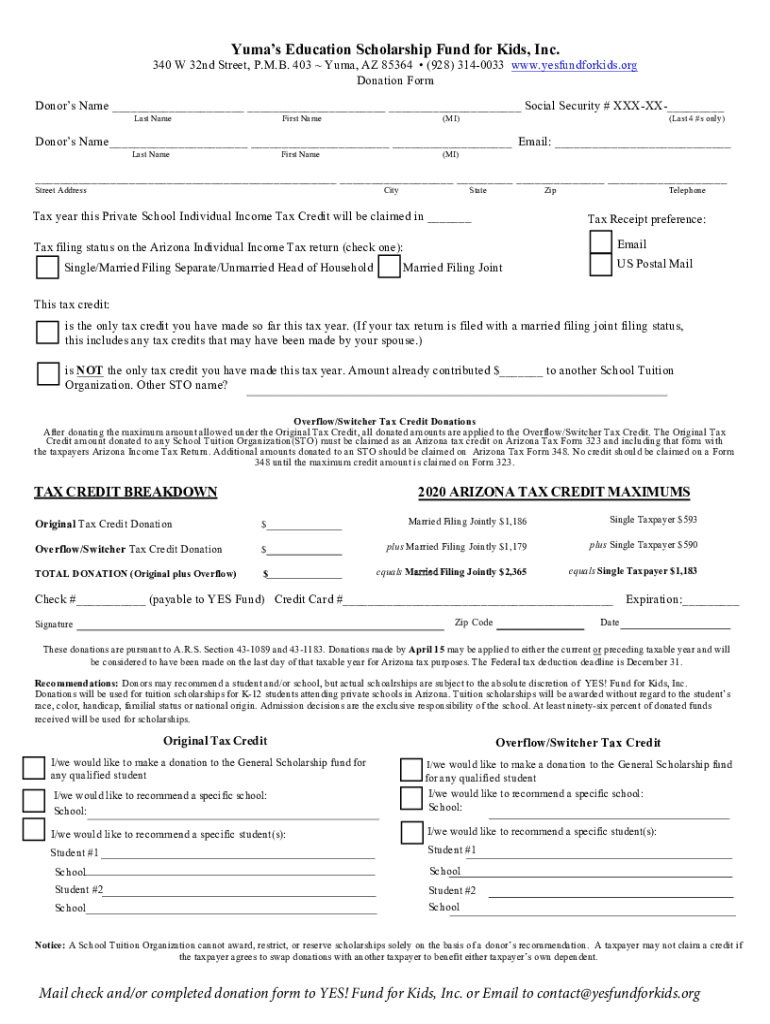
How to use or fill out Yumas Education Scholarship Fund for Kids, Inc with our platform

- Click ‘Get Form’ to open the Yumas Education Scholarship Fund for Kids, Inc donation form in the editor.
- Begin by entering your name in the designated fields: Last Name, First Name, and Middle Initial. Ensure accuracy as this information is crucial for tax purposes.
- Provide your Social Security number's last four digits and your email address for communication regarding your donation.
- Fill in your street address, city, state, and zip code to ensure proper documentation and receipt delivery.
- Indicate the tax year for which you are claiming the Private School Individual Income Tax Credit.
- Select your preferred method of receiving a tax receipt: via email or US Postal Mail.
- Choose your tax filing status from the options provided to help determine eligibility for credits.
- Complete the sections regarding previous contributions to other School Tuition Organizations if applicable.
- Enter the amounts you wish to donate under both Original Tax Credit and Overflow/Switcher Tax Credit sections.
- Finally, sign and date the form before submitting it via email or mailing it to YES! Fund for Kids, Inc.
Start filling out your donation form today using our platform for a seamless experience!
Fill out Yumas Education Scholarship Fund for Kids, Inc online
It's free
It's free
See more Yumas Education Scholarship Fund for Kids, Inc versions
We've got more versions of the Yumas Education Scholarship Fund for Kids, Inc form. Select the right Yumas Education Scholarship Fund for Kids, Inc version from the list and start editing it straight away!
Security and compliance
At DocHub, your data security is our priority. We follow HIPAA, SOC2, GDPR, and other standards, so you can work on your documents with confidence.
Learn more


