







Definition and Meaning
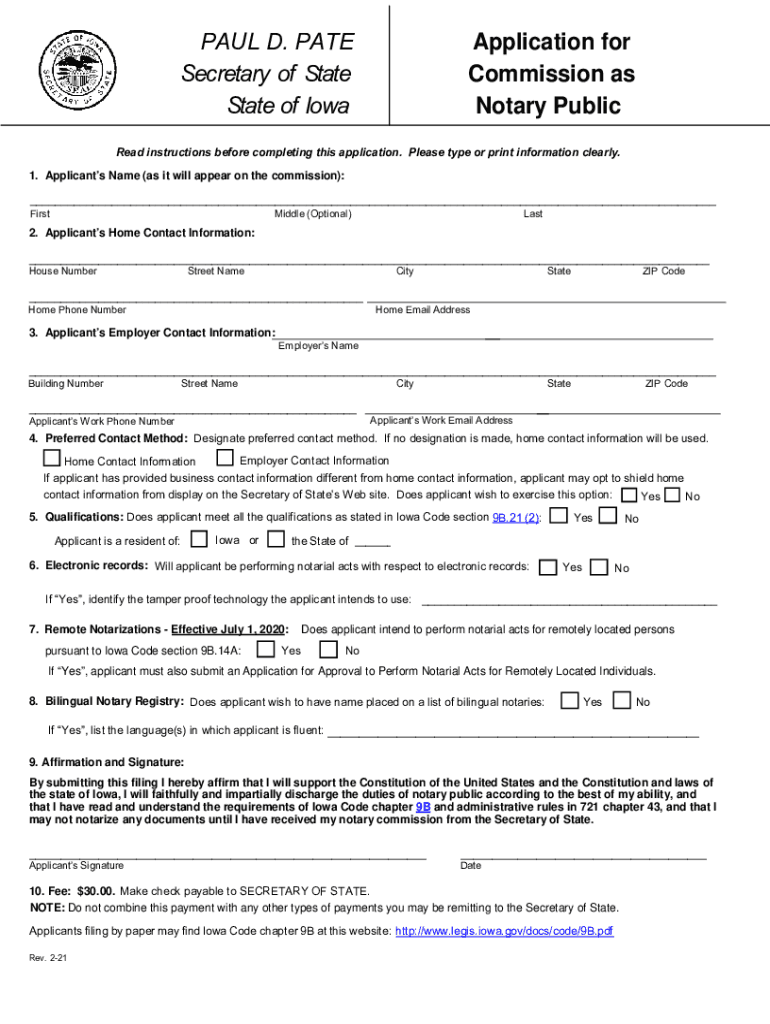
The PAUL D PATE Application for - Iowa Secretary of State is an official form used to apply for a commission as a Notary Public in Iowa. Issued by the Secretary of State, this application mandates specific information from the applicant, such as personal and employment details. Understanding the purpose and structure of this form is crucial for proper completion and submission. The form ensures candidates meet the necessary requirements and adhere to state regulations.
How to Use the Application Successfully
To effectively use the PAUL D PATE Application for the Iowa Secretary of State, applicants should ensure they provide all required information accurately. This includes personal data, contact information, and details about electronic records and remote notarizations preferences. Each section of the application guides you through what is needed to meet the state's expectations and secure your notary public commission.
- Personal Information: Enter your full name, address, and contact details. Ensure accuracy as these details are essential for verification.
- Employer Details: Provide current employment information, including your employer's name and address. This data helps the Secretary of State verify your professional standing.
- Qualifications: Verify that you meet all qualifications specific to becoming a Notary Public in Iowa.
Steps to Complete the Application
- Download the Form: Access the application from the Iowa Secretary of State website or through authorized platforms like DocHub.
- Fill Out Personal Details: Input your full name, address, and contact information accurately.
- Employer and Qualification Information: Provide your employer’s details and confirm that you meet the necessary qualifications for the commission.
- Preferences for Notifications: Decide on your preferred method of correspondence for future notifications or communication.
- Electronic and Remote Notarization Options: Specify if you intend to perform electronic notarizations or remote notarizations.
- Sign the Affirmation: Confirm the accuracy of your application by signing the affirmation statement.
- Submit Payment: A processing fee of $30.00 is required. Include payment details with your application submission.
Who Typically Uses This Application
The primary users of the PAUL D PATE Application are individuals seeking to become commissioned Notary Publics in Iowa. Applicants generally include:
- Professionals: Legal assistant, law clerks, or real estate agents expanding their service offerings.
- Organizations: Companies seeking employees to become notaries to facilitate business processes internally.
- Individuals Seeking New Opportunities: Those looking to add credentials for personal or professional advancement.
Key Elements to Understand
- Affirmation Statement: Signifying that all information provided is correct to the best of the applicant's knowledge.
- Processing Fee: A non-refundable fee of $30.00 must accompany the application.
- Signature Field: The area in which the applicant must verify their application using a legally recognized signature.
Legal Use and Compliance
Submitting the PAUL D PATE Application requires adhering to legal standards mandated by Iowa law. Failure to comply or provide misinformation can result in penalties or denial. Legal use includes:
- Notary Compliance: Ensuring notarial actions meet state guidelines.
- Verification: Providing truthful, verifiable data on applications.
- Accountability: Understanding that false information can lead to legal consequences.
Required Documents for Submission
Applicants should prepare to include several crucial documents when submitting their PAUL D PATE Application:
- Proof of Identification: Valid photo ID (e.g., driver's license, passport).
- Proof of Residency: Documented evidence of Iowa residency if applicable.
These documents solidify applicant identity and eligibility, aiding in a smooth approval process.
Application Process and Approval Time
The submission is typically reviewed within several weeks. Applicants can accelerate this process by ensuring all fields are comprehensively filled and supplemental materials are provided. The time frame may vary based on demand or additional verification requirements.
Important Dates and Deadlines
Prospective notaries should remain aware of specific deadlines when applying and anticipate renewal dates for existing commissions to ensure uninterrupted notary authority.
Digital vs. Paper Version
Applicants can complete the PAUL D PATE Application via a digital platform or a printed hard copy. Each method has specific considerations:
- Digital Submission: Offers speed and convenience, eliminating mailing time.
- Paper Submission: May be preferred by those less comfortable with technology; however, it requires additional mailing steps.
Both versions are equally valid but come with differing logistical requirements.




