




Here's how it works

01. Edit your cruisin coffee menu online
Type text, add images, blackout confidential details, add comments, highlights and more.

02. Sign it in a few clicks
Draw your signature, type it, upload its image, or use your mobile device as a signature pad.

03. Share your form with others
Send cruisin coffee via email, link, or fax. You can also download it, export it or print it out.
How to use or fill out cruisin coffee application with our platform

- Click ‘Get Form’ to open the cruisin coffee application in the editor.
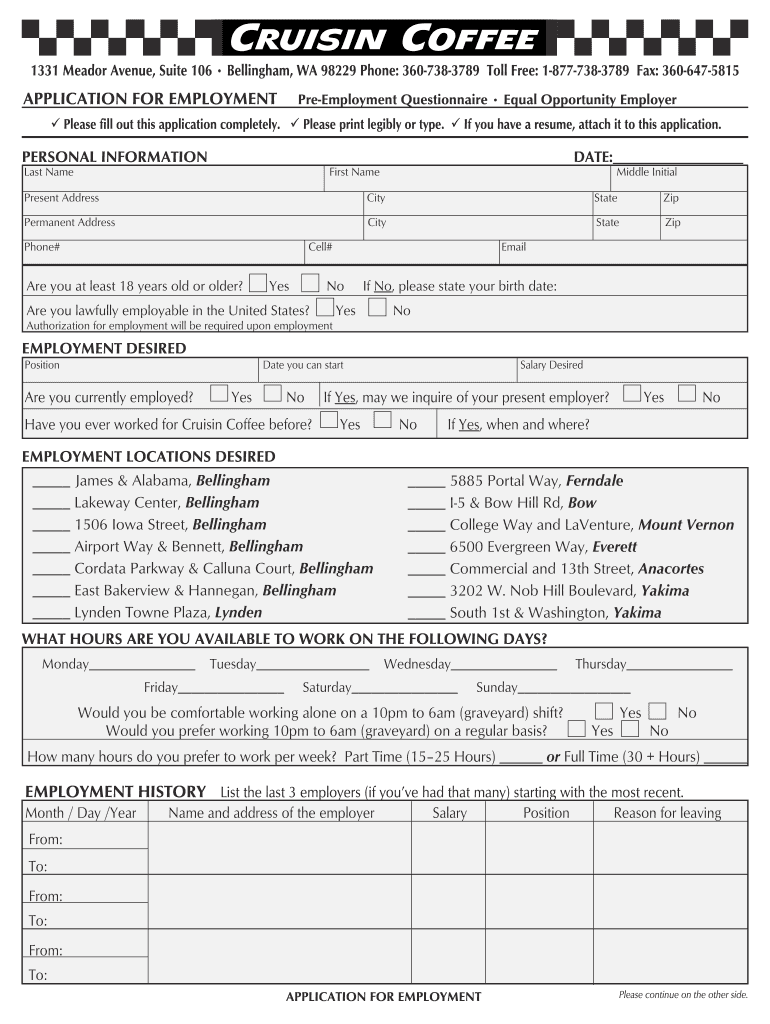
- Begin by filling out your personal information. Enter your last name, first name, middle initial, and contact details including phone and email. Ensure all fields are completed legibly.
- In the 'Employment Desired' section, specify the position you are applying for and your availability to start. Indicate if you are currently employed and whether you have worked for Cruisin Coffee before.
- Select your preferred employment locations from the list provided. This helps streamline your application process by indicating where you wish to work.
- Fill in your availability for each day of the week and indicate your comfort level with graveyard shifts.
- List your employment history, starting with the most recent employers. Include dates of employment, positions held, and reasons for leaving.
- Complete the education history section by circling the last year completed and indicating if you graduated from high school or college.
- Provide references who can vouch for your character and work ethic. Ensure they are not related to you.
- Finally, read through the authorization statement carefully before signing and dating the application to confirm its accuracy.
Start filling out your cruisin coffee application online for free today!
Fill out cruisin coffee application online
It's free
It's free
See more cruisin coffee application versions
We've got more versions of the cruisin coffee application form. Select the right cruisin coffee application version from the list and start editing it straight away!
| Versions | Form popularity | Fillable & printable |
|---|---|---|
| 2008 | 4.9 Satisfied (44 Votes) |
Got questions?
We have answers to the most popular questions from our customers. If you can't find an answer to your question, please contact us.
Contact us
Who owns Cruisin coffee?
Ed Mack is one of those partnerships created over many years of working together. Ed owns Cruisin Coffee, a 13-unit drive-thru coffee chain in western Washington state.
Does Cruisin coffee deliver?
We will deliver your local coffee shop fix or bite to eat directly to your door!
Security and compliance
At DocHub, your data security is our priority. We follow HIPAA, SOC2, GDPR, and other standards, so you can work on your documents with confidence.
Learn more


