Type text, add images, blackout confidential details, add comments, highlights and more.
02. Sign it in a few clicks
Draw your signature, type it, upload its image, or use your mobile device as a signature pad.
03. Share your form with others
Send job briefing template via email, link, or fax. You can also download it, export it or print it out.
How to use or fill out job briefing with our platform
Ease of Setup
DocHub User Ratings on G2
Ease of Use
DocHub User Ratings on G2
Click ‘Get Form’ to open the job briefing in the editor.
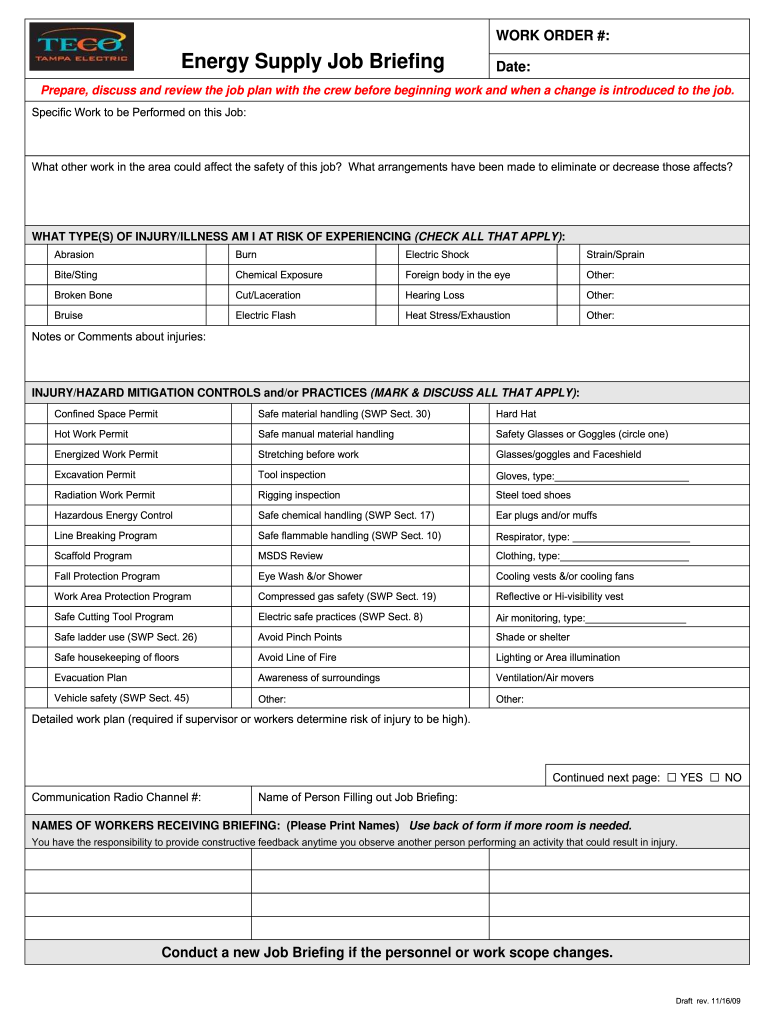
Begin by entering the WORK ORDER # and Date at the top of the form. This information is crucial for tracking and referencing the job.
In the 'Specific Work to be Performed on this Job' section, clearly outline the tasks that will be undertaken. Be specific to ensure all crew members understand their responsibilities.
Identify any other work in the area that could impact safety. Document arrangements made to mitigate these risks in the designated field.
Check all applicable types of injury/illness you may be at risk of experiencing. This helps in preparing for potential hazards.
Discuss and mark all injury/hazard mitigation controls and practices that will be implemented during this job. Ensure everyone understands these safety measures.
If required, provide a detailed work plan if high-risk injuries are anticipated. This should include communication protocols and emergency procedures.
Finally, list names of workers receiving the briefing and ensure they acknowledge their understanding of safety protocols.
Start using our platform today to streamline your job briefing process for free!
OSHA job briefing requirementsJob briefing exampleWhat is the purpose of a pre job briefingWhat is the first step in a pre job briefingWhat topics need to be covered in a pre job briefingOsha 1910 job briefingPre job briefing templateWhen will you receive a job briefing
Security and compliance
At DocHub, your data security is our priority. We follow HIPAA, SOC2, GDPR, and other standards, so you can work on your documents with confidence.
In assigning an employee or a group of employees to perform a job, the employer shall provide the employee in charge of the job with all available informationRead more
1926.952 - Job briefing. | Occupational Safety and Health
The briefing shall cover at least the following subjects: Hazards associated with the job, work procedures involved, special precautions, energy-sourceRead more
Professions are mainly useful as a way to raise Attributes and earn a decent income in items. Later on, professions come with more varied benefits.Read more
Cookie consent notice
This site uses cookies to enhance site navigation and personalize your experience.
By using this site you agree to our use of cookies as described in our Privacy Notice.
You can modify your selections by visiting our Cookie and Advertising Notice.