Ics 211p os 2026

Get Form
ics sign in sheet Preview on Page 1

Here's how it works

01. Edit your ics sign in sheet online
Type text, add images, blackout confidential details, add comments, highlights and more.

02. Sign it in a few clicks
Draw your signature, type it, upload its image, or use your mobile device as a signature pad.

03. Share your form with others
Send ics 211p via email, link, or fax. You can also download it, export it or print it out.

How to use or fill out ics 211p os with our platform

Form edit decoration
9.5
Ease of Setup
DocHub User Ratings on G2
9.0
Ease of Use
DocHub User Ratings on G2
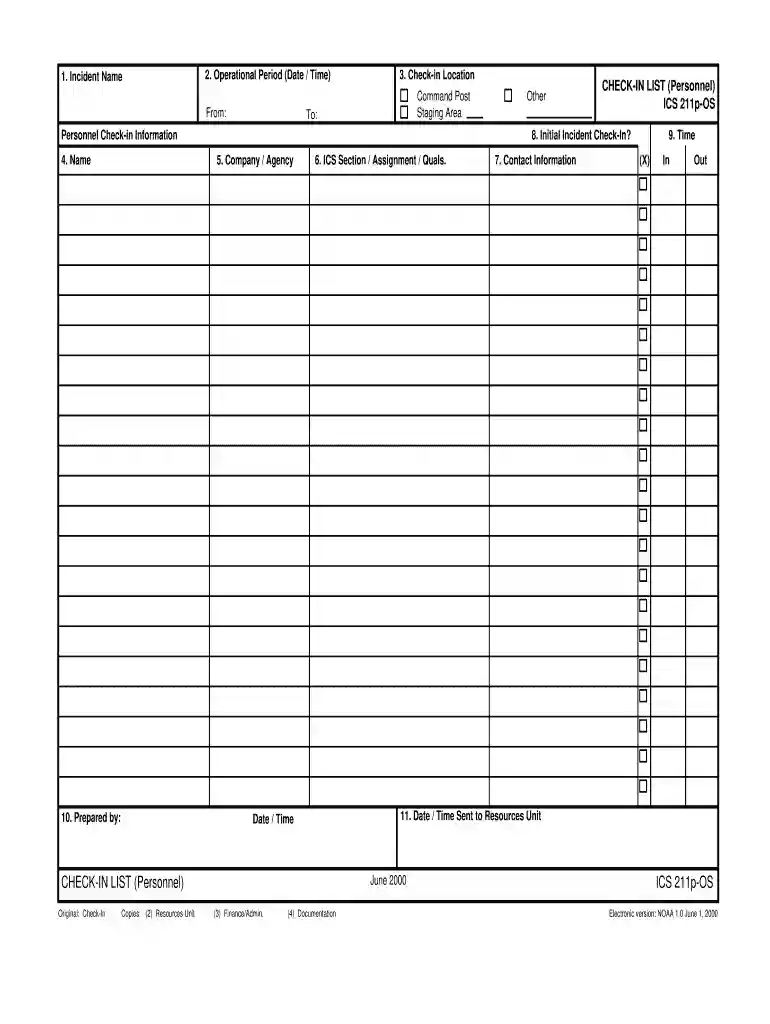
  1. Click ‘Get Form’ to open the ICS 211p OS in the editor.
  2. Begin by entering the 'Incident Name' at the top of the form. This identifies the specific incident for which personnel are checking in.
  3. Fill in the 'Operational Period' section, specifying both the start and end date/time of the operational period.
  4. Select your 'Check-in Location' from options such as Command Post or Staging Area, ensuring accurate reporting.
  5. Provide your 'Company / Agency' name to clarify which organization is represented.
  6. Complete the 'Prepared by' section with your name and relevant details, along with your ICS Section/Assignment qualifications.
  7. Input your contact information in the designated fields to facilitate communication.
  8. Record check-in times under 'In' and 'Out', ensuring accurate tracking of personnel presence.
  9. Finally, indicate when this information was sent to the Resources Unit by filling out the corresponding date/time field.

Start using our platform today for free to streamline your document editing and form completion!

See more ics 211p os versions

We've got more versions of the ics 211p os form. Select the right ics 211p os version from the list and start editing it straight away!
Versions Form popularity Fillable & printable
2000 4.8 Satisfied (167 Votes)
be ready to get more

Complete this form in 5 minutes or less

Get form

Got questions?

We have answers to the most popular questions from our customers. If you can't find an answer to your question, please contact us.
Contact us
Incident Briefing ICS Form 201: Provides the Incident Commander (and the Command and General Staffs) with basic information regarding the incident situation and the resources allocated to the incident. In addition to a briefing document, the ICS Form 201 also serves as an initial action worksheet.
An Inventory Control System (ICS) is a strategic, data-driven framework designed to manage, monitor, and optimize an organizations inventory levels throughout its entire supply chain.
Purpose. The Operational Planning Worksheet (ICS 215) communicates the decisions made by the Operations Section Chief during the Tactics Meeting concerning resource assignments and needs for the next operational period.
ICS Forms Completed by the. Logistics Section. ICS 205. RADIO COMMUNICATIONS PLAN. ICS 206. MEDICAL PLAN. ICS 214. UNIT LOG. ICS 218. SUPPORT VEHICLE INVENTORY.
The Assignment List(s) (ICS 204) informs Division and Group supervisors of incident assignments. Once the Command and General Staffs agree to the assignments, the assignment information is given to the appropriate Divisions and Groups. Preparation.

Security and compliance

At DocHub, your data security is our priority. We follow HIPAA, SOC2, GDPR, and other standards, so you can work on your documents with confidence.

Learn more
ccpa2
pci-dss
gdpr-compliance
hipaa
soc-compliance

People also ask

The ICS Form 211 serves several purposes, as it: (1) records arrival times at the incident of all overhead personnel and equipment, (2) records the initial location of personnel and equipment to facilitate subsequent assignments, and (3) supports demobilization by recording the home base, method of travel, etc., for

ics 211