Kutztown transcript 2026

Get Form
kutztown university transcript request Preview on Page 1

Here's how it works

01. Edit your kutztown university transcript request online
Type text, add images, blackout confidential details, add comments, highlights and more.

02. Sign it in a few clicks
Draw your signature, type it, upload its image, or use your mobile device as a signature pad.

03. Share your form with others
Send kutztown university transcript via email, link, or fax. You can also download it, export it or print it out.

How to use or fill out kutztown transcript with our platform

Form edit decoration
9.5
Ease of Setup
DocHub User Ratings on G2
9.0
Ease of Use
DocHub User Ratings on G2
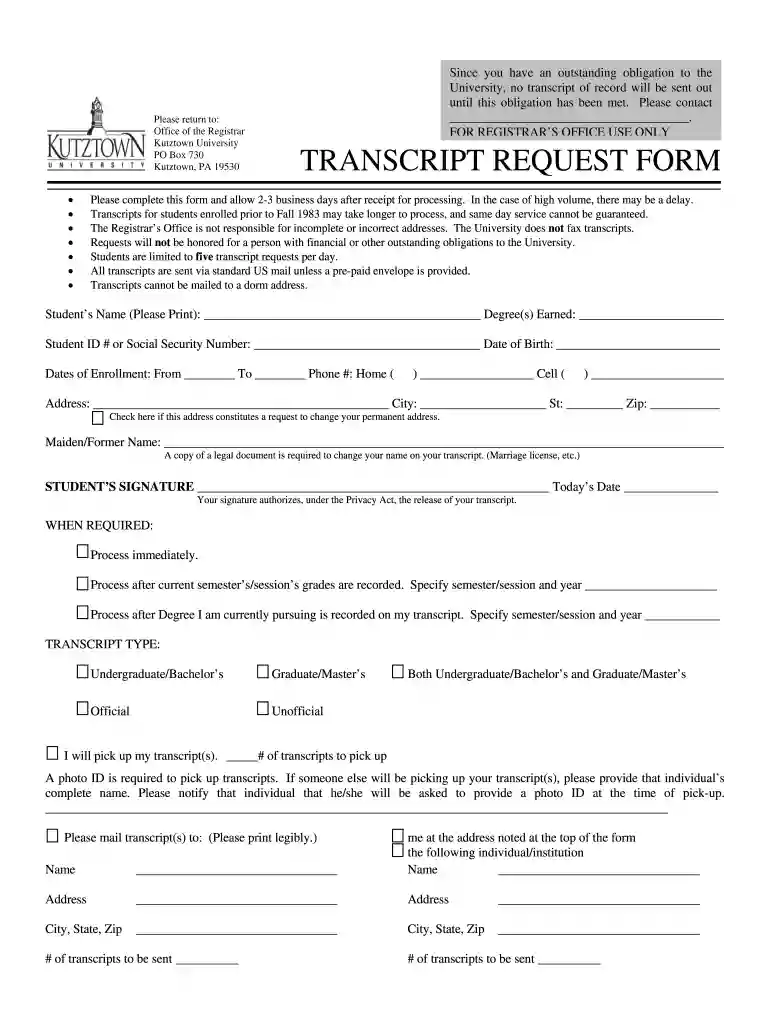
  1. Click ‘Get Form’ to open the kutztown transcript in the editor.
  2. Begin by entering your Student’s Name in the designated field. Ensure it is printed clearly for accurate processing.
  3. Fill in your Degree(s) Earned and Student ID # or Social Security Number. This information is crucial for identification purposes.
  4. Provide your Date of Birth and Dates of Enrollment, specifying the From and To dates accurately.
  5. Enter your contact information, including Home and Cell phone numbers, ensuring they are up-to-date.
  6. Complete the Address section carefully. If this address is a request to change your permanent address, check the appropriate box.
  7. If applicable, include your Maiden/Former Name and attach any required legal documents for name changes.
  8. Sign and date the form at the bottom to authorize the release of your transcript under the Privacy Act.
  9. Select when you require processing: immediately, after grades are recorded, or after your current degree is noted on your transcript.
  10. Choose the Transcript Type you need: Official, Unofficial, etc., and indicate if you will pick up transcripts or have them mailed.

Start using our platform today to fill out your kutztown transcript easily and for free!

See more kutztown transcript versions

We've got more versions of the kutztown transcript form. Select the right kutztown transcript version from the list and start editing it straight away!
Versions Form popularity Fillable & printable
2014 4.9 Satisfied (56 Votes)
2012 4.8 Satisfied (26 Votes)
be ready to get more

Complete this form in 5 minutes or less

Get form

Got questions?

We have answers to the most popular questions from our customers. If you can't find an answer to your question, please contact us.
Contact us
You can likely view your unofficial transcript on your colleges website, or request it from the registrar at your school.
Visit Parchment to request your transcript. Select Ordering your own credentials or academic record You will need to create a Parchment account the first time you request through Parchment. Follow the prompts to complete your request.
E-Transcripts for undergraduate studies may be addressed to recreg@tcnj.edu. For graduate admissions E-Transcripts may be addressed to graduate@tcnj.edu.

Security and compliance

At DocHub, your data security is our priority. We follow HIPAA, SOC2, GDPR, and other standards, so you can work on your documents with confidence.

Learn more
ccpa2
pci-dss
gdpr-compliance
hipaa
soc-compliance