Type text, add images, blackout confidential details, add comments, highlights and more.
02. Sign it in a few clicks
Draw your signature, type it, upload its image, or use your mobile device as a signature pad.
03. Share your form with others
Send isp3550a via email, link, or fax. You can also download it, export it or print it out.
How to use or fill out isp3550 with our platform
Ease of Setup
DocHub User Ratings on G2
Ease of Use
DocHub User Ratings on G2
Click ‘Get Form’ to open the isp3550 in the editor.
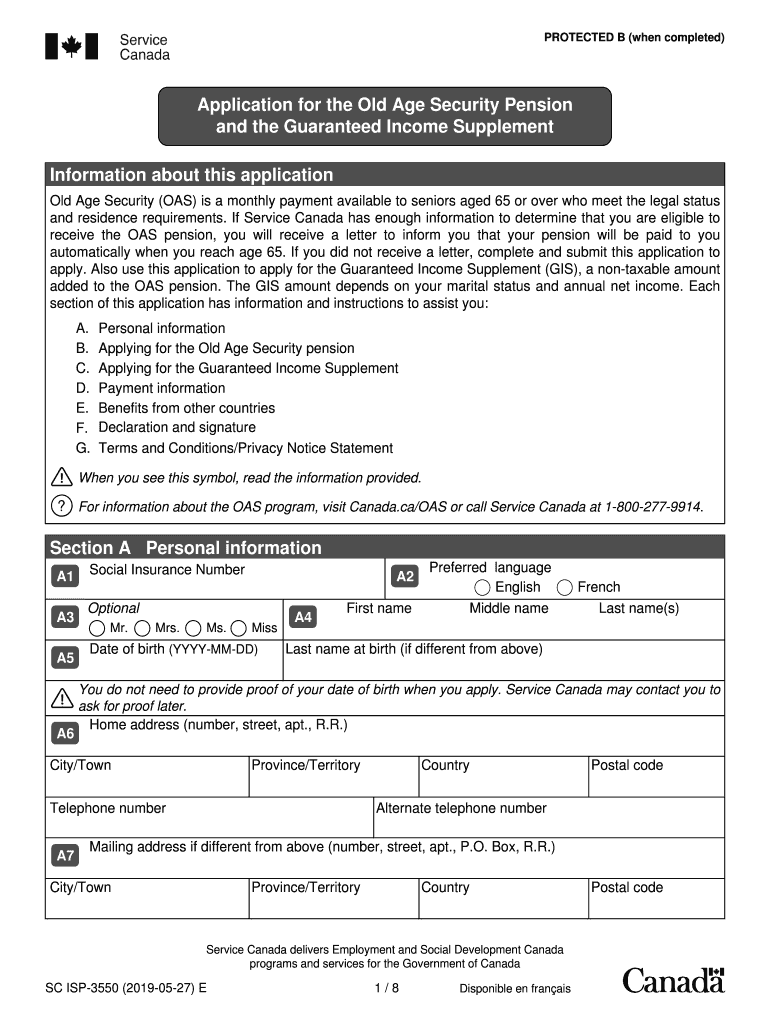
Begin with Section A, where you will enter your personal information. Fill in your Social Insurance Number, date of birth, and full name. Ensure that all details are accurate for verification purposes.
Proceed to Section B to apply for the Old Age Security pension. Select your desired start date for the pension and indicate your legal status in Canada.
In Section C, if applicable, complete the questions regarding the Guaranteed Income Supplement. Provide details about your income and marital status as required.
Fill out Section D with your banking information for direct deposit. If preferred, attach a void cheque instead.
Review Sections F and G for declarations and terms before signing. Ensure all signatures are completed as necessary.
Start filling out your isp3550 today on our platform for free!
ISP-3550 form downloadApplication for the OAS and the GIS ISP 3550ISP-3550 form PDFISP3550AOAS application onlineOAS application form PDFService Canada Old Age pensionSubmitting documents to Service Canada OAS
Security and compliance
At DocHub, your data security is our priority. We follow HIPAA, SOC2, GDPR, and other standards, so you can work on your documents with confidence.
En el presente trabajo se realiza una taxonoma de los sistemas de pensiones a partir del sistema de pilares, con el objetivo de plasmar las diferencias en
Cookie consent notice
This site uses cookies to enhance site navigation and personalize your experience.
By using this site you agree to our use of cookies as described in our Privacy Notice.
You can modify your selections by visiting our Cookie and Advertising Notice.