Type text, add images, blackout confidential details, add comments, highlights and more.
02. Sign it in a few clicks
Draw your signature, type it, upload its image, or use your mobile device as a signature pad.
03. Share your form with others
Send ct gun permit application form via email, link, or fax. You can also download it, export it or print it out.
How to use or fill out dps 799 c with DocHub
Ease of Setup
DocHub User Ratings on G2
Ease of Use
DocHub User Ratings on G2
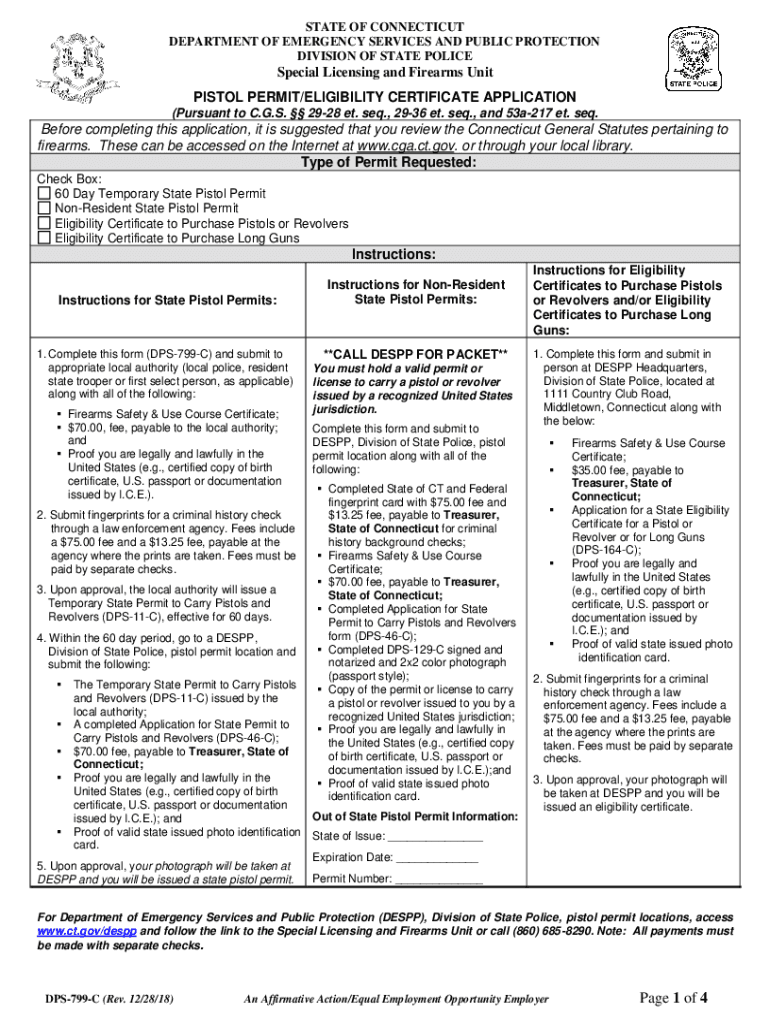
Click ‘Get Form’ to open the DPS-799-C in our platform's editor.
Begin by entering your personal information in the 'Contact / Identifying Information' section. Fill in your name, date of birth, sex, height, weight, race, eye color, hair color, and social security number if applicable.
Provide your residential address and list any previous addresses for the last seven years. Ensure all details are accurate to avoid delays.
Complete the employment history section by listing your employers for the past seven years. This helps establish your background.
Answer the medical and criminal history questions honestly. If you have any relevant information to disclose, attach additional sheets as necessary.
Attach proof of training by including a copy of your firearms safety course certificate. Ensure it is signed by the instructor.
Review all entries for accuracy before signing and dating the declaration at the end of the form.
Start filling out your DPS-799-C form online for free today using our platform!
Nov 14, 2017 Complete this form (DPS-799-C) and submit to appropriate local authority (local police, resident state trooper or first select person, asRead more
Commercial Price List #29 - LSA- locksmith security association
Jan 1, 2016 Monitoring (LPM), Concealed Door Position Status (DPS), and Cylinder Monitoring (CX). Available with 8890FL/8891FL only.*. $678.00. NOTE: TrimRead more
Cookie consent notice
This site uses cookies to enhance site navigation and personalize your experience.
By using this site you agree to our use of cookies as described in our Privacy Notice.
You can modify your selections by visiting our Cookie and Advertising Notice.