




Here's how it works



How to use or fill out playground checklist form with our platform

- Click ‘Get Form’ to open the playground checklist form in the editor.
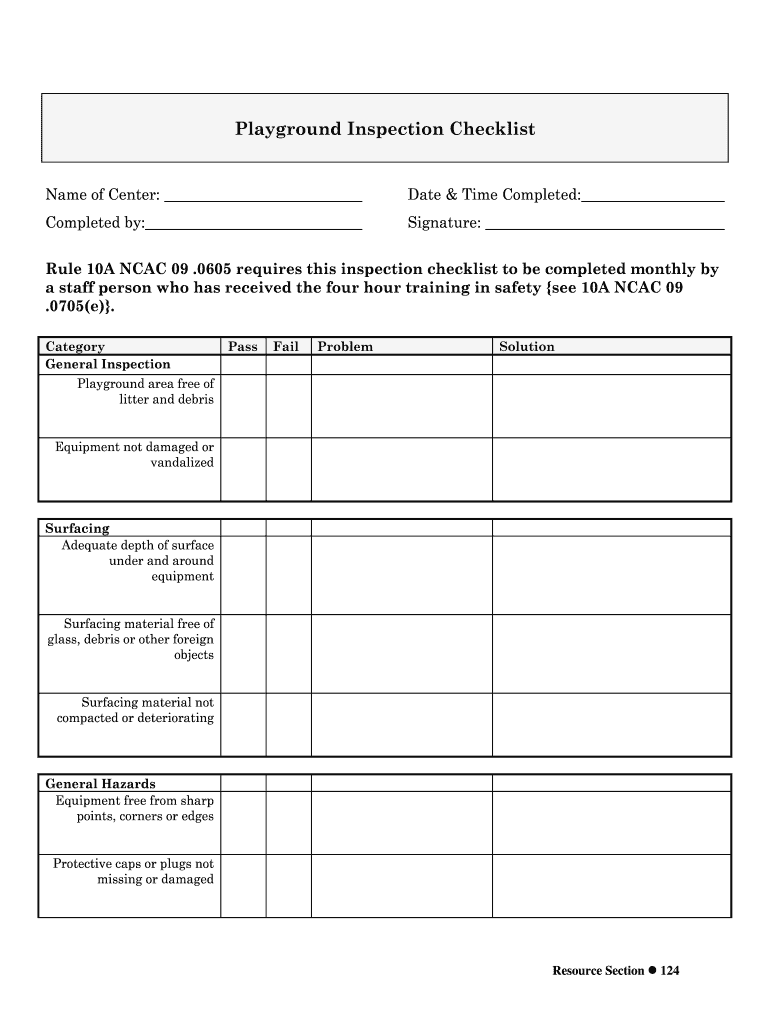
- Begin by entering the 'Name of Center' at the top of the form. This identifies which facility is being inspected.
- Next, fill in the 'Date & Time Completed' field to document when the inspection took place.
- In the 'Completed by' section, enter your name to indicate who performed the inspection.
- Sign in the designated 'Signature' area to validate that you have completed the checklist.
- Proceed through each category listed, marking 'Pass', 'Fail', or noting any 'Problem' and corresponding 'Solution' for each item. This includes checking for litter, equipment condition, surfacing adequacy, and general hazards.
- Once all sections are filled out, review your entries for accuracy before saving or exporting your completed checklist.
Start using our platform today to streamline your playground inspections for free!
It's free
See more playground checklist form versions
Got questions?
Can I type my eSignature on my playground equipment inspection checklist?
Sure, a typed name is recognized as a valid electronic signature when you create it on your form using a compliant solution like DocHub. Simply upload your playground equipment inspection checklist to our editor, click Sign in the top tool pane → Create your signature → Type your name in the appropriate tab, and choose how it will appear on your document.
How do you edit playground equipment safety checklist on Android?
Document editing with DocHub is equally convenient on desktop and mobile devices. You just need an internet browser to modify your playground equipment safety checklist on Android. Open our website and sign in to access the tools you need. Add your document and introduce your intended modifications. After that, you can keep your form in your document storage or send it out instantly.
How do you evaluate a playground?
How would you describe a playground?
What do you think are the 3 most important things to have on a playground?
Security and compliance
At DocHub, your data security is our priority. We follow HIPAA, SOC2, GDPR, and other standards, so you can work on your documents with confidence.
Learn more


