




Here's how it works



How to use or fill out tda direct supervision form with our platform

- Click ‘Get Form’ to open the tda direct supervision form in the editor.
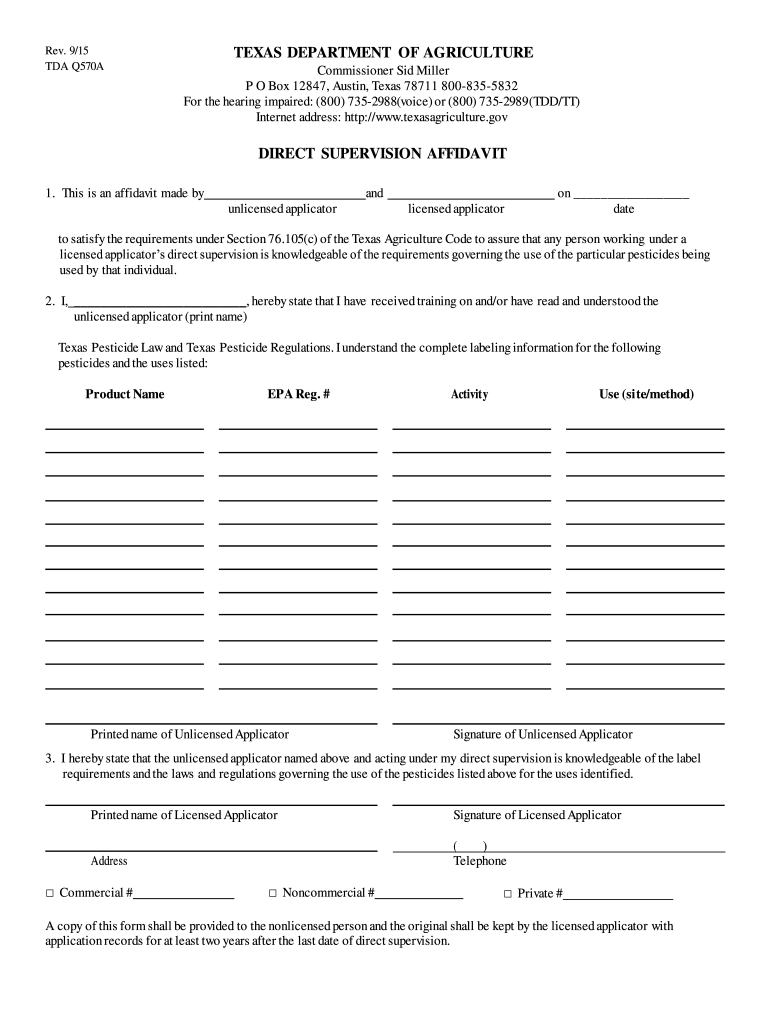
- Begin by filling in the names of both the unlicensed and licensed applicators in the designated fields. Ensure accuracy as this information is crucial for compliance.
- Enter the date on which the affidavit is being made. This should reflect the current date to maintain validity.
- In the section regarding training, have the unlicensed applicator print their name and confirm they have received training on Texas Pesticide Law by checking the appropriate box.
- List each pesticide product name along with its EPA registration number, ensuring that all details are correct for regulatory purposes.
- The unlicensed applicator must sign and provide their printed name, confirming their understanding of label requirements and regulations.
- Finally, the licensed applicator should print their name, sign, and provide their contact information including address and telephone number. Select whether they are a commercial, noncommercial, or private applicator.
Start using our platform today to easily complete your tda direct supervision form online for free!
It's free
See more tda direct supervision form versions
| Versions | Form popularity | Fillable & printable |
|---|---|---|
| 2015 | 4.8 Satisfied (276 Votes) |
Got questions?
Can I sign my tda q570a on a mobile?
Yes, you’ll find numerous apps for this on the web. Nonetheless, if you need to eSign your tda q570a without installing extra software, DocHub is the optimum choice you can make. This powerful editor works on mobile devices just as on desktops. Open our editor in any internet browser, register or log in to your account, and start processing your paperwork.
How do you fill out direct supervision form on Android?
It is a no-brainer on a computer or via a mobile device to complete a direct supervision form with DocHub. All you need to do is open any installed browser on your smartphone and proceed to the DocHub site. Once authenticated, add your file and open it in editing mode. Use our toolbar to make your edits and save adjustments. Optionally, keep your document in your files or send it to a recipient immediately.
How to get a private applicators license in Texas?
Which agency is responsible for licensing pesticide applicators in Texas?
How to get a TDA license in Texas?
Security and compliance
At DocHub, your data security is our priority. We follow HIPAA, SOC2, GDPR, and other standards, so you can work on your documents with confidence.
Learn more


