Type text, add images, blackout confidential details, add comments, highlights and more.
02. Sign it in a few clicks
Draw your signature, type it, upload its image, or use your mobile device as a signature pad.
03. Share your form with others
Send it via email, link, or fax. You can also download it, export it or print it out.
How to use or fill out the tea program with our platform
Ease of Setup
DocHub User Ratings on G2
Ease of Use
DocHub User Ratings on G2
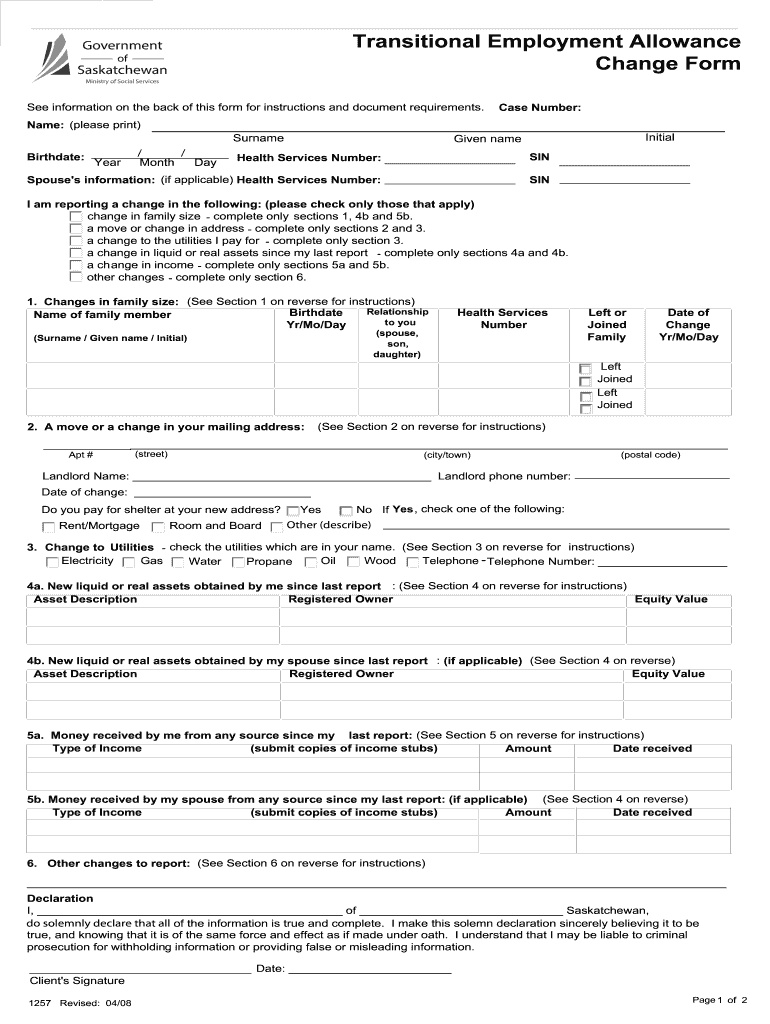
Click ‘Get Form’ to open the tea program in the editor.
Begin by entering your Case Number and personal details, including your name and Health Services Number. Ensure all information is printed clearly.
Indicate any changes you are reporting by checking the relevant boxes. Depending on your selection, complete the corresponding sections as outlined in the instructions.
For family size changes, fill out Section 1 with details of any new family members or those who have left. Include their birthdates and relationship to you.
If reporting an address change, complete Sections 2 and 3 with your new mailing address and landlord information, if applicable.
Report any changes to utilities in Section 3 by checking the appropriate boxes for utilities in your name.
For asset changes, provide details in Sections 4a and 4b regarding liquid or real assets obtained since your last report.
Document any income changes in Sections 5a and 5b, ensuring to submit copies of income stubs as required.
Complete Section 6 for any other changes not covered in previous sections.
Finally, sign and date the declaration at the bottom of the form to confirm that all information is accurate.
Start using our platform today to easily fill out your tea program form online for free!
Tea program for teachersTEA Program usaTea program eligibilityFulbright TEA Program 2026 deadlineFulbright TEA Program 2025Tea program 2026 registrationFulbright TEA Program 2026 applicationIREX Fulbright tea Program application
Security and compliance
At DocHub, your data security is our priority. We follow HIPAA, SOC2, GDPR, and other standards, so you can work on your documents with confidence.
Current and prospective Texas educators can find helpful links and information about educator certification, the State Board for Educator Certification (SBEC),Read more
Cookie consent notice
This site uses cookies to enhance site navigation and personalize your experience.
By using this site you agree to our use of cookies as described in our Privacy Notice.
You can modify your selections by visiting our Cookie and Advertising Notice.