




Here's how it works



How to use or fill out gmc evidence form with our platform

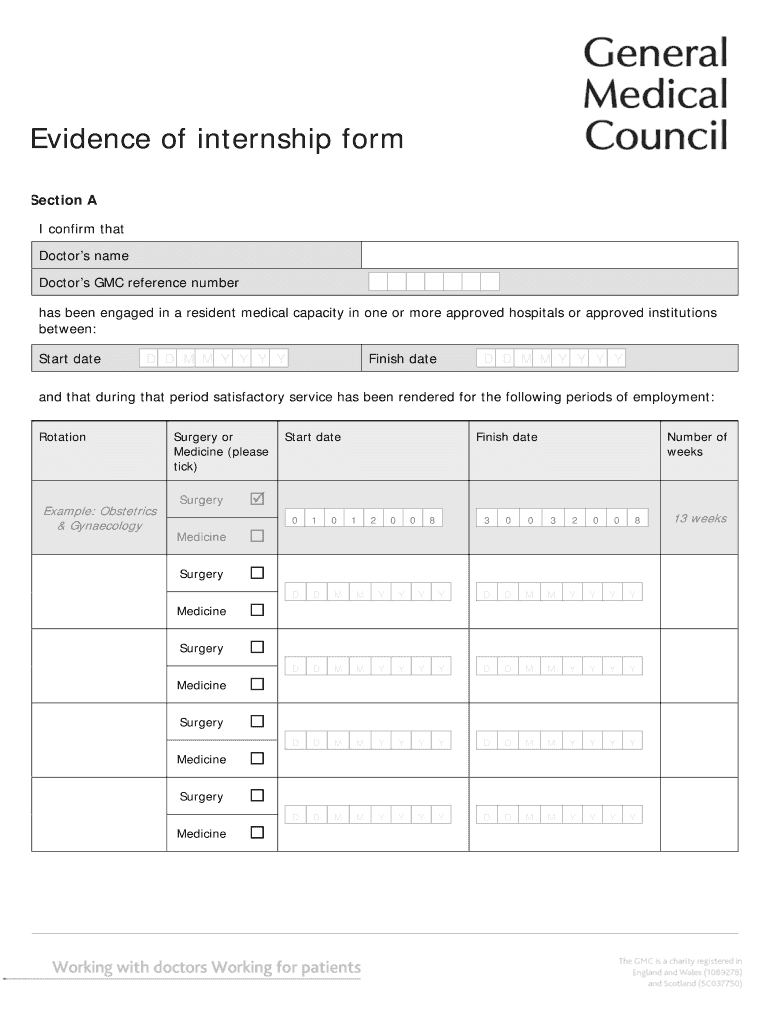
- Click ‘Get Form’ to open the gmc evidence form in the editor.
- In Section A, enter the Doctor’s name and GMC reference number. Specify the start and finish dates of the internship using the provided date fields.
- Indicate the periods of employment by selecting the appropriate rotations (e.g., Obstetrics & Gynaecology, Surgery, or Medicine) and filling in the number of weeks for each rotation.
- Move to Section B to list any periods of study, exam preparation, or leave taken during the internship. Fill in the start and finish dates along with the duration in weeks.
- In Section C, provide details about your medical school or institution. Enter the supervising consultant's name, address, contact information, and ensure you include an official stamp for validation.
Start filling out your gmc evidence form online for free today!
It's free
See more gmc evidence form versions
| Versions | Form popularity | Fillable & printable |
|---|---|---|
| 2008 | 4.8 Satisfied (60 Votes) |
Got questions?
What do I need to sign my gmc evidence of internship form electronically?
Electronic document signing requires a software solution that works in compliance with data security and eSignature regulations. DocHub is an excellent tool for that, because it meets all the above mentioned requirements. Whatever method you prefer to sign your gmc evidence of internship form in DocHub, your eSignature will be legally binding and court-admissible.
Can I print my gmc evidence of internship form pdf and complete it by myself?
If you choose analog ways of completing your gmc evidence of internship form pdf, it is simple to download your file for printing. Search DocHub’s Forms & Templates catalog to find the exact file template you need and open it for editing or download it on your gadget in the format of your choice. It is possible to complete your form electronically and put your handwritten signature on it right after printing or eSign your file with DocHub.
How to obtain GMC?
What is evidence of internship GMC?
What does it mean to be GMC accredited?
Security and compliance
At DocHub, your data security is our priority. We follow HIPAA, SOC2, GDPR, and other standards, so you can work on your documents with confidence.
Learn more


