




01. Edit your bounce house liability waiver online
Type text, add images, blackout confidential details, add comments, highlights and more.

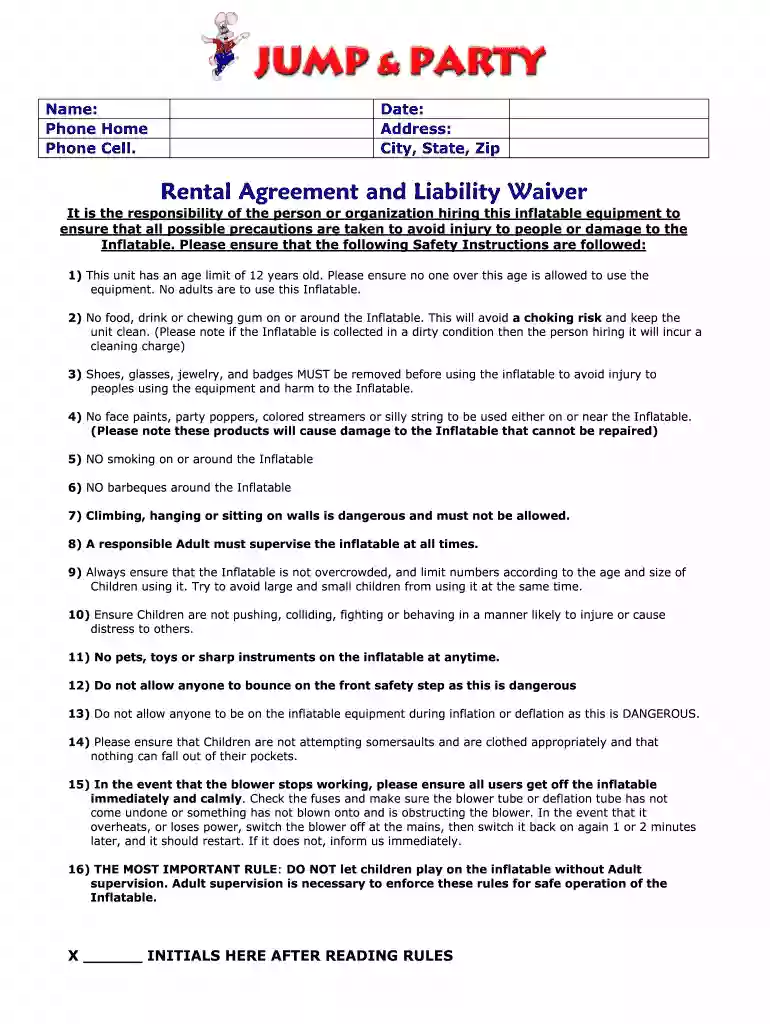
Type text, add images, blackout confidential details, add comments, highlights and more.

Draw your signature, type it, upload its image, or use your mobile device as a signature pad.

Send rental waiver form via email, link, or fax. You can also download it, export it or print it out.
A printable bounce house waiver is a legal document used primarily by companies and individuals who rent bounce houses and other inflatable equipment. This waiver serves as a contract between the rental business and the customer, outlining both parties' responsibilities and liabilities. It typically includes terms designed to protect the rental company from legal claims related to injuries or damages incurred during the use of the inflatable equipment. The waiver ensures that customers acknowledge potential risks and agree to assume full responsibility for any incidents that may occur, thereby limiting the renter's liability.
To effectively use a printable bounce house waiver, the rental company should follow a structured process:
Identify Necessary Information: Ensure that all relevant details, such as company name, contact information, and specific rental terms, are included in the waiver.
Customize the Waiver: Adapt the waiver to include any unique terms related to the specific equipment being rented or additional rules that the company wishes to enforce.
Distribute the Waiver: Provide the waiver to customers well in advance of the rental period. This allows sufficient time for review and understanding of the document's terms.
Collect Signed Waivers: Prior to the rental, collect the signed waiver from the customer. This can be done in person or electronically, using platforms such as DocHub for ease of use and verification.
Store Signed Waivers Securely: Maintain organized records of signed waivers, either digitally or physically, to ensure they are accessible if needed for legal purposes.
Obtaining the appropriate document involves several steps to ensure it meets both business needs and legal standards:
Research Templates: Explore available templates online or from industry associations to find one that aligns with legal requirements and business operations.
Consult Legal Advice: Consider consulting with a legal professional to ensure the waiver complies with state laws and covers specific business liabilities.
Download and Print: Once finalized, the waiver can be downloaded and printed for distribution to customers. Using an online platform like DocHub can ensure seamless editing and printing processes.
Completing the waiver requires both parties to fill out several key sections accurately:
Enter Personal and Event Details: The customer must fill in their personal information, along with the details of the event where the inflatable will be used.
Review Terms and Conditions: Both parties should thoroughly review the listed terms, including safety instructions and liability disclaimers.
Acknowledge Risks: The customer must acknowledge the potential risks involved with inflatable use and accept full responsibility for any accidents or injuries.
Provide Signatures: All involved parties should sign the document to signify agreement. Electronic signatures can be applied if completing the document online.
Submit the Completed Waiver: Ensure the waiver is securely submitted and filed with the rental company before the event date.
The use of a printable waiver is crucial for several reasons:
Legal Protection: It provides legal protection to the rental company by reducing potential liability in case of accidents or damages.
Clear Communication: The waiver ensures both parties understand their responsibilities, reducing misunderstandings and disputes.
Risk Management: By signing the waiver, customers acknowledge the risks involved, fostering a safer environment through increased awareness.
A well-structured waiver should contain several essential elements:
Identification Details: Names and contact information for both the rental company and the customer.
Specific Terms and Conditions: A clear outline of the safety instructions, age restrictions, and supervision requirements.
Liability Disclaimer: A statement clarifying the customer’s assumption of responsibility for injuries and damage during the rental period.
Signatures and Dates: Areas for both customer and company representative signatures, including dates to establish the document's validity.
Regulations governing bounce house rentals can vary significantly by state. It is vital for businesses to stay informed about specific requirements in their area. For instance, some states may have unique safety standards, age restrictions, or insurance mandates that impact how the waiver should be drafted and utilized. Consulting with a legal professional familiar with state regulations can ensure compliance and adequate protection for the rental business.
Implementing waivers in real-world scenarios is integral to highlighting their importance:
Event Hosting: A company organizing a community event includes a bounce house. They ensure every participant signs a waiver to mitigate liability for potential injuries due to improper use of the equipment.
Birthday Parties: Parents renting a bounce house for a backyard birthday require all attending families to sign the waiver ensuring they understand the risks and rules.
Such examples demonstrate the practical application of waivers, providing clarity and security for both the lessor and lessee in various situations.
At DocHub, your data security is our priority. We follow HIPAA, SOC2, GDPR, and other standards, so you can work on your documents with confidence.



I grant permission for photographs or videos to be taken during this event and used for promotional purposes, both in print and online, without compensation.
Please provide the following information for Adult Participant or Parent/Guardian of Minor Participant(s) (Please Print):. First Name: Last Name: Birthdate:.


