Type text, add images, blackout confidential details, add comments, highlights and more.
02. Sign it in a few clicks
Draw your signature, type it, upload its image, or use your mobile device as a signature pad.
03. Share your form with others
Send ia 15 via email, link, or fax. You can also download it, export it or print it out.
How to use or fill out ia 15 form nys with DocHub
Ease of Setup
DocHub User Ratings on G2
Ease of Use
DocHub User Ratings on G2
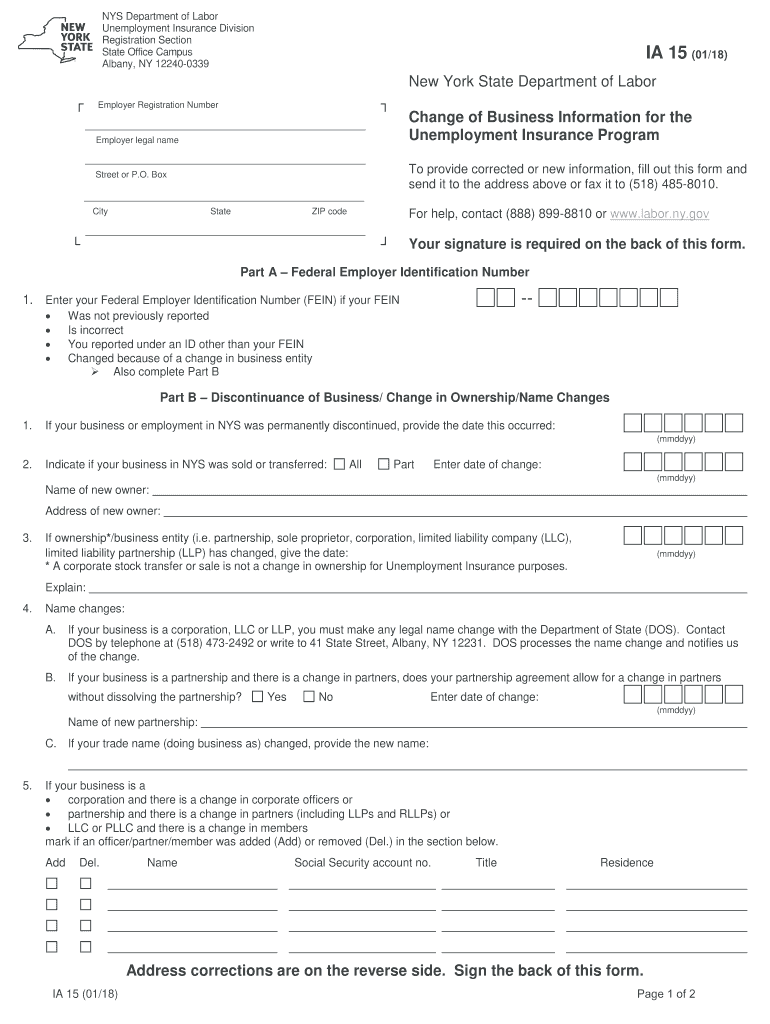
Click ‘Get Form’ to open the IA 15 form in our editor.
Begin by entering your Employer Registration Number at the top of the form. This is essential for identifying your business.
In Part A, provide your Federal Employer Identification Number (FEIN). If this number has changed or was not previously reported, ensure you complete this section accurately.
Move to Part B to indicate any changes in business ownership or name. Fill in the date of change and provide details about the new owner if applicable.
In Part C, update your mailing and physical addresses. Ensure all information is current to avoid any issues with correspondence from the Unemployment Insurance program.
Finally, review all entries for accuracy and sign on the back of the form before submitting it via mail or fax.
Start using our platform today to fill out your IA 15 form easily and for free!
How do I update my phone number for NYS unemployment?
The easiest way to update your address and/or telephone number is online. Log in with your NY.gov ID and click on Unemployment Services. This brings you to the Unemployment Insurance Benefits Online page. Click the Claim Weekly Benefits button, which brings you to the Benefit Payments page.
Do I need to notify NYS unemployment when I return to work?
You must report any day you work when you claim your weekly UI benefits. This includes part-time, temporary or unpaid jobs. Carefully read all letters and electronic messages the Department of Labor sends to you. Follow the instructions and return all forms by the deadline.
How do I update my NYS personal information for unemployment?
Go to my.ny.gov and sign in with the username and password you use to access your DOL Online Services. After you login select Update My Account at the top of the page, then change your email address and click modify account.
How do I get my NYS unemployment 1099?
Form 1099-G Visit the Department of Labors website. Log in to your NY.Gov ID account. Select Unemployment Services and View/Print 1099-G.
How to submit documents to unemployment NY online?
If you submit your request through your online account, first select Submit Documents and then Submit Wage Documents. Please use the subject line Wage Documentation.
ia 15 form
IA 15 instructionsNYS-45 FormForm NYS-45 instructionsNys 45 printable formForm IA 900New york State 941 FormElectronic reporting of form nys 45 informationNYS-100N
Security and compliance
At DocHub, your data security is our priority. We follow HIPAA, SOC2, GDPR, and other standards, so you can work on your documents with confidence.
docHub For Your Weekly Benefits Online Go to .labor.ny.gov/signin. Enter your NY.gov username and password. Click the Unemployment Services button on the My Online Services page. Then click docHub to Claim Your Weekly Benefits Here and follow the instructions.
How do I speak to a live person for NYS unemployment?
For questions about your UI claim, call our Telephone Claims Center Monday through Friday, 8 a.m. to 5 p.m. at 888-209-8124.
What is proof of income for unemployment in NY?
You must offer proof, such as paycheck stubs, for each week of work. For unemployment purposes, a week of employment is a Monday through Sunday period. If you choose to have your rate based on weeks of employment, we will calculate your benefit rate as one-half your average weekly wage.
ia15
NEW YORK STATE MEDICAID PROGRAM DURABLE
Jul 19, 2005 DME providers who choose to submit their claims on paper forms must use the New. York State eMedNY-150001 claim form. A link to this formRead more
To provide corrected or new information, fill out this form and send it to the address above or fax it to (518) 485-8010. For help, contact (888) 899-8810 orRead more
Cookie consent notice
This site uses cookies to enhance site navigation and personalize your experience.
By using this site you agree to our use of cookies as described in our Privacy Notice.
You can modify your selections by visiting our Cookie and Advertising Notice.