







Definition & Meaning
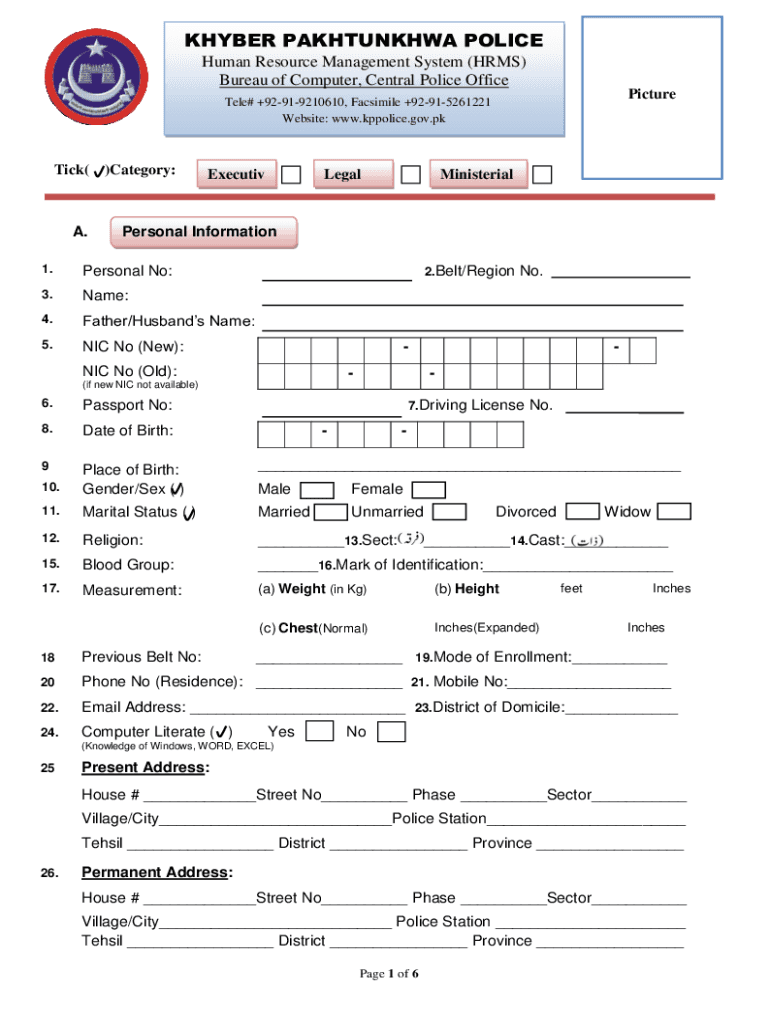
The HRMS (Human Resource Management System) forms are essential tools utilized by organizations to manage personal and service information for their employees. These forms are typically used to collect data such as personal details, employment history, training records, qualifications, and other professional information pertinent to effective personnel management. The system ensures that comprehensive data about employees is available for administrative purposes, streamlining human resource operations within diverse institutions, including law enforcement agencies like the Khyber Pakhtunkhwa Police.
Steps to Complete the HRMS Forms
- Gather Required Information: Assemble necessary personal, educational, and professional details, including service history and qualifications.
- Access the Form Online: Navigate to the DocHub platform to obtain the electronic version of the HRMS form. This ensures the form can be filled and signed digitally, facilitating a more streamlined submission process.
- Fill Out Personal Details: Enter information such as name, identification number, date of birth, and contact details in the designated fields.
- Provide Employment History: Document your entire employment trajectory, highlighting key positions, responsibilities, and durations.
- Input Educational Background: List degrees, certificates, and relevant training programs, including the institutions attended and dates of graduation.
- Include Additional Information: Fill in optional sections like disciplinary records and security clearances, if applicable.
- Review and Sign: Carefully review the completed form to ensure accuracy, then sign using the legally binding e-signature feature provided on the platform.
Who Typically Uses the HRMS Forms
- Human Resource Departments: HR professionals use these forms to track employee information for recruiting, payroll, and performance management purposes.
- Law Enforcement Agencies: Departments like the Khyber Pakhtunkhwa Police utilize HRMS forms to manage personnel records, ensuring comprehensive service information is captured.
- Educational Institutions: Schools and universities utilize these forms to maintain records of faculty and administrative staff.
- Corporate Entities: Businesses, especially those with a large workforce, use HRMS forms for managing employee data systemically.


Key Elements of the HRMS Forms
- Personal Information Section: Captures essential personal identifiers and contact information.
- Employment Details: Records job titles, employment dates, and responsibilities.
- Training & Qualifications: Includes certifications, educational background, and ongoing professional development.
- Disciplinary Actions: Logs any disciplinary proceedings, maintaining a transparent record of conduct.
- Signature Fields: Facilitates the ability to add authenticated electronic signatures for form validation.
Legal Use of the HRMS Forms
HRMS forms filled and signed via DocHub possess legal validity under the ESIGN Act, allowing for their use in formal HR documentation processes. Signatures collected electronically are legally binding and accepted across various industries, ensuring compliance with U.S. legal standards.
Digital vs. Paper Version
- Digital Versions: E-forms available through DocHub are easily accessed, filled, and stored online, ensuring efficiency and environmental benefits.
- Paper Versions: While still in use, paper forms require manual handling, storage, and are more prone to errors and inefficiencies compared to their digital counterparts.
Form Submission Methods
- Online Submission: Most HRMS forms can be completed and signed digitally using platforms like DocHub, facilitating secure and instant submission.
- Traditional Mail: Paper forms can be mailed to the appropriate department, although this method is becoming less common due to digital options.
- In-Person Submission: Occasionally required for sensitive documents, where verification of identity is necessary.
Software Compatibility
DocHub’s HRMS forms are compatible with various software, including Google Workspace, enhancing ease of use for users who rely on integrated systems. These forms can also be accessed through widely-used platforms like Dropbox, facilitating efficient document management in enterprise environments.
Penalties for Non-Compliance
Organizations missing mandated submission deadlines may face penalties, including fines or reduced operational capabilities. Timely and accurate submission of HRMS forms ensures compliance with regulatory requirements, minimizing legal risks and disruptions to HR processes.
Business Types That Benefit Most from HRMS Forms
- Large Enterprises: Require robust systems to manage large employee datasets efficiently.
- Government Agencies: Utilize HRMS forms for maintaining detailed personnel records critical for government operations.
- Healthcare Providers: Benefit from streamlined employee information management, crucial for regulated and compliance-driven environments.
- Educational Entities: Need structured data management systems to handle diverse faculty and administrative staff roles effectively.
By using DocHub’s dynamic HRMS forms, organizations streamline their HR processes, ensuring timely collection and management of employee data while complying with legal standards.




