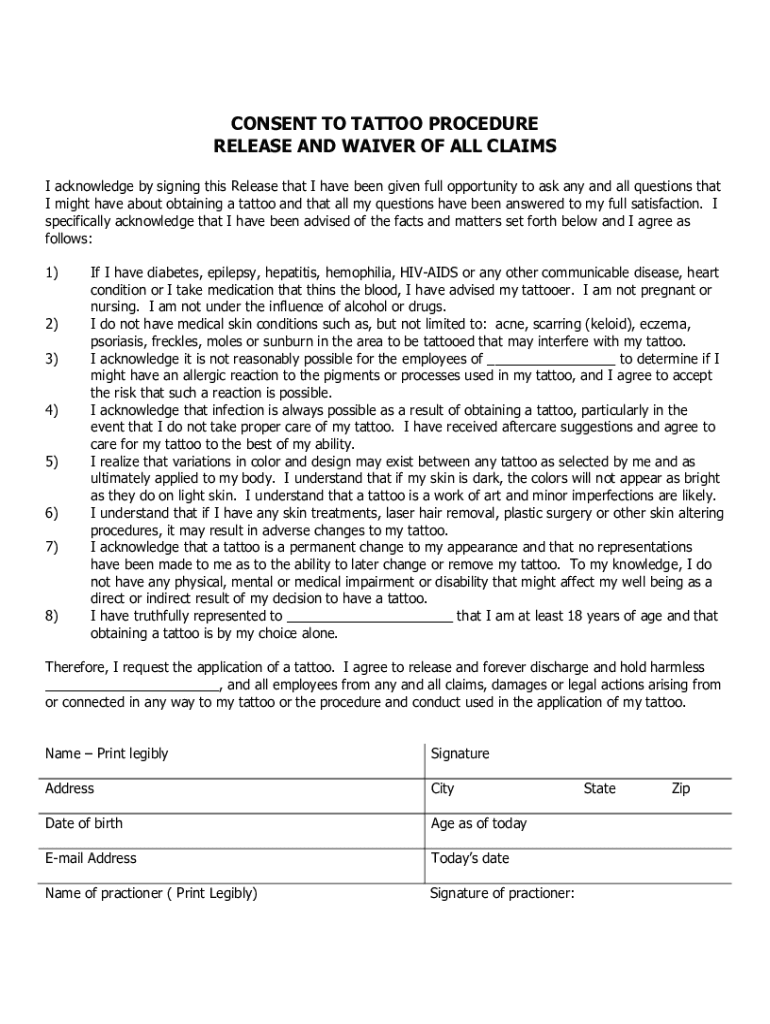
Consent to Tattoo Procedure Waiver 2026

Get Form
Consent to Tattoo Procedure Waiver Preview on Page 1

Here's how it works

01. Edit your form online
Type text, add images, blackout confidential details, add comments, highlights and more.
02. Sign it in a few clicks
Draw your signature, type it, upload its image, or use your mobile device as a signature pad.
03. Share your form with others
Send it via email, link, or fax. You can also download it, export it or print it out.

How to Use or Fill Out the Consent to Tattoo Procedure Form Online

Form edit decoration
9.5
Ease of Setup
DocHub User Ratings on G2
9.0
Ease of Use
DocHub User Ratings on G2
  1. Click ‘Get Form’ to open it in the editor.
  2. Begin by entering your name legibly in the designated field. This ensures that your identity is clearly recorded.
  3. Provide your address, including city, state, and zip code. Accurate information is crucial for any future correspondence.
  4. Fill in your date of birth and age as of today. This confirms that you meet the age requirement for obtaining a tattoo.
  5. Enter your email address for communication purposes regarding your tattoo procedure.
  6. Review the waiver sections carefully, ensuring you understand each statement before signing. This is important for acknowledging risks associated with tattoos.
  7. Sign the form where indicated, confirming your consent and understanding of the procedure.
  8. Lastly, ensure that the practitioner’s name and signature are filled out correctly to validate the procedure.

Start filling out your Consent to Tattoo Procedure form online today for free!

See more Consent to Tattoo Procedure Waiver versions

We've got more versions of the Consent to Tattoo Procedure Waiver form. Select the right Consent to Tattoo Procedure Waiver version from the list and start editing it straight away!
Versions Form popularity Fillable & printable
2015 4.8 Satisfied (55 Votes)
be ready to get more

Complete this form in 5 minutes or less

Get form

Got questions?

We have answers to the most popular questions from our customers. If you can't find an answer to your question, please contact us.
Contact us
LibreOffice is free and open source software that allows you to create forms and export as a PDF form. When you distribute your form, others can fill out your form easily. Once they complete your form, they can print or save their responses in PDF format.
Best free online form builder for quickly creating powerful forms Google Forms pros: Google Forms cons: Google Forms price: 100% free. Jotform pros: Jotform cons: Jotform price: Free plan available; paid plans start at $39/month. Feathery pros: Feathery cons:
Its easy to create fillable PDF form in Adobe Acrobat. Open Acrobat. Select a file or scan a document. Add new form fields. To change existing text boxes or images, click Edit in the toolbar. Save your fillable PDF.
Google Forms is free online software that allows you to create surveys, quizzes, and more. Google Forms is part of Googles web-based apps suite, which also includes Google Docs, Google Sheets, Google Slides, and more.
Use eSignature to fill out a PDF form and sign it Flat forms are non-interactive forms that require extra effort and extra steps to be completed. An interactive form contains fields that you can select or fill in, eliminating the need to print the form and complete it by hand.

Security and compliance

At DocHub, your data security is our priority. We follow HIPAA, SOC2, GDPR, and other standards, so you can work on your documents with confidence.

Learn more
ccpa2
pci-dss
gdpr-compliance
hipaa
soc-compliance
be ready to get more

Complete this form in 5 minutes or less

Get form

People also ask

More videos on YouTube Step 1: Access Google Docs. Step 2: Open a New Blank Document. Step 3: Insert Your Logo. Step 4: Create Text Fields for User Input. Step 5: Customize Dropdown Selections. Step 6: Add Checkboxes for Multiple Choices. Step 7: Include an Open-Ended Text Box. Step 8: Formatting and Customization.
Introducing Canvas free PDF editor The easiest online PDF editor youll ever use, import right into Canva and edit for free. Well work our magic and break your PDF into editable elements so you can convert and customize like any design asset.

Related links