DocHub 52465358--ds-2021-form-Ds 2021 Form - Fill Online, Printable, Fillable, Blank-2026

Get Form
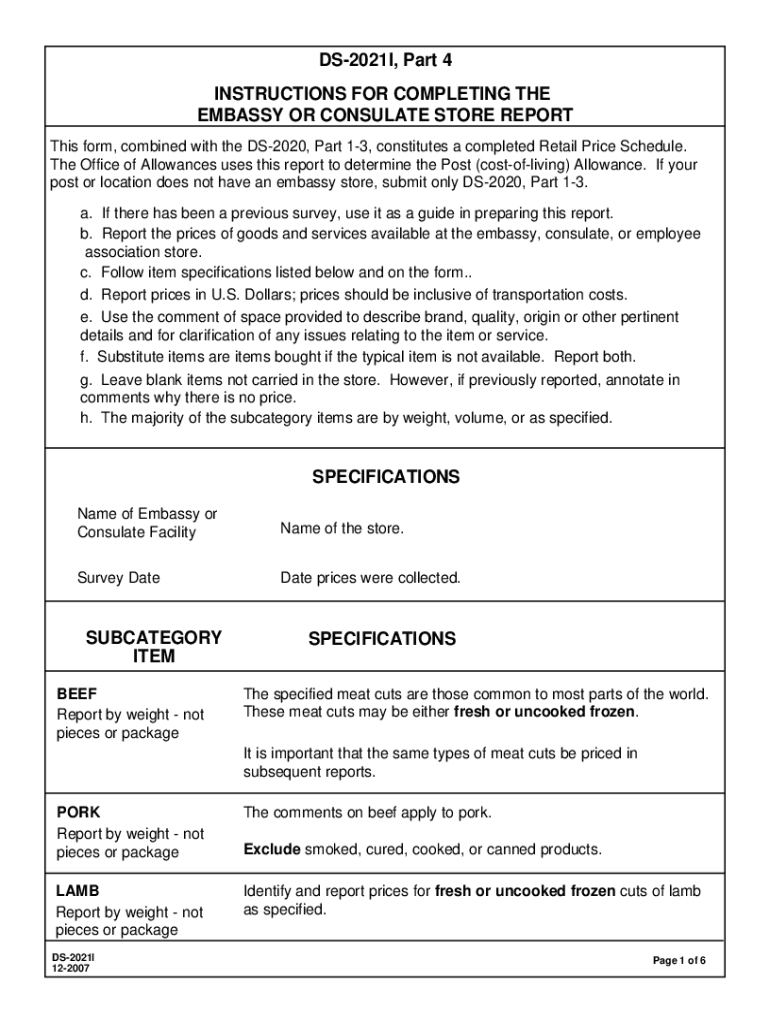
DocHub 52465358--ds-2021-form-Ds 2021 Form - Fill Online, Printable, Fillable, Blank Preview on Page 1

Here's how it works

01. Edit your form online
Type text, add images, blackout confidential details, add comments, highlights and more.
02. Sign it in a few clicks
Draw your signature, type it, upload its image, or use your mobile device as a signature pad.
03. Share your form with others
Send it via email, link, or fax. You can also download it, export it or print it out.

How to use or fill out DocHub 52465358--ds-2021-form-Ds 2021 Form - Fill Online, Printable, Fillable, Blank

Form edit decoration
9.5
Ease of Setup
DocHub User Ratings on G2
9.0
Ease of Use
DocHub User Ratings on G2
  1. Click ‘Get Form’ to open it in the editor.
  2. Begin by entering the 'Name of Embassy or Consulate Facility' and 'Name of the store' at the top of the form.
  3. Fill in the 'Survey Date' to indicate when prices were collected.
  4. For each item listed under subcategories like BEEF, PORK, and CHICKEN, report prices by weight. Ensure you specify if items are fresh or frozen.
  5. Use the comment space provided for additional details about each item, such as brand and quality.
  6. If an item is not available, leave it blank but annotate in comments why there is no price.
  7. Review all entries for accuracy before saving or printing your completed form.

Start filling out your DS-2021 Form today for free using our platform!

See more DocHub 52465358--ds-2021-form-Ds 2021 Form - Fill Online, Printable, Fillable, Blank versions

We've got more versions of the DocHub 52465358--ds-2021-form-Ds 2021 Form - Fill Online, Printable, Fillable, Blank form. Select the right DocHub 52465358--ds-2021-form-Ds 2021 Form - Fill Online, Printable, Fillable, Blank version from the list and start editing it straight away!
Versions Form popularity Fillable & printable
2007 4.8 Satisfied (66 Votes)
be ready to get more

Complete this form in 5 minutes or less

Get form

Got questions?

We have answers to the most popular questions from our customers. If you can't find an answer to your question, please contact us.
Contact us
U.S. Department of State If you are applying for a U.S. passport, use the Passport Form Filler to fill out our primary forms (DS-11, DS-82, DS-5504, and DS-64) online and print them. The Form Filler will save you time and reduce the chance of errors on your form.
Adobe Acrobat is a far superior forms tool. If you are creating basic fillable fields then anything will do. If you are trying to create dynamic PDF fields or fields with calculations etc. you should be using Acrobat.
How do you create a fillable PDF form with eSignature? Register for the eSignature free trial. Upload your Word or PDF document. If your form already has fields, eSignature changes them to digital fillable fields; if your form does not have any fields, manually add them now.
Follow this guide to Create a Fillable Form Online with DocHub Add a document to DocHub using the Drag-and-Drop area. Use the toolbar to Create a Fillable Form Online and make other changes to the document. Click the Download / Export icon in the top right area to proceed. Select the storage location for your document.
Prepare the form. In Adobe Acrobat, navigate to the toolbar and select Tools Prepare Form. This will prompt Acrobat to find the horizontal lines and create fillable fields. Save your form.

Security and compliance

At DocHub, your data security is our priority. We follow HIPAA, SOC2, GDPR, and other standards, so you can work on your documents with confidence.

Learn more
ccpa2
pci-dss
gdpr-compliance
hipaa
soc-compliance
be ready to get more

Complete this form in 5 minutes or less

Get form