
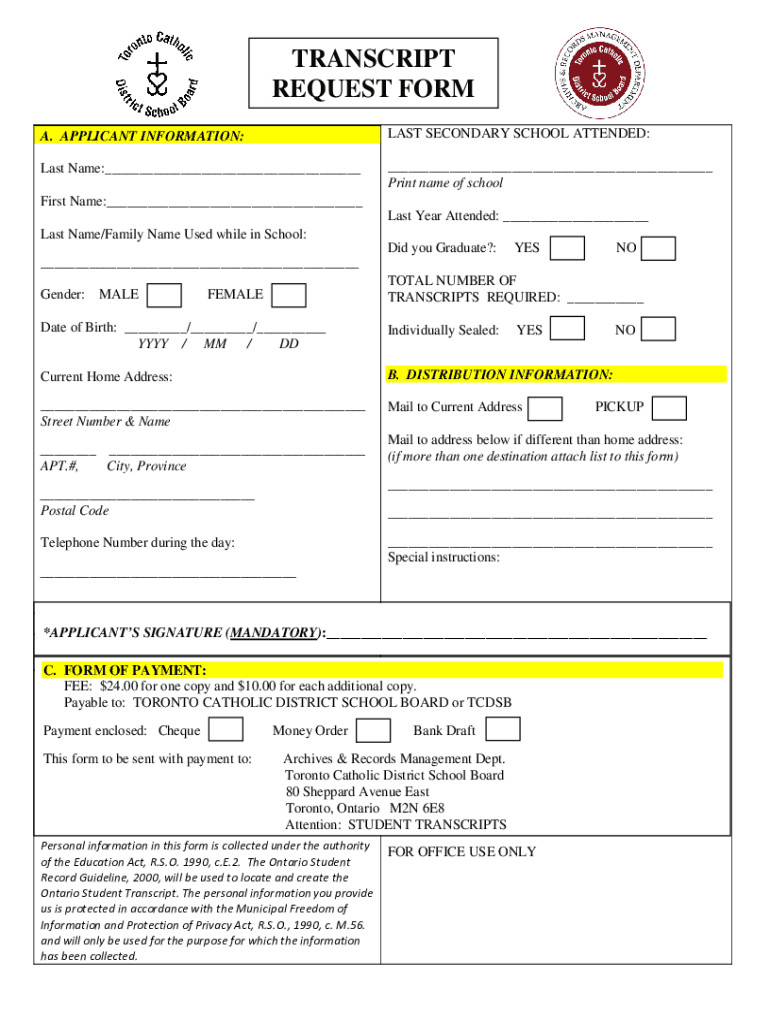







Definition and Meaning
The Tcdsb Transcript form is a document request form used primarily for obtaining academic transcripts from the Toronto Catholic District School Board. Transcripts are detailed records of a student's academic history, including courses taken, grades received, and any honors or recognitions awarded. These documents are essential for students applying to colleges, universities, or certain job opportunities where academic performance is considered during the selection process. The form facilitates a formal and structured method of requesting these critical educational records.
Steps to Complete the Tcdsb Transcript Form
-
Gather Required Information: Before filling out the form, ensure you have all necessary details on hand. This typically includes personal identification information, such as your full name, student ID, date of birth, and the years you attended the school.
-
Provide Distribution Details: Indicate where and to whom the transcript should be sent. This could be directly to educational institutions, employers, or back to yourself for personal records.
-
Specify Payment Method: Determine the fee for processing the transcript request and decide on a payment method. Common options include credit card, check, or money orders.
-
Consent for Information Use: Provide your consent for the use and sharing of your personal information as required to process your request. Consent is essential for legal and privacy considerations.
-
Submit the Form: Complete the form by signing digitally using platforms like DocHub or by hand-signing a printed copy. Ensure that all required sections are filled accurately to avoid delays.
Key Elements of the Tcdsb Transcript Form
- Applicant Information: Includes details such as name, contact information, and student number.
- Document Specifications: Details the type and number of transcripts needed, especially if different versions are required.
- Delivery Instructions: Options for how and where the transcript should be delivered, with choices like electronic delivery or physical mailing.
- Payment Details: Involves the fee structure and available payment methods, crucial for processing the request promptly.
- Authorization Section: A consent area where the applicant authorizes the sharing and processing of personal information.
Who Typically Uses the Tcdsb Transcript Form
This form is often used by:
- Students and Alumni: Those enrolling in universities or colleges, or needing proof of education for job applications.
- Educational Institutions: Schools requesting confirmation of a student's previous academic performance.
- Employers: Companies verifying educational qualifications of potential hires.
- Individuals Seeking Immigration or Visa Processing: Where educational history may be required for legal documentation.


How to Use the Tcdsb Transcript Form Efficiently
To ensure seamless processing:
- Double-Check All Details: Verify that all personal information is correct to prevent processing delays.
- Understand Submission Methods: Know whether your submission will be online, via mail, or in person for proper preparedness.
- Track Submission Status: Use any available tracking or notification services to keep informed about the status of your request.
Submission Methods: Online, Mail, and In-Person
- Online Submission: Fill and sign the form electronically using platforms like DocHub, allowing for convenient and efficient processing.
- Mail Submission: Print, complete, and send the form by postal service for a more traditional approach. Ensure you include any required payment.
- In-Person Submission: Deliver the completed form directly to the issuing office if it offers this option, allowing personal interaction and immediate feedback.
Required Documents for Submission
When completing the Tcdsb Transcript form, it's essential to have:
- Proof of Identity: Such as a passport or driver’s license.
- Proof of Enrollment or Graduation: To validate the period attended and the school within the Toronto Catholic District School Board.
- Payment Proof: If necessary, to confirm the fee has been settled.
Legal Use of the Tcdsb Transcript
Legally, the Tcdsb Transcript form encompasses:
- Privacy Compliance: Protects the privacy of personal and educational data in compliance with local laws.
- Consent Authorization: Secures permission from the applicant to distribute academic records where required.
This comprehensive guide provides step-by-step instructions, detailed explanations, and essential context to maximize your understanding and effective use of the Tcdsb Transcript form.




