







Definition & Meaning
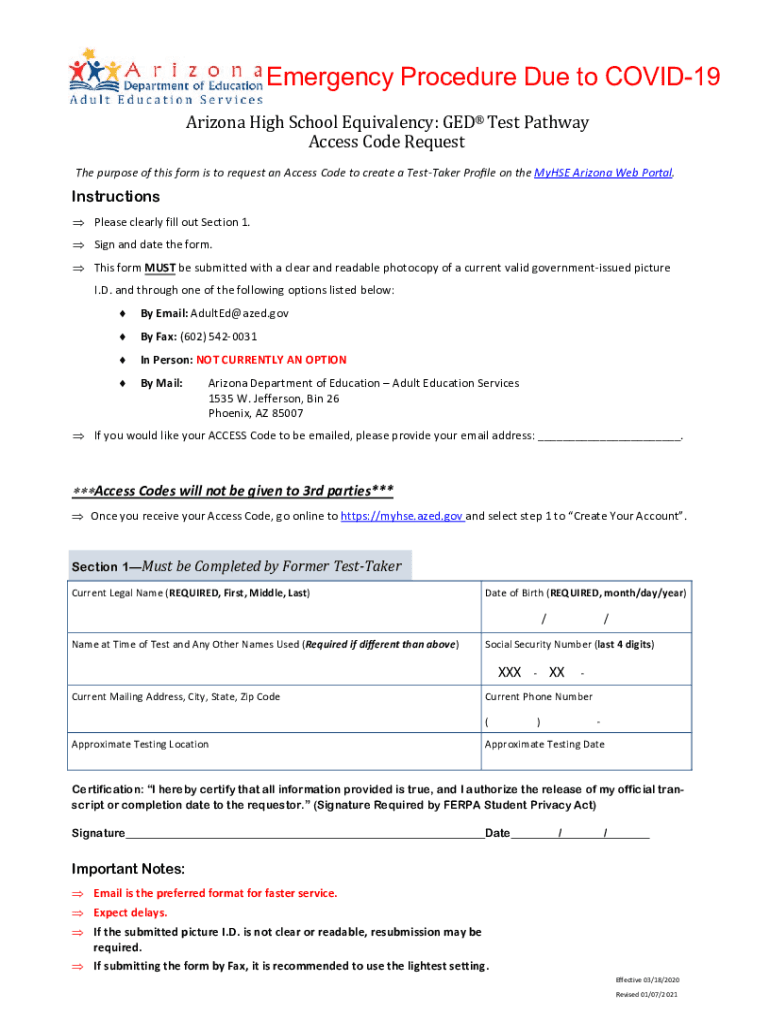
The HSEAccessCodeRequestForm.pub is a document specifically designed to facilitate the request for an Access Code, which is necessary to create a Test-Taker Profile on the MyHSE Arizona Web Portal. This form plays a crucial role in the GED® Test Pathway, enabling individuals to initiate their journey toward obtaining a high school equivalency diploma. Its primary utility lies in its ability to authenticate and authorize users to access the portal, ensuring that all participants meet the necessary eligibility criteria.
How to Use the HSEAccessCodeRequestForm.pub
Utilizing the HSEAccessCodeRequestForm.pub involves several straightforward steps. Initially, you must download the form from the authorized website. Once obtained, carefully follow the instructions provided to fill out each section accurately. Pay close attention to details such as your personal information, ensuring all entries are correct to prevent processing delays. After completion, submit the form through the specified methods, which could include online submission or mailing it to the designated address. It is vital to ensure that all required fields are completed, and any additional documentation, such as a valid government-issued ID, is included if specified.
Required Documents
To successfully complete the HSEAccessCodeRequestForm.pub, you must provide specific documents that verify your identity. The primary requirement is a valid government-issued ID, such as a driver’s license or passport, to authenticate your identity as part of the access code request process. Additionally, ensure that any supplementary information requested within the form is readily available, as missing documentation can lead to submission issues. Thoroughly reviewing the form’s guidelines will ensure that you submit a complete application, streamlining the approval process.
Steps to Complete the HSEAccessCodeRequestForm.pub
Completing the HSEAccessCodeRequestForm.pub requires attention to detail across several key steps:
- Download the Form: Access the HSEAccessCodeRequestForm.pub online from the official portal to ensure you have the most current version.
- Read Instructions Carefully: Familiarize yourself with the instructions and requirements specified on the form to avoid errors.
- Fill Out Personal Information: Enter your details, including full name, date of birth, and contact information, ensuring accuracy throughout.
- Provide Documentation: Attach a copy of a valid government-issued ID to verify your identity as mandated by the form's requirements.
- Review and Confirm: Double-check all entries and attached documents, verifying completeness and correctness.
- Submit the Form: Send your completed form and attached documentation to the designated submission address or upload it online, as instructed.
By adhering to these steps, you can efficiently complete the form, minimizing potential delays in receiving your Access Code.
Who Typically Uses the HSEAccessCodeRequestForm.pub
The primary users of the HSEAccessCodeRequestForm.pub are individuals seeking to enroll in the GED® Test Pathway through the MyHSE Arizona Web Portal. This form is tailored for prospective test-takers who intend to achieve high school equivalency credentials. It is frequently used by adult learners who have not completed a traditional high school education and are pursuing alternative pathways. Schools and educational institutions may also reference this form when guiding students through the GED® registration process, ensuring they have the necessary resources to complete their profiles.


State-Specific Rules for the HSEAccessCodeRequestForm.pub
While the HSEAccessCodeRequestForm.pub is utilized broadly for accessing the MyHSE Arizona Web Portal, state-specific rules can influence how this form is processed. Each state may have unique requirements or protocols that applicants must adhere to when submitting their requests. It's crucial to confirm any additional guidance or variations with state regulations, especially concerning acceptable identification forms or submission methods. Applicants should refer to their local educational authorities or the portal’s regional offices for precise instructions aligned with their state's guidelines.
Form Submission Methods (Online / Mail / In-Person)
There are multiple ways to submit the HSEAccessCodeRequestForm.pub, each catering to different preferences and resources available to applicants:
- Online Submission: The most convenient option for tech-savvy users, allowing for fast processing and immediate confirmation of receipt.
- Mail Submission: Offers traditionalists the opportunity to send physical copies of their forms, albeit with potentially longer processing times.
- In-Person Submission: In certain cases, forms can be handed in at designated offices, providing a direct interaction option for applicants requiring assistance or confirmation.
Selecting the most suitable submission method will depend on personal convenience and access to resources, ensuring efficient processing of the form.
Digital vs. Paper Version
The HSEAccessCodeRequestForm.pub can be accessed and submitted in both digital and paper formats, offering flexibility to users across various technological proficiency levels. The digital version is favored for its efficiency, offering features such as form autofill and electronic submission, greatly speeding up the completion and approval process. Conversely, the paper version appeals to users less comfortable with online systems, allowing them to print and manually fill out the form. It is important to consider personal preferences and access to technology when deciding on the format that best suits your needs.
Key Elements of the HSEAccessCodeRequestForm.pub
Understanding the key elements of the HSEAccessCodeRequestForm.pub is crucial for correctly completing the form. The main components include:
- Personal Information Section: Captures essential details such as name, address, and contact information.
- Identification Verification: Requires attaching a copy of a government-issued ID.
- Acknowledgements and Signatures: Formal section where you confirm the accuracy of the information provided and acknowledge particular terms or conditions.
Each part of the form must be completed with accuracy, as omissions or errors could delay the process of receiving your Access Code.




