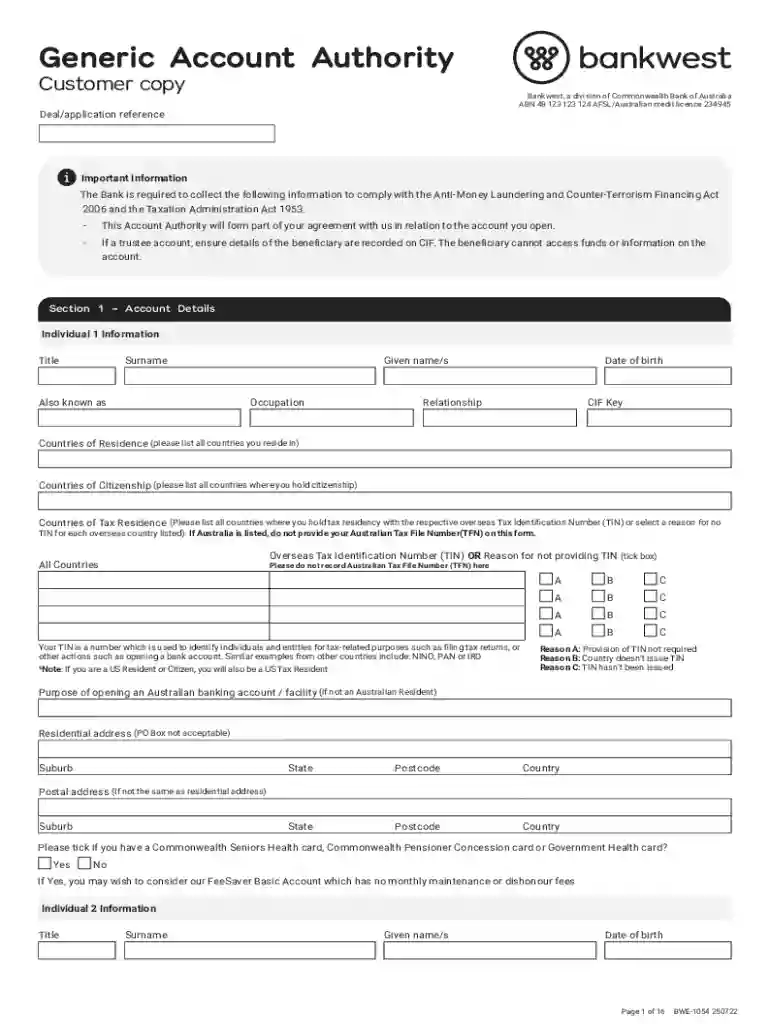
Generic Account Authority Form 2026

Get Form
Generic Account Authority Form Preview on Page 1

Here's how it works

01. Edit your form online
Type text, add images, blackout confidential details, add comments, highlights and more.

02. Sign it in a few clicks
Draw your signature, type it, upload its image, or use your mobile device as a signature pad.

03. Share your form with others
Send it via email, link, or fax. You can also download it, export it or print it out.

How to use or fill out Generic Account Authority Form with our platform

Form edit decoration
9.5
Ease of Setup
DocHub User Ratings on G2
9.0
Ease of Use
DocHub User Ratings on G2
  1. Click ‘Get Form’ to open the Generic Account Authority Form in the editor.
  2. Begin with Section 1 – Account Details. Fill in the information for Individual 1, including Title, Surname, Given Name/s, Date of Birth, and Occupation. Ensure all fields are completed accurately.
  3. Continue to list Countries of Residence, Citizenship, and Tax Residence. If applicable, provide your Overseas Tax Identification Number (TIN) or select a reason for not providing it.
  4. Complete the Residential Address section. Remember that PO Boxes are not acceptable. If your postal address differs from your residential address, fill that in as well.
  5. Repeat the process for Individuals 2 through 4 as necessary, ensuring each person's details are filled out correctly.
  6. Proceed to Section 2 – Product Details. Enter relevant account information such as BSB number and account number.
  7. Review all sections for accuracy before saving or submitting your form using our platform's features.

Start filling out your Generic Account Authority Form online for free today!

See more Generic Account Authority Form versions

We've got more versions of the Generic Account Authority Form form. Select the right Generic Account Authority Form version from the list and start editing it straight away!
Versions Form popularity Fillable & printable
2022 4.1 Satisfied (57 Votes)
2013 4.8 Satisfied (57 Votes)
be ready to get more

Complete this form in 5 minutes or less

Get form

Got questions?

We have answers to the most popular questions from our customers. If you can't find an answer to your question, please contact us.
Contact us
Generic accounts (accounts that are not attributed to a single user) do not facilitate an audit trail, in that there is no way to determine who was using the account at any particular time unless a separate log is kept.
The account opening form serves as a key step in establishing a formal banking relationship, enabling us to collect essential information for compliance and communication purposes.
An account opening form is a document that you fill in at a bank branch, credit union, or other financial institution when you open an account for your funds. These types of documents are usually presented on paper but the process takes longer to complete.
A generic account is a computer account that is not uniquely owned by an individual user. It might be used by a number of individuals who share the same password. Ideally, user accounts should be uniquely owned so that account activities can be attributed to a specific person (with a reasonable level of assurance).
A generic account is an account that is used by a service or application. Generic accounts are not mail-enabled and users are not permitted to use them as temporary accounts.

Security and compliance

At DocHub, your data security is our priority. We follow HIPAA, SOC2, GDPR, and other standards, so you can work on your documents with confidence.

Learn more
ccpa2
pci-dss
gdpr-compliance
hipaa
soc-compliance

People also ask

Lack of Traceability: With generic accounts, its challenging to trace actions back to individual users. This ambiguity can lead to accountability issues when errors or malicious actions occur.

Related links