AFFIDAVIT OF 2026

Get Form
AFFIDAVIT OF Preview on Page 1

Here's how it works

01. Edit your form online
Type text, add images, blackout confidential details, add comments, highlights and more.
02. Sign it in a few clicks
Draw your signature, type it, upload its image, or use your mobile device as a signature pad.
03. Share your form with others
Send it via email, link, or fax. You can also download it, export it or print it out.

How to use or fill out AFFIDAVIT OF with our platform

Form edit decoration
9.5
Ease of Setup
DocHub User Ratings on G2
9.0
Ease of Use
DocHub User Ratings on G2
  1. Click ‘Get Form’ to open the AFFIDAVIT OF in the editor.
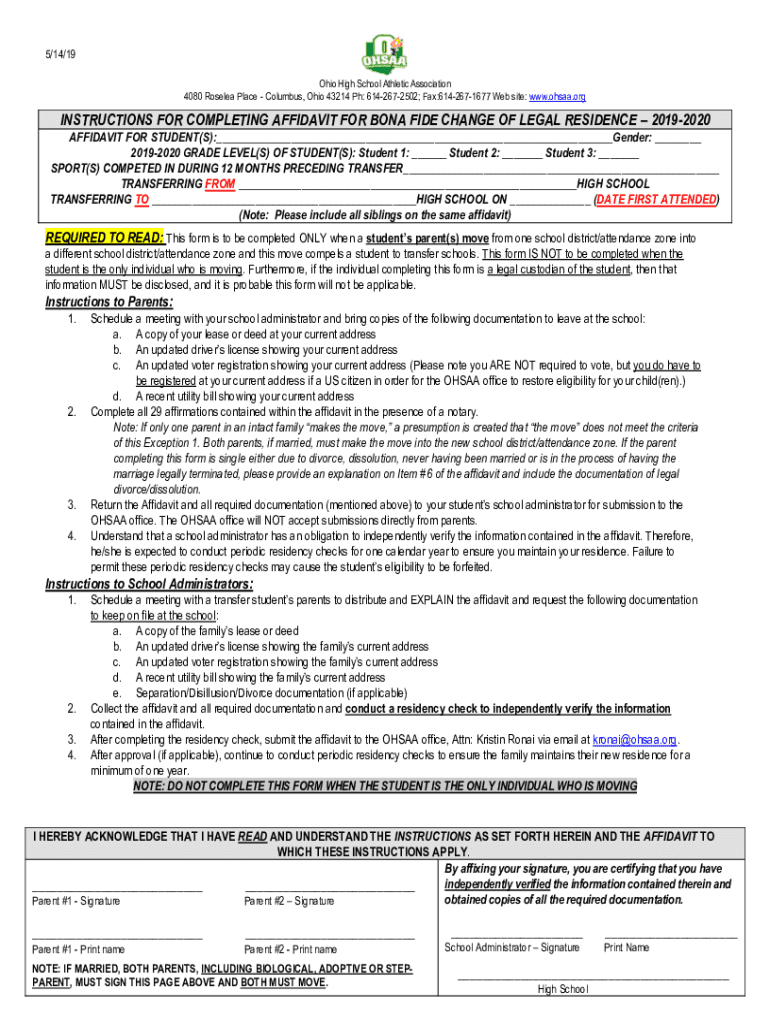
  2. Begin by entering the names of the student(s) and their gender in the designated fields. Ensure accuracy as this information is crucial for identification.
  3. Fill in the grade levels for each student, followed by the sports they competed in during the past year. This section helps establish eligibility.
  4. Indicate the high school you are transferring from and to, along with the date you first attended the new school. This is essential for residency verification.
  5. Complete all 29 affirmations within the affidavit, ensuring that you do so in front of a notary public. This step is vital for legal validation.
  6. Once completed, return the affidavit along with required documentation to your student’s school administrator for submission to OHSAA.

Start using our platform today to streamline your document editing and signing process for free!

See more AFFIDAVIT OF versions

We've got more versions of the AFFIDAVIT OF form. Select the right AFFIDAVIT OF version from the list and start editing it straight away!
Versions Form popularity Fillable & printable
2022 4.1 Satisfied (56 Votes)
2019 4.4 Satisfied (38 Votes)
2016 4 Satisfied (24 Votes)
2012 4.5 Satisfied (43 Votes)
be ready to get more

Complete this form in 5 minutes or less

Get form

Got questions?

We have answers to the most popular questions from our customers. If you can't find an answer to your question, please contact us.
Contact us
An affidavit is a sworn statement put in writing. When you use an affidavit, youre claiming that the information within the document is true and correct to the best of your knowledge. Like taking an oath in court, an affidavit is only valid when you make it voluntarily and without any coercion.
Generally, an affidavit should not set out the opinion of the person making the affidavit; that is, it must be based on facts, not your beliefs or views. The exception is where the person is giving evidence as an expert; for instance, a psychologist or licensed valuer.
I am executing this affidavit to attest to the truth of the foregoing facts and statements and for whatever purpose this may serve. IN WITNESS WHEREOF, I have hereunto affixed my signature this day of , 2020 at , Philippines.
I, Mr./Ms. Age, , occupation R/at: do hereby take oath and state on solemn affirmation as under:- I. state that, I undertake to show all the original documents at the time of submission/admission. I will submit true/attested copies of Marksheet, Passport and Visa.
What to include in your affidavit. Title. This is either your name (Affidavit of Jane Doe) or the specific case information. Statement of identity. The next paragraph tells the court about yourself. Statement of truth. Statement of facts. Closing statement of truth. Sign and docHub.

Security and compliance

At DocHub, your data security is our priority. We follow HIPAA, SOC2, GDPR, and other standards, so you can work on your documents with confidence.

Learn more
ccpa2
pci-dss
gdpr-compliance
hipaa
soc-compliance
be ready to get more

Complete this form in 5 minutes or less

Get form

People also ask

The following are six critical sections that must be included: Title. This is either your name (Affidavit of Jane Doe) or the specific case information. Statement of identity. The next paragraph tells the court about yourself. Statement of truth. Statement of facts. Closing statement of truth. Sign and docHub.
Most family-based immigrants and some employment-based immigrants use this form to show they have adequate means of financial support and are not likely to rely on the U.S. government for financial support.

Related links