




Here's how it works



How to use or fill out MANUFACTURING, PUBLISHING, RESEARCH & DEVELOPMENT with our platform

- Click ‘Get Form’ to open it in the editor.
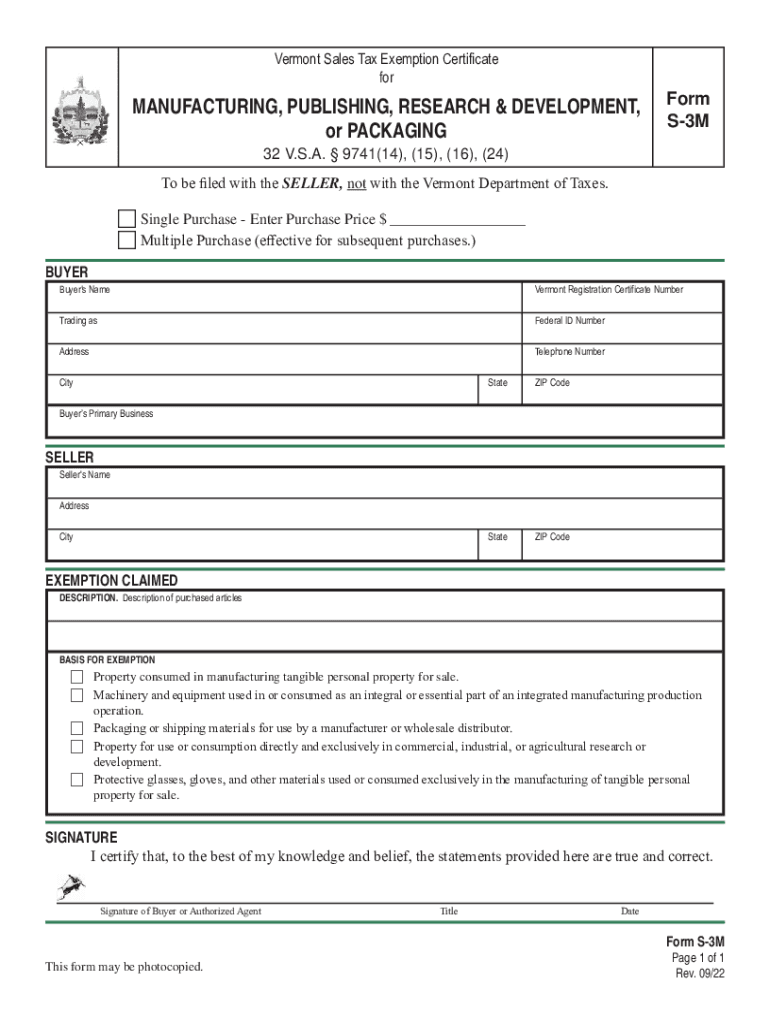
- Begin by entering the purchase price if it's a single purchase. For multiple purchases, check the appropriate box.
- Fill in the buyer's name, Vermont Registration Certificate Number, and Federal ID Number. Ensure all fields are completed accurately.
- Provide the buyer's address, telephone number, city, state, and ZIP code.
- Indicate the buyer’s primary business type to clarify eligibility for exemption.
- For the seller section, enter the seller's name and address details.
- In the exemption claimed section, describe the purchased articles and select the basis for exemption that applies to your purchase.
- Finally, ensure that you sign and date the form to certify its accuracy before submission.
Start using our platform today for free to streamline your document editing and form completion!
It's free
See more MANUFACTURING, PUBLISHING, RESEARCH & DEVELOPMENT, versions
Got questions?
Can I use DocHub to create legal eSignatures on my vermont tax exemption form?
Yes, you can use DocHub for signing any business and personal paperwork, including your vermont tax exemption form. All electronic signatures you generate with our tool are legally binding and court-admissible, as DocHub complies with standards required by ESIGN and UETA. Save your completed form with a detailed Audit Trail if needed.
How do you fill out registration fees on Android?
It is a no-brainer on a computer or via a mobile device to fill out a registration fees with DocHub. All you need to do is open any installed web browser on your smartphone and go to the DocHub website. Once authenticated, add your document and open it in editing mode. Use our toolbar to make your edits and save modifications. Optionally, keep your file in your files or send it to a recipient on the spot.
Security and compliance
At DocHub, your data security is our priority. We follow HIPAA, SOC2, GDPR, and other standards, so you can work on your documents with confidence.
Learn more


