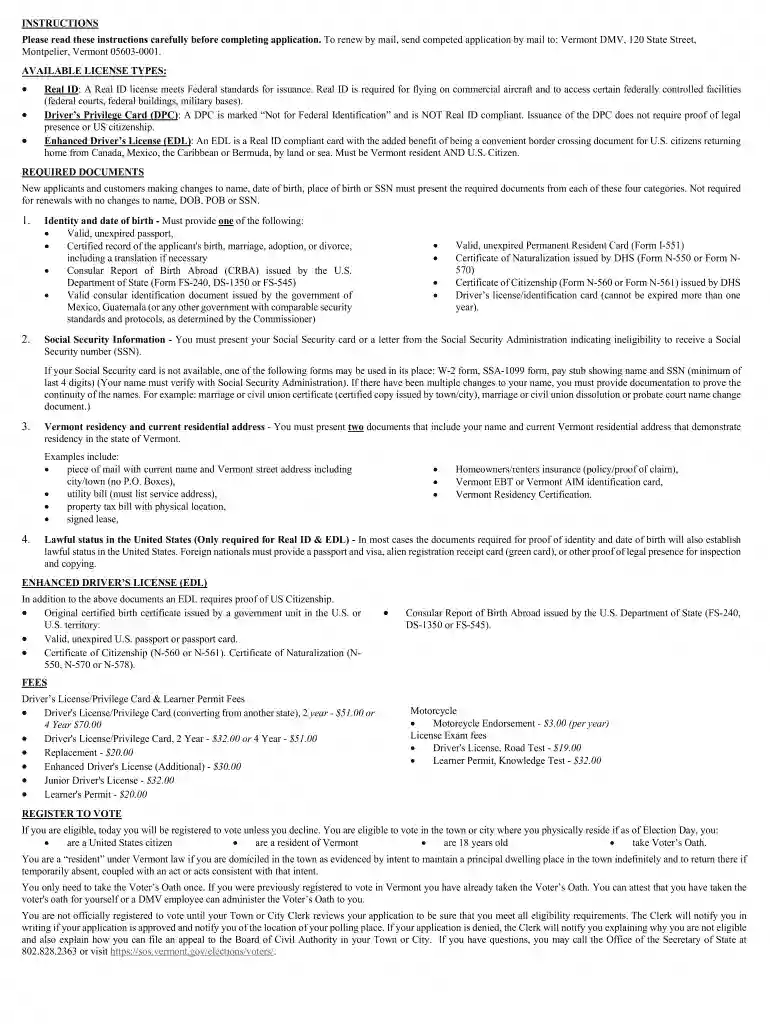
Definition and Purpose of the PDF License/Permit Application - Vermont DMV - Vermont.gov
The PDF License/Permit Application provided by the Vermont Department of Motor Vehicles (DMV) is a crucial document for residents who wish to apply for various driving and identification permits in Vermont. This form is designed to streamline the process of acquiring a driver's license, learner's permit, or other related identification cards. By filling out this form, individuals can initiate their application for a Real ID, Driver’s Privilege Card, or Enhanced Driver’s License, each with its specific requirements and benefits.
How to Obtain the PDF License/Permit Application - Vermont DMV - Vermont.gov
Obtaining the PDF License/Permit Application from the Vermont DMV is a straightforward process. Interested individuals can download the form directly from the Vermont DMV official website in the PDF format, ensuring it is both accessible and easy to complete digitally or by hand. Alternative methods include picking up a physical copy from a local DMV office or requesting it via mail, particularly for those who might not have reliable internet access. This accessibility allows applicants to choose the most convenient option for their circumstances.
Steps to Complete the PDF License/Permit Application - Vermont DMV - Vermont.gov
Completing the PDF License/Permit Application requires careful attention to detail. The following steps outline the process:
- Download and Open the Form: Access the form online through the Vermont DMV website or retrieve a physical copy from a DMV office.
- Fill Out Personal Information: Enter your full name, address, date of birth, and contact details in the designated fields.
- Select the Type of License or Permit: Indicate whether you are applying for a new license, renewal, or another category, such as a learner's permit.
- Provide Supporting Documentation: Attach necessary documentation for identity verification, such as a birth certificate or social security card, as well as proof of residency.
- Complete the Required Sections: Carefully fill in all mandatory fields, ensuring no sections are left incomplete.
- Review and Sign: Double-check for accuracy before signing the application. A parent or guardian’s signature is required for minors.
- Submit the Application: Submit the completed form either online, via mail, or in person at a DMV office, depending on the preferred submission method.
Key Elements of the PDF License/Permit Application - Vermont DMV - Vermont.gov
The application form consists of several critical components that applicants must complete diligently:
- Personal Identification Information: Sections required entry of name, address, and social security number.
- Application Type and License Class: Choose between standard, enhanced, or Real ID options.
- Identity Verification Documents: List of accepted documentation required to establish identity and legal presence.
- Residency Proof: Requirements for residents to provide evidence of Vermont residency.
- Applicant's Signature: Certification that all information is truthful and accurate.
Eligibility Criteria for the PDF License/Permit Application - Vermont DMV - Vermont.gov
To successfully apply for a license or permit using the Vermont DMV PDF form, applicants need to meet certain eligibility criteria:

- Age Requirements: Must meet minimum age requirements specific to the type of permit or license.
- Residency: Applicants must be able to prove residency in Vermont.
- Legal Residency Status: Proof of lawful presence in the United States is mandatory.
- Previous Licenses: Disclosure of any previous licenses held, including those from other states or countries.
State-Specific Rules for the PDF License/Permit Application - Vermont DMV - Vermont.gov
Vermont has its unique set of rules governing the issuance of driving permits and licenses:
- Driver’s Privilege Card Option: Available for residents ineligible for a Real ID.
- Graduated Driver Licensing Program: Requirements for younger drivers under the age of 18.
- Enhanced Driver’s License: An additional option for those who frequently cross U.S. borders.
Form Submission Methods: Online, Mail, or In-Person
Applicants can choose from various submission methods to complete the application process:
- Online Submission: Some sections of the application process and verification steps may be available through the Vermont DMV's online portal.
- Mail Submission: Completed forms and supporting documents can be sent via mail to the Vermont DMV.
- In-Person Submission: Applicants can visit a Vermont DMV office to submit forms, where staff can provide assistance and verification services.
Legal Use and Compliance of the PDF License/Permit Application - Vermont DMV - Vermont.gov
The legal compliance of the application is essential:
- Adhering to State and Federal Law: Ensures legal issuance of driver's licenses according to state and federal guidelines.
- Data Security: Protection of applicant information following privacy laws and data protection standards.
- Legal Obligations: Applicants are responsible for providing accurate data to avoid penalties for false information.
Examples of Using the PDF License/Permit Application - Vermont DMV - Vermont.gov
Real-world scenarios illustrate how different individuals interact with the PDF License/Permit Application:
- First-time Drivers: Teenagers applying for a learner's permit under the graduated licensing program.
- Non-U.S. Citizens: Legal residents applying for a Driver’s Privilege Card when unable to get a Real ID.
- Frequent Travelers: Residents applying for an Enhanced Driver’s License to streamline border crossings.