




Here's how it works



How to use or fill out Fillable Online ESP RFR APPENDIX VI LETTER OF INTENT FORM with our platform

- Click ‘Get Form’ to open it in the editor.
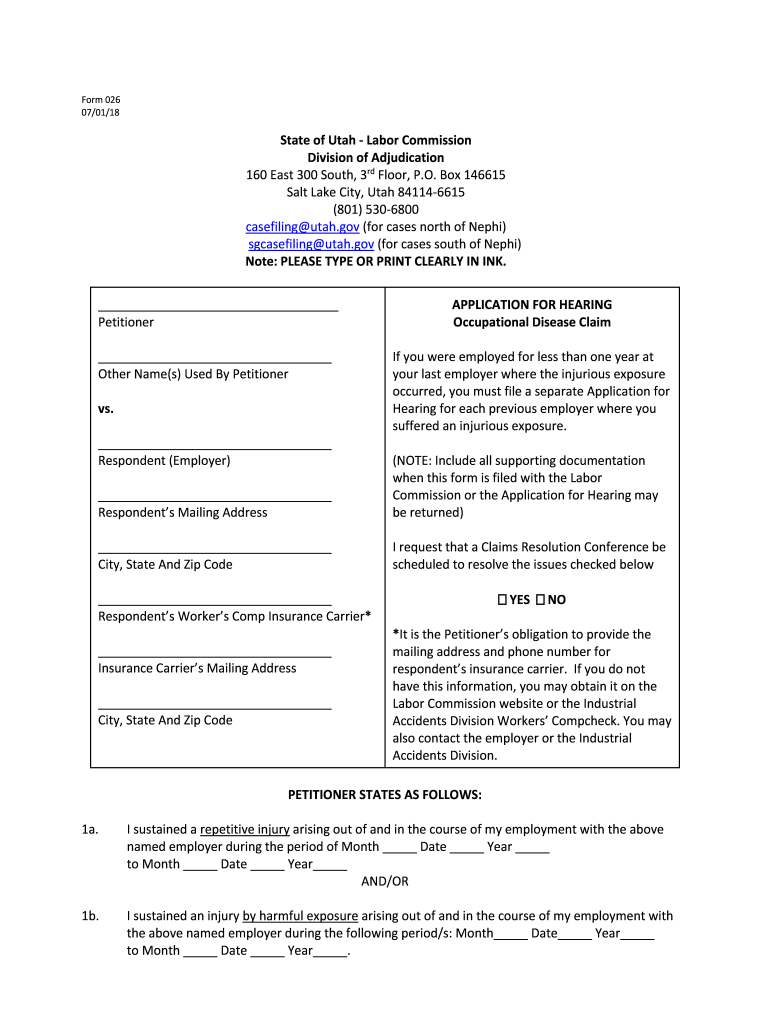
- Begin by entering your name and any other names you have used in the designated fields. Ensure clarity for accurate processing.
- Fill in the respondent's details, including their mailing address and insurance carrier information. This is crucial for communication regarding your claim.
- In section 1, specify the dates of your employment and describe the nature of your injury. Be as detailed as possible to support your case.
- Complete sections detailing your injuries, wage information, and marital status. This data helps establish context for your claim.
- Indicate the benefits you are seeking by marking an 'X' next to each applicable issue. Attach any necessary supporting documentation as instructed.
- Review all entered information for accuracy before submitting. Incomplete forms may be returned, delaying your application process.
Start filling out your form today on our platform for free and streamline your claims process!
It's free
See more Fillable Online ESP RFR APPENDIX VI LETTER OF INTENT FORM ... versions
| Versions | Form popularity | Fillable & printable |
|---|---|---|
| 2018 | 4.8 Satisfied (120 Votes) |
Got questions?
Can I sign my Fillable Online ESP RFR APPENDIX VI LETTER OF INTENT FORM ... on a mobile?
Of course, you’ll find many different apps for this on the web. Nevertheless, if you need to eSign your Fillable Online ESP RFR APPENDIX VI LETTER OF INTENT FORM ... without installing extra software, DocHub is the best choice you can make. This powerful editor works on mobile devices just as on desktops. Open our editor in your preferred internet browser, register or log in to your account, and start managing your forms.
How to manage my Fillable Online ESP RFR APPENDIX VI LETTER OF INTENT FORM ... from Gmail?
If your go-to electronic mail service is Gmail, you can easily incorporate your DocHub editor into your work. Modify your Fillable Online ESP RFR APPENDIX VI LETTER OF INTENT FORM ... with DocHub instruments and attach it to your drafts in Gmail. See how easy it can be to exchange files and collaborate having a swift PDF editing solution at hand.
Security and compliance
At DocHub, your data security is our priority. We follow HIPAA, SOC2, GDPR, and other standards, so you can work on your documents with confidence.
Learn more


