
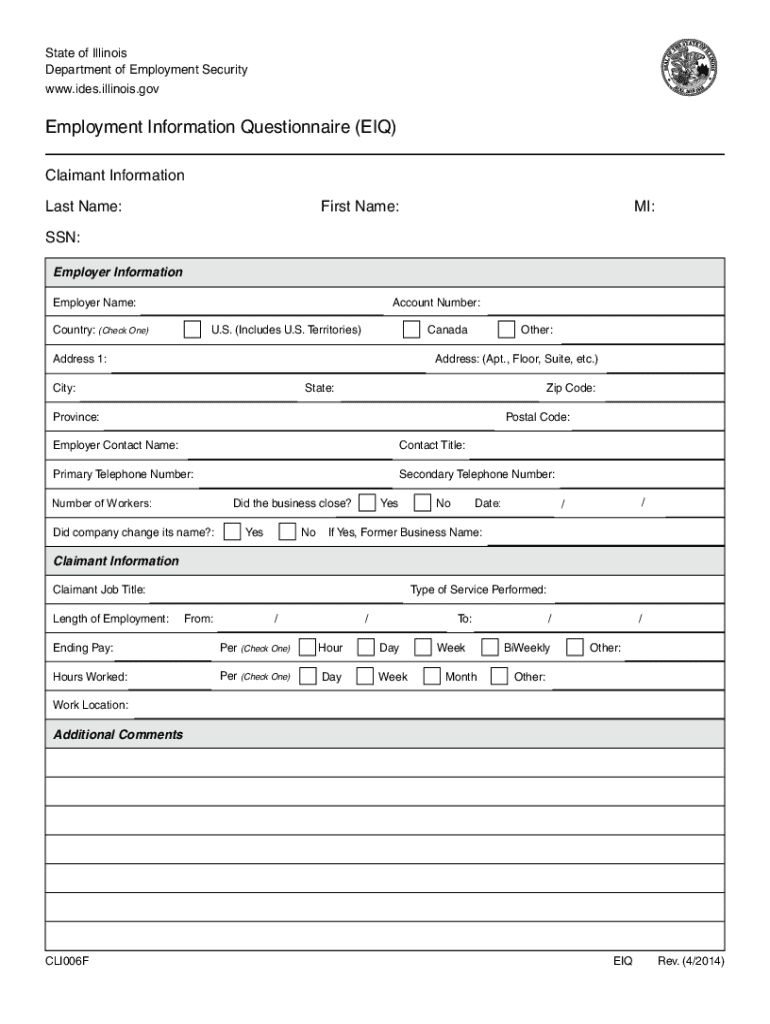







Definition & Purpose of the IDES Employment Information Questionnaire
The IDES Employment Information Questionnaire, referred to as CLI006F, is a detailed form used by the Illinois Department of Employment Security (IDES) to gather essential employment-related information from both claimants and employers. The purpose of this form is to document comprehensive details such as personal identification, employer information, job title, employment duration, and other pertinent data required for accurate processing and assessment of unemployment benefits claims.
Steps to Complete the IDES Employment Information Questionnaire
- Gather Necessary Information: Before completing the form, ensure you have all required information at hand, including your personal identification details, employer's address, and your employment details.
- Personal Information Section: Fill in your full name, social security number, and contact information accurately to avoid any discrepancies.
- Employment Details: Enter precise details of your employment, including the job title, start and end dates, and the nature of your employment (full-time, part-time, contract).
- Employer Details: Provide the employer's full name, address, and contact information. If there are multiple employers, include details for each.
- Verification and Signature: Review the form thoroughly to ensure accuracy before signing. Submit as directed, maintaining a copy for your records.
Obtaining the IDES Employment Information Questionnaire
The IDES Employment Information Questionnaire CLI006F can typically be obtained through several channels:
- Online Download: Visit the Illinois Department of Employment Security's official website to download the form.
- Mail Request: Contact IDES to request a physical copy by mail if unable to download.
- Local IDES Office: Visit a local IDES office to pick up a physical copy if you prefer in-person transactions.
Importance and Benefits of Using the Questionnaire
- Accurate Information Collection: The form ensures that all necessary employment information is collected in a structured manner, reducing the risk of errors.
- Streamlined Process: By gathering all required details upfront, the form helps streamline the unemployment benefits application process.
- Legally Compliant Documentation: Completing the questionnaire accurately ensures compliance with IDES requirements, which is crucial for the timely processing of unemployment claims.
Who Typically Uses the IDES Employment Information Questionnaire
- Claimants: Individuals applying for unemployment benefits in Illinois must complete this form to provide essential information about their previous employment.
- Employers: May need to complete sections or provide verification for former employees to substantiate claims.
- IDES Personnel: Use the collected information for processing claims, verifying eligibility, and determining the appropriate benefits for claimants.


Key Elements of the Questionnaire
- Personal Identification: Full name, social security number, and current contact information.
- Employment History: Detailed information on past employment, including job title and duration.
- Employer Information: Names and addresses of past employers.
- Declaration and Signature: A section for certifying the accuracy of the provided information.
Legal Use and Compliance
- Confidentiality Assurance: Information provided in the form is protected under state confidentiality laws.
- Accuracy Obligation: Claimants are legally obligated to provide truthful and complete information.
- Penalties for False Information: Submitting false information can result in severe legal consequences, including fines and imprisonment.
Digital vs. Paper Version of the Form
- Digital Version: Often preferred for its convenience and ease of submission. It allows for quicker processing and real-time updates.
- Paper Version: Suitable for those who prefer physical documentation or lack digital access. May take longer to process due to mailing times.
Each block ensures users are equipped with comprehensive knowledge about the IDES Employment Information Questionnaire CLI006F, from its purpose and completion process to its legal implications and user applicability.




