DATE STAMP: 2026

Get Form
digital date stamp online Preview on Page 1

Here's how it works

01. Edit your digital date stamp online online
Type text, add images, blackout confidential details, add comments, highlights and more.
02. Sign it in a few clicks
Draw your signature, type it, upload its image, or use your mobile device as a signature pad.
03. Share your form with others
Send how to date stamp a pdf via email, link, or fax. You can also download it, export it or print it out.

How to use or fill out DATE STAMP: with our platform

Form edit decoration
9.5
Ease of Setup
DocHub User Ratings on G2
9.0
Ease of Use
DocHub User Ratings on G2
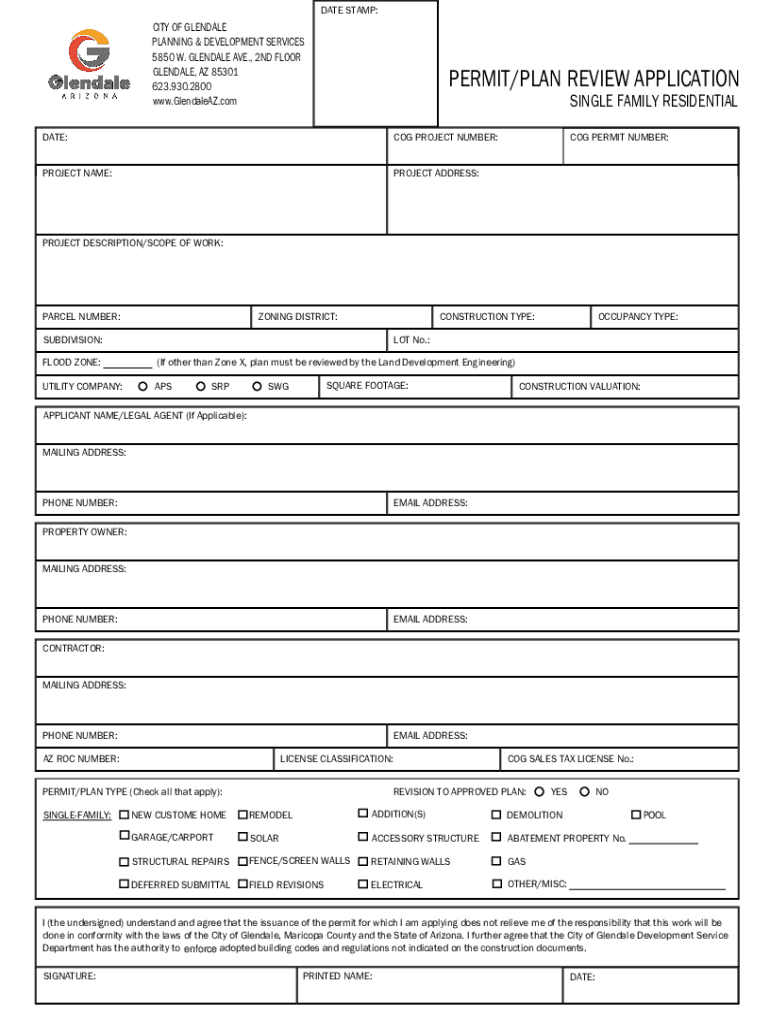
  1. Click ‘Get Form’ to open the DATE STAMP: application in the editor.
  2. Begin by entering the current date in the 'DATE' field. This is essential for tracking your application.
  3. Fill in the 'COG PROJECT NUMBER' and 'PROJECT NAME' fields to identify your project clearly.
  4. Provide the 'PROJECT ADDRESS' and 'PARCEL NUMBER' to specify the location of your project.
  5. Select your 'ZONING DISTRICT' and 'CONSTRUCTION TYPE' from the dropdown options available.
  6. Complete the sections for applicant, property owner, and contractor details, ensuring all contact information is accurate.
  7. Check applicable permit/plan types by marking the relevant boxes, such as 'NEW CUSTOM HOME' or 'REMODEL'.
  8. Finally, review all entries for accuracy before signing at the bottom of the form. Ensure you print your name and date next to your signature.

Start filling out your DATE STAMP: application today for free on our platform!

See more DATE STAMP: versions

We've got more versions of the DATE STAMP: form. Select the right DATE STAMP: version from the list and start editing it straight away!
Versions Form popularity Fillable & printable
2021 4.8 Satisfied (54 Votes)
be ready to get more

Complete this form in 5 minutes or less

Get form

Got questions?

We have answers to the most popular questions from our customers. If you can't find an answer to your question, please contact us.
Contact us
to put a printed date on a document, food product, etc.: The forms will be date stamped and worked on in strict chronological order.
A postmark is a postal marking made on an envelope, parcel, postcard or the like, indicating the place, date and time that the item was delivered into the care of a postal service, or sometimes indicating where and when received or in transit.
: an implement or device for stamping a date and often (as on postal matter) related information (as place of origin or receipt) : the date and related information stamped by a date stamp. date-stamp.
It is the policy of the Postal Service to prohibit backdating and predating of mail except in the following cases: When postal operating requirements and public demand necessitate that postmarking commence before and/or continue after the date contained in the postmark.
How to Timestamp a Photo? Fotors free online photo date stamper makes adding time and date stamps to photos simple and easy. Select the Text option from the menu on the left. Just click the text box, add the date and time of the photo, and youre done!

Security and compliance

At DocHub, your data security is our priority. We follow HIPAA, SOC2, GDPR, and other standards, so you can work on your documents with confidence.

Learn more
ccpa2
pci-dss
gdpr-compliance
hipaa
soc-compliance
be ready to get more

Complete this form in 5 minutes or less

Get form

People also ask

Non-barcoded stamps can be used as postage up until 31 July 2023. If you wont be able to use them up, you can send them to Royal Mail who will swap them out for barcoded stamps. The Swap Out scheme opened on 31 March 2022.
A date stamp is used to mark the date on physical or digital documents. It helps keep track of when documents were created, modified, or processed. Youll find them in offices, healthcare, logistics, and even law firms to manage records efficiently.

Related links