
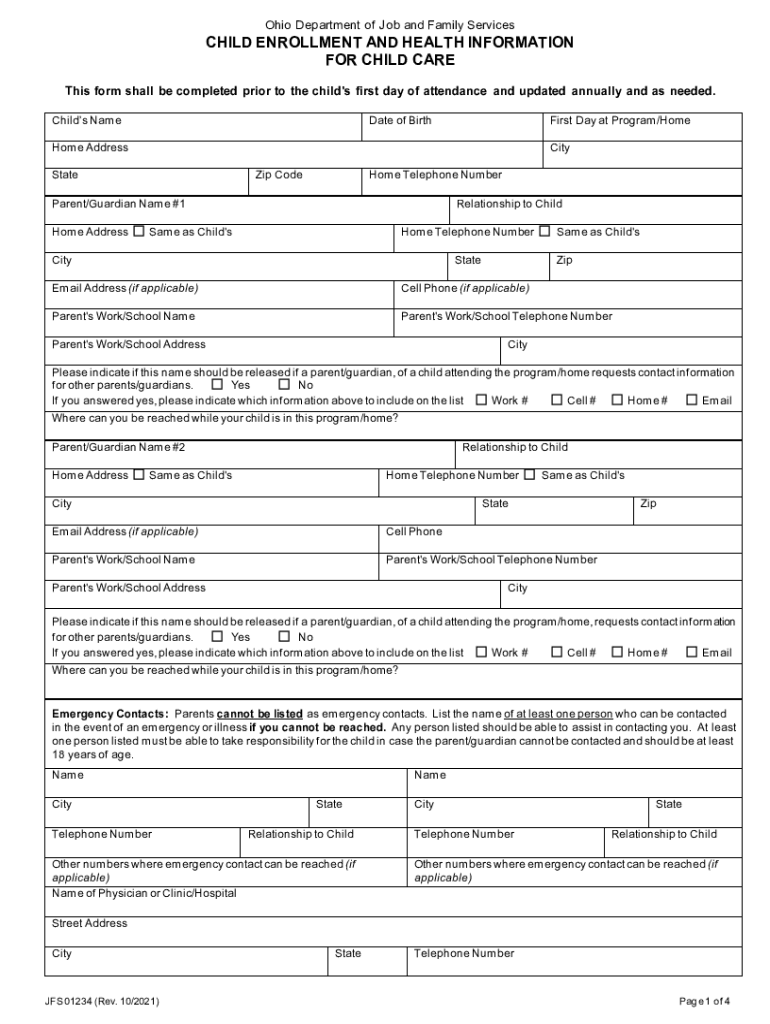







Definition and Purpose of JFS 01234
The JFS 01234 form is a Child Enrollment and Health Information document utilized by the Ohio Department of Job and Family Services. This form is essential for parents or guardians enrolling their children in childcare programs within the state. It gathers crucial details about the child, including health conditions, allergies, dietary restrictions, and consent for emergency transportation. Its primary purpose is to ensure the safety and well-being of children in care, providing a comprehensive overview of necessary health and emergency information.
How to Use the JFS 01234
The JFS 01234 is designed for simplicity, ensuring that parents and guardians can efficiently provide the necessary information. The process begins with downloading or obtaining the form from the Ohio Department of Job and Family Services website. It's important to have all pertinent information ready, including contact details, health insurance information, and any specific medical instructions. Once completed, the form should be submitted to the childcare provider before the child's first day to ensure smooth enrollment.
Steps to Complete the JFS 01234
- Personal Information: Begin by filling in the child's name, birth date, and address.
- Parent/Guardian Details: Enter the names and contact information of parents or guardians.
- Emergency Contacts: Provide at least two emergency contacts, including their names, relationship to the child, and phone numbers.
- Health Information: Detail any health conditions, allergies, and dietary restrictions. Include specific instructions for managing these conditions.
- Medical Provider Information: List the child's primary healthcare provider's name and contact information.
- Consent for Treatment: Sign the section granting permission for the childcare provider to obtain emergency medical treatment if necessary.
Important Terms Related to JFS 01234
- Emergency Contact: A person listed on the form who can be reached if the parent or guardian is unavailable.
- Allergy: A hypersensitive reaction to specific substances, which should be clearly detailed in the form.
- Dietary Restrictions: Any limitations on what the child can or cannot eat due to health reasons.
- Consent for Treatment: Legal authorization for the childcare facility to secure medical assistance when required.
Who Typically Uses the JFS 01234
The JFS 01234 is primarily used by parents and guardians enrolling their children in regulated childcare facilities in Ohio. Childcare providers also rely on this form to ensure they have accurate health and safety information, mandating updates at least once a year or as changes occur. Healthcare professionals may reference the data provided during emergencies or routine care while the child is under a program's watch.


Legal Use of the JFS 01234
The legality of the JFS 01234 is grounded in its function as a protective measure, aligning with state childcare regulations. The form must be completed fully and accurately to avoid legal repercussions. It also includes consent elements, such as the agreement for emergency transport and medical treatment. Correct handling and secure storage must comply with privacy laws, ensuring the child's sensitive information remains protected.
Filing Deadlines and Important Dates
JFS 01234 must be submitted before the child begins attending the childcare program. Updating the form annually is required to maintain compliance with state regulations. It's advisable to review and renew the information every time there is a change in health status, contact details, or other critical information to prevent any service interruptions or legal issues.
Required Documents for JFS 01234
When completing the JFS 01234, having certain documents on hand can streamline the process:
- Child's Birth Certificate: To verify the child's date of birth and legal name.
- Medical Records: To accurately document health conditions and allergies.
- Insurance Card: To provide current insurance information, aiding in obtaining necessary medical treatments if required.




