




Here's how it works



How to use or fill out 2023 pt 300a with our platform

- Click ‘Get Form’ to open the 2023 pt 300a in the editor.
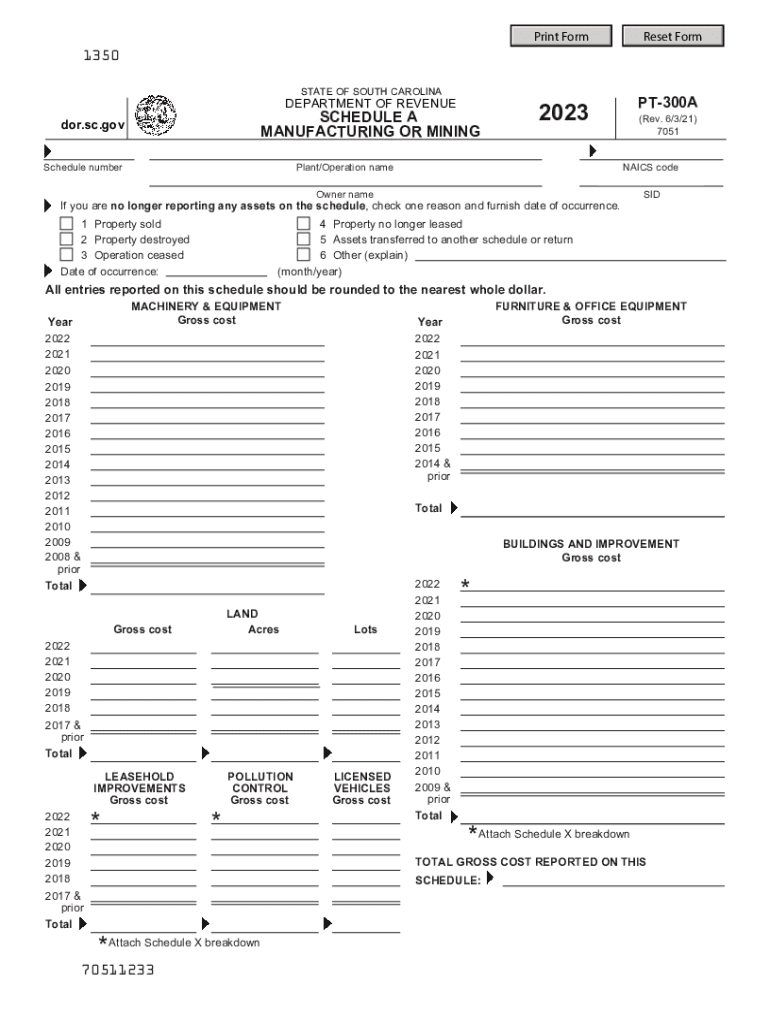
- Begin by entering the Plant/Operation name and NAICS code in the designated fields. Ensure accuracy as this information is crucial for identification.
- Fill in the Owner name and SID. If you are no longer reporting any assets, check one of the reasons provided and include the date of occurrence.
- For each asset category (Machinery & Equipment, Furniture & Office Equipment, Buildings and Improvement, Land, Leasehold Improvements, Pollution Control, Licensed Vehicles), enter the gross cost for each year listed. Round all entries to the nearest whole dollar.
- After completing all sections, review your entries for accuracy before saving or exporting your completed form.
Start using our platform today to fill out your 2023 pt 300a form easily and for free!
It's free
See more 2023 pt 300a versions
Got questions?
How can I send my 2023 pt 300a from Google Drive for approval?
If you often work with documents kept in your Google Drive, DocHub is a perfect solution for you to easily and quickly complete, edit, and approve them. This editor integrates well with Google services, so you can export your 2023 pt 300a from your Google Drive to the editor without downloading and re-uploading it. Right-click on your file, select Open With → DocHub PDF Sign and Edit. In our editor, add and assign Signature Fields for all people involved, then click on the Menu button above → Send → select how you want to share your paperwork.
How to manage my 2023 pt 300a from Gmail?
If your go-to email service is Gmail, you can easily integrate your DocHub editor in your work. Modify your 2023 pt 300a with DocHub instruments and connect it to your drafts in Gmail. See how straightforward it is to exchange documents and collaborate with a swift PDF editing solution at hand.
Security and compliance
At DocHub, your data security is our priority. We follow HIPAA, SOC2, GDPR, and other standards, so you can work on your documents with confidence.
Learn more


