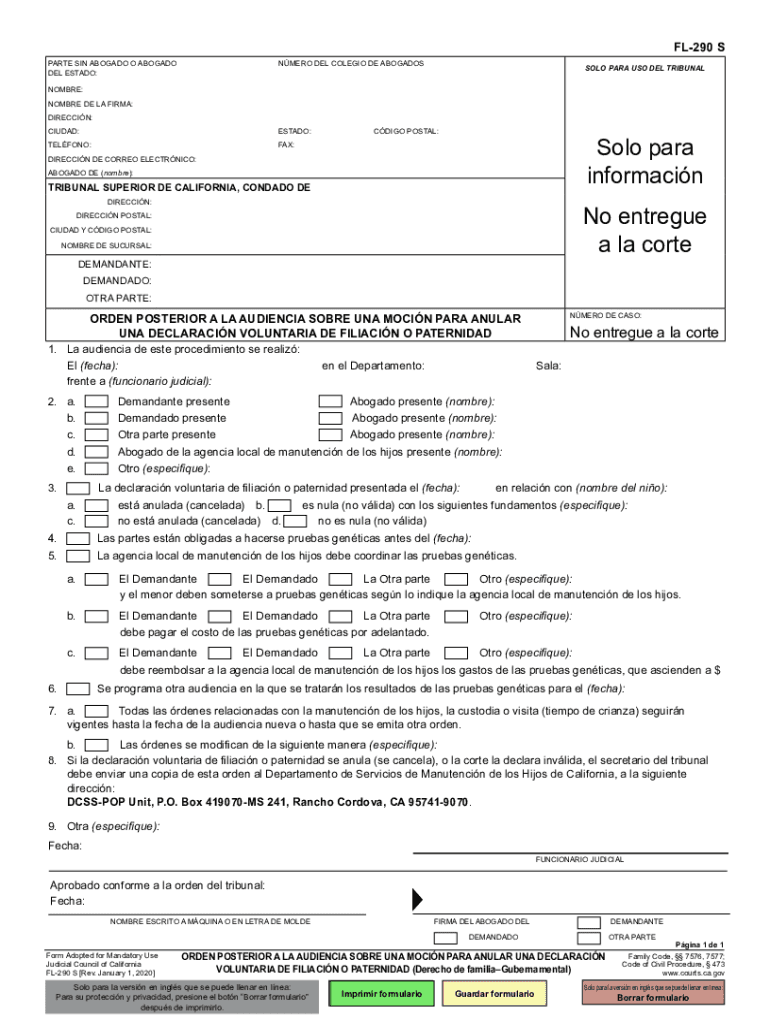
Posterior audiencia mocion paternidad 2026

Get Form
posterior audiencia mocion paternidad Preview on Page 1

Here's how it works

01. Edit your form online
Type text, add images, blackout confidential details, add comments, highlights and more.
02. Sign it in a few clicks
Draw your signature, type it, upload its image, or use your mobile device as a signature pad.
03. Share your form with others
Send it via email, link, or fax. You can also download it, export it or print it out.

How to use or fill out posterior audiencia mocion paternidad with our platform

Form edit decoration
9.5
Ease of Setup
DocHub User Ratings on G2
9.0
Ease of Use
DocHub User Ratings on G2
  1. Click ‘Get Form’ to open the posterior audiencia mocion paternidad in the editor.
  2. Begin by entering your personal information in the designated fields, including your name, address, and contact details. Ensure accuracy as this information is crucial for court records.
  3. Fill in the case number and details regarding the parties involved: plaintiff, defendant, and any other relevant parties. This section helps establish who is participating in the proceedings.
  4. Indicate whether the voluntary declaration of parentage is annulled or invalidated by checking the appropriate box and providing reasons if applicable.
  5. Complete sections regarding genetic testing requirements, specifying who must undergo testing and who will bear associated costs. This ensures compliance with local child support agency directives.
  6. Schedule any follow-up hearings by entering dates in the provided fields to keep all parties informed of future proceedings.
  7. Finally, review all entries for accuracy before saving or printing your completed form. Utilize our platform’s features to ensure a smooth submission process.

Start using our platform today to easily fill out your posterior audiencia mocion paternidad form for free!

See more posterior audiencia mocion paternidad versions

We've got more versions of the posterior audiencia mocion paternidad form. Select the right posterior audiencia mocion paternidad version from the list and start editing it straight away!
Versions Form popularity Fillable & printable
2020 4.8 Satisfied (201 Votes)
2006 4.4 Satisfied (267 Votes)
be ready to get more

Complete this form in 5 minutes or less

Get form

Got questions?

We have answers to the most popular questions from our customers. If you can't find an answer to your question, please contact us.
Contact us

Yes, a typed name is accepted as a valid electronic signature when you add it to your paperwork utilizing a compliant solution like DocHub. Simply import your posterior audiencia mocion paternidad to our editor, click Sign in the top tool pane → Create your signature → Type your name in the proper tab, and decide how it will appear on your document.

With DocHub, there are several convenient ways to edit your posterior audiencia mocion paternidad online. You can drag and drop the form and edit it straight at the DocHub site or use our browser extension to fill out your form right away. On top of that, you can edit your PDF on your smartphone, as DocHub is compatible with all the accessible mobile platforms.

Security and compliance

At DocHub, your data security is our priority. We follow HIPAA, SOC2, GDPR, and other standards, so you can work on your documents with confidence.

Learn more
ccpa2
pci-dss
gdpr-compliance
hipaa
soc-compliance