Renewal accbc 2026

Get Form
accbc Preview on Page 1

Here's how it works

01. Edit your accbc online
Type text, add images, blackout confidential details, add comments, highlights and more.

02. Sign it in a few clicks
Draw your signature, type it, upload its image, or use your mobile device as a signature pad.

03. Share your form with others
Send accbc verify via email, link, or fax. You can also download it, export it or print it out.

How to use or fill out renewal accbc with our platform

Form edit decoration
9.5
Ease of Setup
DocHub User Ratings on G2
9.0
Ease of Use
DocHub User Ratings on G2
  1. Click ‘Get Form’ to open the renewal accbc in the editor.
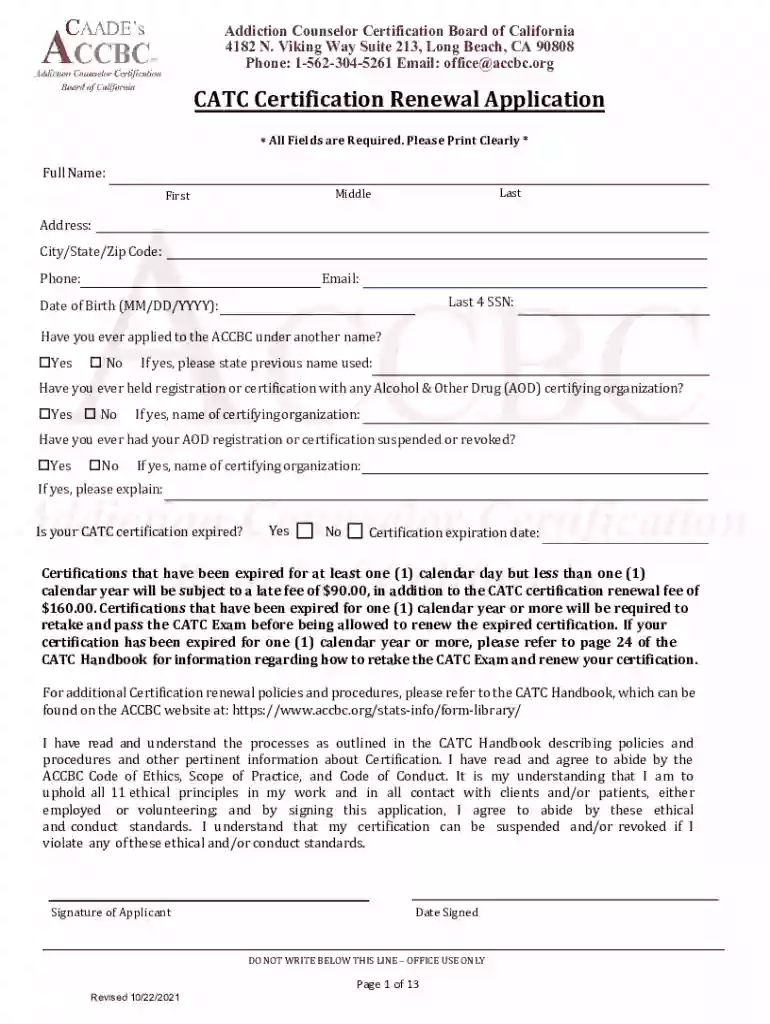
  2. Begin by entering your full name, including last, middle, and first names. Ensure that all fields are filled out clearly.
  3. Provide your address, including city, state, and zip code. This information is crucial for communication regarding your application.
  4. Fill in your phone number and email address for contact purposes. Make sure these are current and accurate.
  5. Enter your date of birth in the format MM/DD/YYYY and the last four digits of your Social Security Number.
  6. Indicate if you have ever applied under another name or held registration with any AOD certifying organization by selecting 'Yes' or 'No'.
  7. If applicable, provide details about any previous names used or certifications held.
  8. Confirm whether your CATC certification is expired and provide the expiration date if it is.
  9. Review all sections for completeness before submitting. Ensure you have included all required documentation as outlined in the checklist.

Start filling out your renewal accbc today on our platform for free!

See more renewal accbc versions

We've got more versions of the renewal accbc form. Select the right renewal accbc version from the list and start editing it straight away!
Versions Form popularity Fillable & printable
2021 4.8 Satisfied (177 Votes)
2019 4.2 Satisfied (113 Votes)
2014 4.3 Satisfied (70 Votes)
be ready to get more

Complete this form in 5 minutes or less

Get form

Got questions?

We have answers to the most popular questions from our customers. If you can't find an answer to your question, please contact us.
Contact us
We will accept renewal applications up to one year prior to expiration date. Complete the application form and attach your 32 hours of continuing education from an approved education provider that is listed on our list at with your $100.00 fee.
License renewal procedures License renewal cycleProof of adequate vision required at renewal StateGeneral populationGeneral population AR 8 years every other renewal CA 5 years when renewing in person CO 5 years every renewal48 more rows
Submit your Renewal Application with proof of your 32 hours and payment of $100.00. If you are renewing after your card expired, you do not need to fulfill the 32 hours requirement for continuing education. You must retake the exam and pass or you will be illegally working.
For a timely active renewal, sole owners pay $450, while non-sole owners pay $700. Make sure to include the correct payment with your application. You can submit your renewal application and payment in two ways: Mail: Send your completed application and payment to the CSLB headquarters.
Step 3 - Print the paperwork and complete the renewal form. Step 4 - Submit the paperwork and renewal fee ($100) to the DIR, the address is on the registration form.

Security and compliance

At DocHub, your data security is our priority. We follow HIPAA, SOC2, GDPR, and other standards, so you can work on your documents with confidence.

Learn more
ccpa2
pci-dss
gdpr-compliance
hipaa
soc-compliance
be ready to get more

Complete this form in 5 minutes or less

Get form