





Wi dcf f 2026

Get Form
dcf staff record form Preview on Page 1

Here's how it works

01. Edit your dcf staff record form online
Type text, add images, blackout confidential details, add comments, highlights and more.
02. Sign it in a few clicks
Draw your signature, type it, upload its image, or use your mobile device as a signature pad.
03. Share your form with others
Send dcf staff record checklist via email, link, or fax. You can also download it, export it or print it out.

How to use or fill out wi dcf f with our platform

Form edit decoration
9.5
Ease of Setup
DocHub User Ratings on G2
9.0
Ease of Use
DocHub User Ratings on G2
  1. Click ‘Get Form’ to open it in the editor.
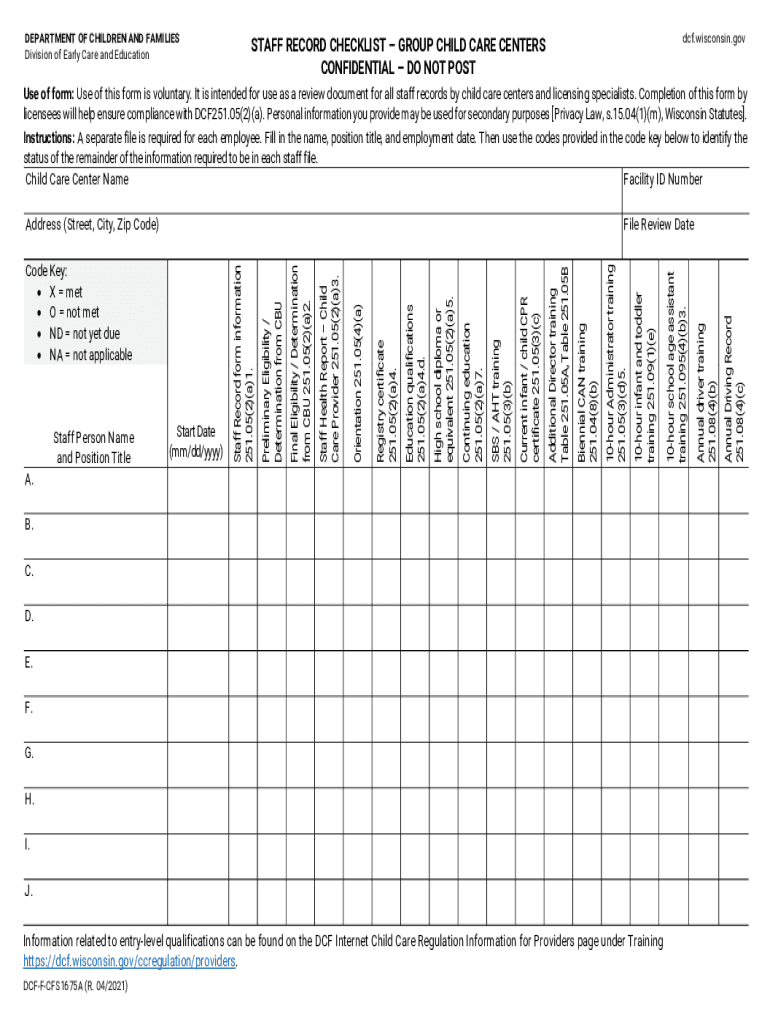
  2. Begin by entering the Child Care Center Name and Facility ID Number at the top of the form.
  3. For each employee, create a separate file. Fill in their name, position title, and employment date in the designated fields.
  4. Refer to the code key provided on the form to indicate the status of each qualification. Use 'X' for met, 'O' for not met, 'ND' for not yet due, and 'NA' for not applicable.
  5. Complete all relevant sections related to training and qualifications as outlined in the form. Ensure that you check off each requirement based on your review of staff records.
  6. Finally, enter the File Review Date and any additional notes necessary before saving your completed document.

Start using our platform today to streamline your document editing and ensure compliance effortlessly!

See more wi dcf f versions

We've got more versions of the wi dcf f form. Select the right wi dcf f version from the list and start editing it straight away!
Versions Form popularity Fillable & printable
2021 4.8 Satisfied (239 Votes)
2018 4.3 Satisfied (96 Votes)
2015 4.4 Satisfied (88 Votes)
be ready to get more

Complete this form in 5 minutes or less

Get form

Got questions?

We have answers to the most popular questions from our customers. If you can't find an answer to your question, please contact us.
Contact us

Many software solutions are available out there for document editing and signing. DocHub is one of the most popular online solutions that comply with all data protection and compliance requirements and ensures your eSigned documentation is legally enforceable. All you need to try it out is to create an account, add your dcf staff record, fill out the necessary information, and click Sign. Create your electronic signature by typing, drawing it, uploading its image to your document, or scanning a unique QR code.

If you store your files in Google Drive, there is no need to download your wisconsin dcf staff on your computer and upload it back to our editor. A much simpler way is to set up a browser extension developed by DocHub to simplify this flow. The extension allows editing PDFs in your browser. Alternatively, you may integrate your DocHub and Gmail accounts for more efficient modifying.

Wisconsin Department of Children and Families.
Child neglect - A parent, family member, or other person responsible for a childs welfare commits this offense if he or she endangers a childs physical, mental, or emotional health by failing to provide a child with necessary food, clothing, medical care, shelter, and education.
Income Eligibility To qualify for this program, a familys income must fall within 185-300% Federal Poverty Level (FPL). Families will need to provide proof of income or a denial/ineligibility documentation for Wisconsin Shares.

Security and compliance

At DocHub, your data security is our priority. We follow HIPAA, SOC2, GDPR, and other standards, so you can work on your documents with confidence.

Learn more
ccpa2
pci-dss
gdpr-compliance
hipaa
soc-compliance

People also ask

After you have been determined eligible, you can remain financially eligible until your income docHubes 85% of the state median income.Step 2: Complete an Eligibility Interview. Group SizeMonthly 185% FPLMonthly 85% SMI2$2,823$4,8023$3,550$5,9314$4,278$7,0615$5,006$8,1916 more rows
If you have a concerns about how a child is being treated, contact the Child Protective Services agency for the county where the child is in care.
After you have been determined eligible, you can remain financially eligible until your income docHubes 85% of the state median income.Step 2: Complete an Eligibility Interview. Group SizeMonthly 185% FPLMonthly 85% SMI2$2,823$4,8023$3,550$5,9314$4,278$7,0615$5,006$8,1916 more rows
Child Care Rates Infant/Young Toddler ( 6 weeks 24 months) Full-time (30 to 40 hours of care)$241.00 per weekChildren 6-13 years of age Full-time care (30-40 hours of care)$180.00 per weekChildren 6-13 years of age Part-time care (2 days a week, 4 hours per day)$140.00 per week6 more rows
After you have been determined eligible, you can remain financially eligible until your income docHubes 85% of the state median income.Step 2: Complete an Eligibility Interview. Group SizeMonthly 185% FPLMonthly 85% SMI2$2,823$4,8023$3,550$5,9314$4,278$7,0615$5,006$8,1916 more rows

Related links