Mv27b 2026

Get Form
mv27b Preview on Page 1

Here's how it works

01. Edit your mv27b online
Type text, add images, blackout confidential details, add comments, highlights and more.

02. Sign it in a few clicks
Draw your signature, type it, upload its image, or use your mobile device as a signature pad.

03. Share your form with others
Send mv 27b via email, link, or fax. You can also download it, export it or print it out.

How to use or fill out mv27b with our platform

Form edit decoration
9.5
Ease of Setup
DocHub User Ratings on G2
9.0
Ease of Use
DocHub User Ratings on G2
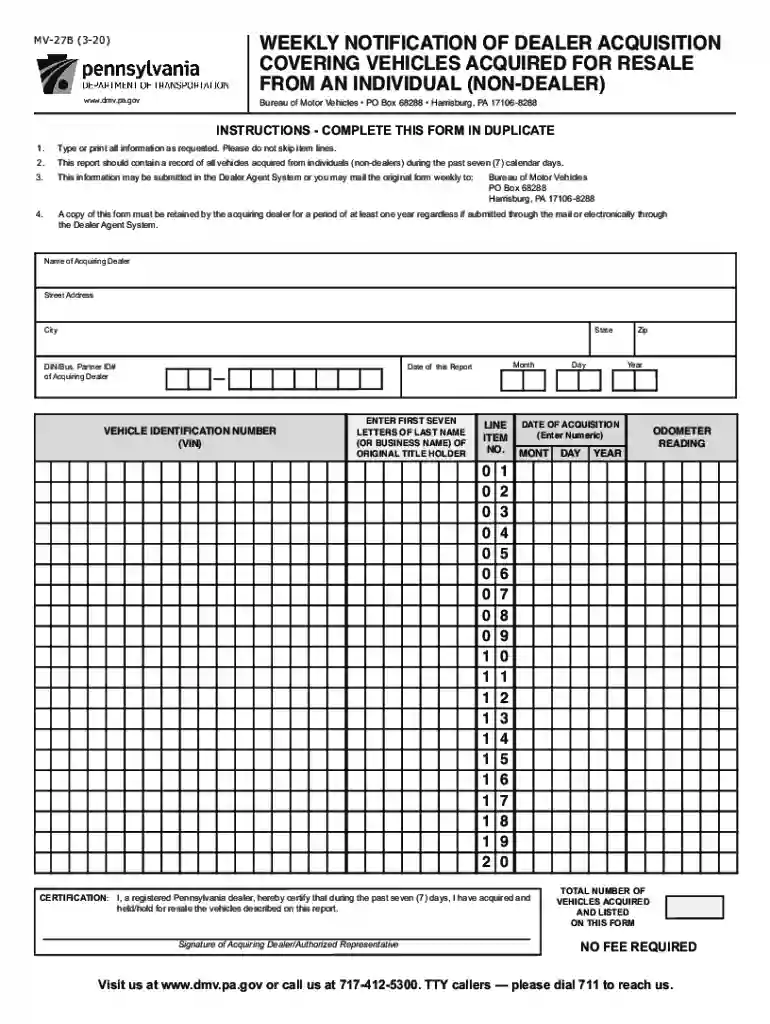
  1. Click ‘Get Form’ to open the mv27b in the editor.
  2. Begin by entering the 'Name of Acquiring Dealer' and 'Street Address'. Ensure all information is typed clearly.
  3. Fill in the 'City', 'State', and 'Zip' fields accurately to avoid any processing delays.
  4. Enter the 'Date of this Report' by selecting the month, day, and year from the date picker.
  5. Input your DIN/Business Partner ID# in the designated field for identification purposes.
  6. For each vehicle acquired, list the 'Vehicle Identification Number (VIN)', 'Year', and 'Odometer Reading'.
  7. Complete the section for entering the first seven letters of the last name or business name of the original title holder.
  8. Finally, certify your report by signing as an authorized representative at the bottom of the form.

Start using our platform today to fill out your mv27b form online for free!

See more mv27b versions

We've got more versions of the mv27b form. Select the right mv27b version from the list and start editing it straight away!
Versions Form popularity Fillable & printable
2020 4.8 Satisfied (172 Votes)
2012 4.4 Satisfied (518 Votes)
2007 4.4 Satisfied (315 Votes)
be ready to get more

Complete this form in 5 minutes or less

Get form

Got questions?

We have answers to the most popular questions from our customers. If you can't find an answer to your question, please contact us.
Contact us

Signing documents on a mobile device is fast, straightforward, and doesn’t require software installation if you have an account with DocHub. Log in from any browser, complete your empty fields with your data, and click on Sign → Create your signature. You can draw your eSignature the same way you usually do on paper, add its image to your mv 27a, or type in your name and stylize its look. No matter what option you choose, your document will be valid.

When you edit your pa form mv 27a with DocHub, you only need a stable internet connection and virtually any web browser installed on your device. No need to install any third-party software or research guides. Simply open a tab with DocHub, drag and drop your file, and modify it immediately.

Selling a New Vehicle The sellers signature is required to be docHubd or verified on the Pennsylvania title. The sellers signature may be required to be docHubd on some out-of-state titles. The seller will need to provide the authorized PennDOT agent with proper proof of identification (PDF).
If you are unable to locate your vehicles VIN plate or you are unable to secure a legible tracing of the plate, contact a certified inspection mechanic or notary public at a motor vehicle dealership.
Get REAL ID In-Person Visit any PennDOT Driver License Center to have your documents verified and imaged, and receive your REAL ID within 15 business days.

Security and compliance

At DocHub, your data security is our priority. We follow HIPAA, SOC2, GDPR, and other standards, so you can work on your documents with confidence.

Learn more
ccpa2
pci-dss
gdpr-compliance
hipaa
soc-compliance
be ready to get more

Complete this form in 5 minutes or less

Get form

People also ask

This form is used to obtain a Pennsylvania Certificate of Title for vehicles currently titled in Pennsylvania.
MV-41 (7-15) APPLICATION FOR CORRECTION OF VEHICLE. RECORD OR VERIFICATION OF VEHICLE. IDENTIFICATION NUMBER. pennsylvania.
To do a Pennsylvania title transfer, buyers and sellers will need to meet and exchange documents. In general, youll need: A vehicle title (or other proof of ownership documents such as Manufacturer Certificate of Origin, out-of-state title, or court order) Application for Certificate of Title (Form MV-1)
Payment Information All of PennDOTs Driver License Centers accept debit or credit cards, checks or money orders as forms of payment, but no cash. The Riverfront Office Center Customer Counter currently accepts debit or credit cards, checks, money orders, or cash.
Renewing Online You may renew your PA Drivers Permit in person at PennDOT, via mail, or online. However, if you want to renew online, there are some caveats: Only non-commercial vehicle licenses are permitted to apply for online renewals. There must be no changes to your license (a change of address will be accepted).

mv 27b pdf